
OTA reconciliation for vacation rentals means matching guest bookings, channel commissions, taxes, and net payouts from platforms like Airbnb and Vrbo against your PMS records and bank deposits.
A booking shows $920 in your PMS. The bank deposit says $762. Nothing is wrong, but if you can’t explain that gap, you don’t actually know what happened to the money. This is what vacation rental OTA reconciliation solves: matching every reservation, every deduction, and every bank deposit until the money trail is complete. Done properly, OTA payout reconciliation turns a confusing bank statement into a set of explained numbers, booking by booking.
What Is OTA Reconciliation?
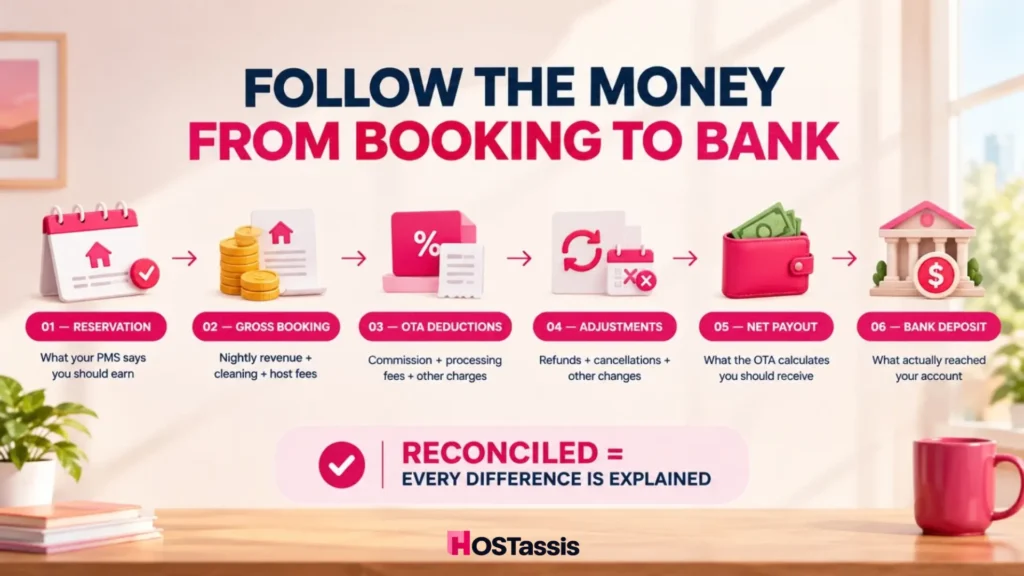
Quick Answer : OTA reconciliation is the financial auditing process where hotels match reservation records, commission statements, and actual payouts against Online Travel Agencies (OTAs) like Booking.com or Expedia.
It’s a three-part check, not a single lookup. You’re confirming whether the reservation record, the channel’s settlement report, and the bank deposit all tell the same story. When they don’t, reconciliation is the process of finding out why, instead of assuming the platform simply took more than it should have.
Why Don’t OTA Payouts Match Reservation Revenue?
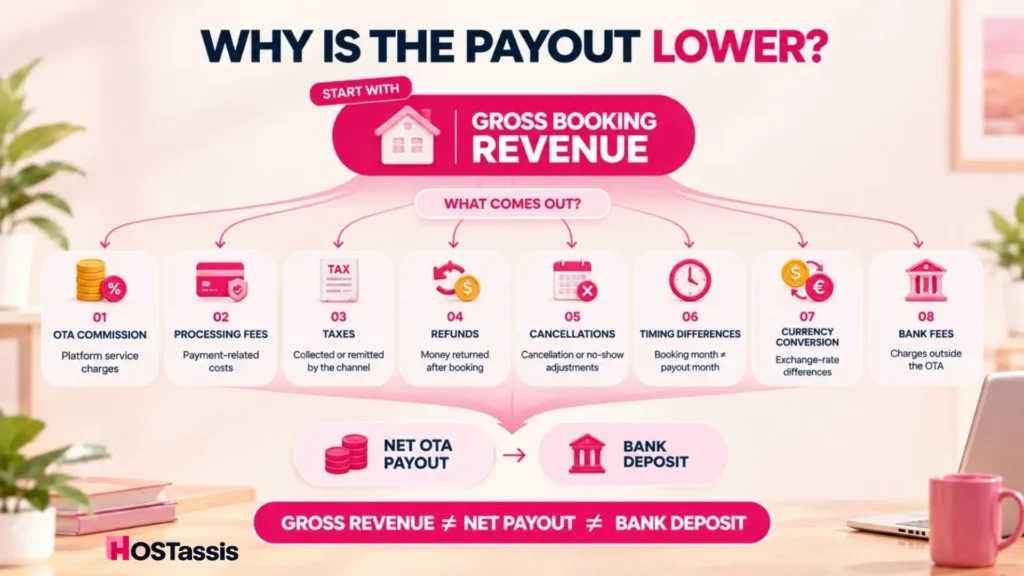
Online Travel Agency (OTA) payouts rarely match expected reservation revenue because OTAs deduct commissions, taxes, and fees before depositing funds, and settle payments based on travel or check-out dates rather than the original booking date.
Several things sit between them:
- Platform commission. Airbnb and Vrbo both take a cut before you see a payout. Booking.com’s fee handling depends on the property’s payment setup, so it can’t be assumed to follow the same pattern.
- Payment processing fees. Separate from commission, and easy to miss if you’re only checking one line item.
- Taxes. Some are collected and remitted by the platform, some aren’t, and the split isn’t always visible from the reservation screen.
- Cancellations and no shows. These generate adjustment lines that can show up in a later payout, not the original one.
- Refunds. Issued after the stay, sometimes weeks later, and often bundled into a payout that involves several unrelated bookings.
- Timing differences. A booking made in one month can be paid out the next, which throws off any reconciliation done by calendar month alone.
Airbnb’s reporting separates gross earnings, service fees, and adjustments into distinct lines. Vrbo does something similar with Gross Booking Amount and Deductions. Both platforms already treat these as separate figures, which is exactly why they shouldn’t be reconciled as one number.
The 3 Records You Need for OTA Reconciliation
You need three core records to perform accurate online travel agency (OTA) reconciliation: OTA commission statements, Property Management System (PMS) exports, and payout or settlement reports.
Every OTA reconciliation question comes down to comparing three records. Most mistakes happen when someone jumps straight to the third one without checking the first two.
- Reservation Record. What should have been earned, based on your PMS.
- OTA Settlement. What the booking channel actually calculated, fees included.
- Bank Deposit. What cash actually arrived.
The rule is simple. A payout isn’t reconciled until all three agree, or every difference between them has a documented explanation. Not a guess. A reason you could show someone else.
| Data Point | PMS / Reservation | OTA Report | Bank |
| Reservation ID | Yes | Yes | Usually no |
| Stay dates | Yes | Yes | No |
| Gross booking revenue | Yes | Yes | No |
| Platform commission | Sometimes | Yes | No |
| Refund or adjustment | Sometimes | Yes | No |
| Net payout | Sometimes | Yes | Yes |
| Actual cash received | No | No | Yes |
This table is the whole argument for why a bank feed alone can’t reconcile OTA payouts. The bank only ever shows the last row.

Worked Example: One Booking From Reservation to Bank
A booking travels from initial reservation to final bank settlement through a clear, multi-step transaction and reconciliation lifecycle.
Reservation
- Nightly revenue: $800
- Cleaning fee: $100
- Other host fee: $20
- Gross booking amount: $920
Deductions
- OTA fee: minus $138
- Adjustment: minus $20
- Expected payout: $762
Bank
- Deposit received: $762 (matches)
That’s a clean reconciliation. Now take the same expected payout and a deposit that doesn’t match it.
- Expected OTA payout: $762
- Bank deposit: $742
- Variance: $20
The instinct here is to write off the $20 as a platform fee and move on. Don’t. Before recording it as anything, check for a refund tied to the same reservation, a later adjustment line, tax withholding that wasn’t in the original calculation, or a bank side fee unrelated to the OTA at all. Most $20 gaps turn out to be one of those four things, not a new or unexplained charge.
What Data Should You Collect Before Reconciling?
Before starting a reconciliation, you must collect internal financial records and external source documents that cover the exact same accounting period.
For each booking, collect:
- Reservation ID or confirmation code
- Property or listing name
- Channel (Airbnb, Vrbo, Booking.com)
- Guest stay dates
- Gross booking amount
- Fees and taxes charged
- Refunds, if any
- OTA commission
- Payout ID and payout date
- Currency
- Net payout amount
- Bank deposit reference
The reservation ID matters more than any other field. Guest names get misspelled and dates get mistyped, but the ID stays constant across every report the platform generates.
How to Reconcile Airbnb, Vrbo and Booking.com Payouts? Step by Step
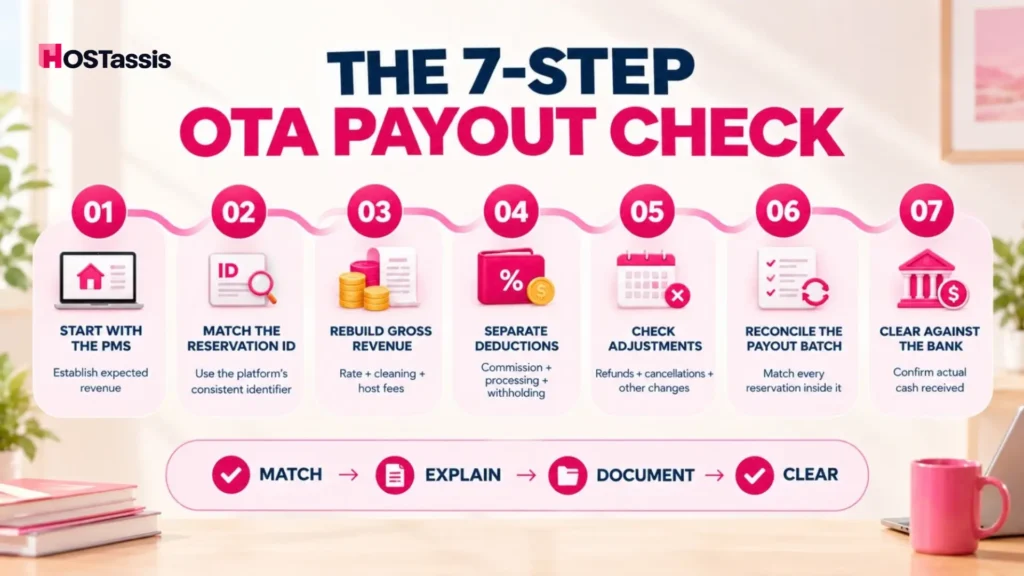
Reconcile Airbnb, Vrbo, and Booking.com payouts by matching individual platform transaction reports to your monthly bank deposits using a dedicated clearing account.
- Start with the reservation, not the bank deposit. Pull your PMS export first. It’s your record of what should have happened, before the platform touched it.
- Match the reservation ID or confirmation code. Guest names alone aren’t reliable enough for this.
- Rebuild the gross booking amount. Add nightly rate, cleaning fee, and any other host set charges. Don’t start from the bank deposit as if it were revenue.
- Identify every OTA deduction separately. List commission, processing fees, and withholding as individual lines, not one vague “OTA difference.”
- Add refunds and adjustments. A refund can land in a later payout than the original booking.
- Tie OTA activity to the payout batch. One payout often covers several reservations. Add every underlying row and confirm the total matches.
- Match the net payout to the bank. Only clear the deposit once reservation level detail is fully reconciled. If something still doesn’t add up, record it as an open item instead of forcing a match.
How Is Airbnb Reconciliation Different?
Airbnb reconciliation is different from standard bank reconciliation because payouts are batched, combined with host service fees, and subject to multi-currency or multi-reservation adjustments before hitting your bank account.
Airbnb’s Earnings Summary and Transaction History are the two reports built for this. The Earnings Summary gives you a high-level view of gross earnings, service fees, and adjustments for a period, while Transaction History provides the reservation level detail behind those totals. Both are downloadable as CSV files, which makes it possible to work through a full payout period outside the platform.
The main thing to know is that Airbnb frequently batches multiple reservations into a single payout, so the payout total alone tells you almost nothing. You need the underlying transaction rows before you can confirm what the deposit is actually made of.
How Vrbo Reconciliation Is Different?
Vrbo reconciliation is different primarily because Vrbo reports gross booking amounts on tax forms like Form 1099-K without reducing them for commissions, refunds, or processing fees, requiring hosts to manually filter payout summaries.
Because the report defines payout as gross booking amount minus deductions directly on the page, the process is mostly a matter of confirming that the math on the report matches your own reservation record and the bank deposit, using the same reservation ID logic described above.
How Booking.com Reconciliation Is Different?
Booking.com reconciliation differs from standard accounts receivable because it relies on a monthly invoice and commission model rather than immediate direct payouts for every transaction.
Because of this, there’s no single statement that applies to every Booking.com property. The safer approach is to match the reservation and its applicable commission or payment records against whatever settlement or bank receipt your specific payment setup generates, rather than assuming one model covers every case.
How Do You Reconcile a Batch Payout Covering Multiple Reservations?
To reconcile a batch payout covering multiple reservations, you must match the single bank deposit to the individual bookings that make up the total amount. Because platforms like Airbnb, Booking.com, or Vrbo often lump reservations together and deduct fees, the net payout rarely matches a single invoice.
- Pull the payout’s full activity detail, not just the summary total.
- Match each line to its reservation ID.
- Sum every booking, refund, fee, and adjustment inside the batch.
- Compare that sum to the payout total, and only then compare the payout total to the bank deposit.
Skipping straight to “does the total match the bank” is how errors stay buried inside a batch for months.
The Most Common OTA Reconciliation Differences
The most common online travel agency (OTA) reconciliation differences involve virtual credit card underpayments, incorrect commission charges on canceled or modified stays, and tax or resort fee mismatches.
Most mismatches repeat the same handful of causes.
| Difference | Likely Cause |
| Issue / Scenario | Common Cause |
| Deposit lower than booking value | Platform fee or commission deducted |
| Deposit arrives in a different month | Payout timing / processing delay |
| One deposit covers several bookings | Batch payout structure |
| Negative line appears unexpectedly | Refund or adjustment applied |
| Cancelled booking still shows activity | Cancellation or no-show fee processed |
| Tax totals don’t match guest total | OTA collected or remitted part of the tax |
| Deposit value differs slightly | Currency conversion or bank processing fee |
| Reservation shows but no payout yet | Pending or failed payment status |
| Bank deposit has no obvious booking | Batched payout or reference mismatch |
What Should You Do When an OTA Payout Does Not Match?
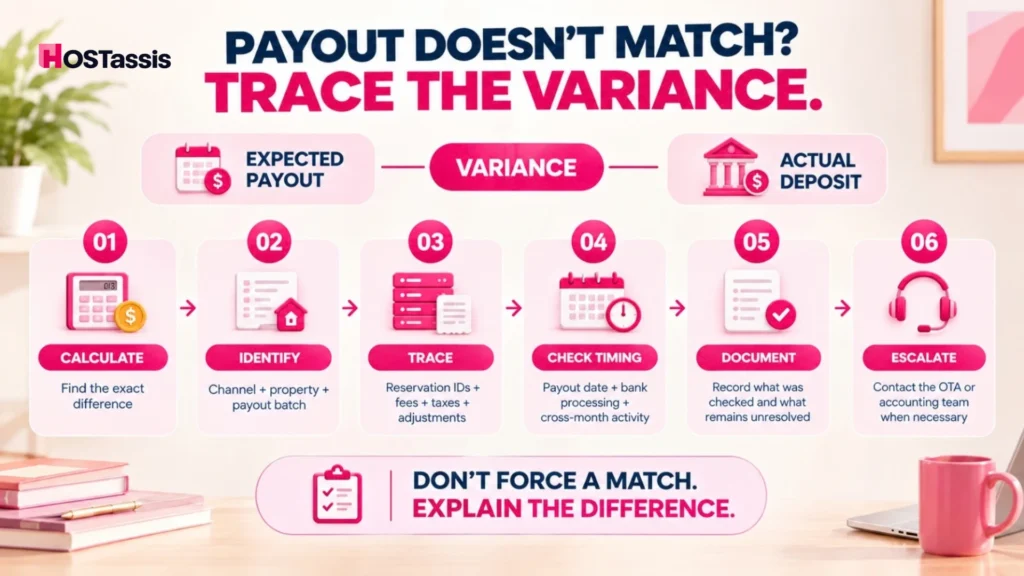
When an Online Travel Agency (OTA) payout does not match your records, you should immediately compare the net deposit against the remittance statement to isolate whether the variance stems from standard deductions, timing gaps, or an error.
- Calculate the exact variance amount.
- Identify the channel and property it belongs to.
- Isolate the specific payout batch involved.
- Trace every booking ID inside that batch.
- Check for uncaptured fees, taxes, or adjustments.
- Check for bank side timing delays.
- If it still doesn’t resolve, flag it as an open variance with a note explaining what was checked.
- Escalate to the platform or your accounting team when it’s warranted.
Whether something needs escalation isn’t about a fixed dollar amount. It depends on the size of the variance, whether the cause is clear or unexplained, whether the same issue keeps recurring across payouts, and whether your accounting controls require a documented resolution before the books close. A small variance that repeats every month deserves more attention than a larger one you can explain in full.
How Often Should Vacation Rental Managers Reconcile OTA Payouts?
Vacation rental managers should treat monthly reconciliation of OTA payouts as the baseline requirement, though portfolios handling a high volume of bookings gain real value from checking payouts weekly or even daily, since that catches errors before they pile up across multiple payout cycles.
Portfolios with higher booking volume or more channels often check payout exceptions weekly, catching mismatches while the underlying booking detail is still easy to trace. The exact frequency matters less than consistency. Reconciling on an irregular schedule defeats the purpose, since gaps compound the longer they sit.
Spreadsheet vs PMS vs Vacation Rental Accounting Software
Whether a spreadsheet, a PMS, or dedicated vacation rental accounting software is the right fit comes down to how many properties you manage, how complicated your operations are, and what level of reporting your owners or business actually require.
| Feature / Need | Spreadsheets (Excel / Google Sheets) | Property Management System (PMS) | Vacation Rental Accounting Software |
| Primary focus | Manual data tracking and custom formulas | Operations, guest communication, and calendar sync | Bookkeeping, tax compliance, and financial statements |
| Best for | One or two properties with minimal bookings | Automating reservations, messaging, and cleaning schedules | Reconciling OTA payouts, expenses, and Schedule E |
| Data entry | Fully manual, high error risk | Automated from channel managers like Airbnb and Vrbo | Synced through bank feeds or PMS integrations |
| Owner statements | Manual exports and formatting | Built-in owner portals with automated reports | Advanced ledger tracking and trust accounting |
Why Choose Us for Airbnb Cohosting?
Running a listing well means more than replying to messages and unlocking the door. Someone needs to be checking that every reservation actually pays out correctly, catching pricing gaps before they cost you a booking, and staying on top of the small operational things that keep reviews high and cancellations low.
That’s the part we handle.
- Guest messages, booking coordination, and turnover scheduling stay covered, so nothing gets missed between one checkout and the next check in.
- Pricing gets adjusted for season and local demand instead of sitting untouched for months.
- Every payout gets checked against your reservations, so you know what Airbnb actually paid you matches what you’re owed.
- Guest issues get handled directly, before they turn into a bad review.
- You get clear reporting you can check against your own numbers, not just a summary to trust blindly.
Most co-hosting services stop at messaging guests. We also make sure the money side holds up.
OTA Reconciliation Checklist
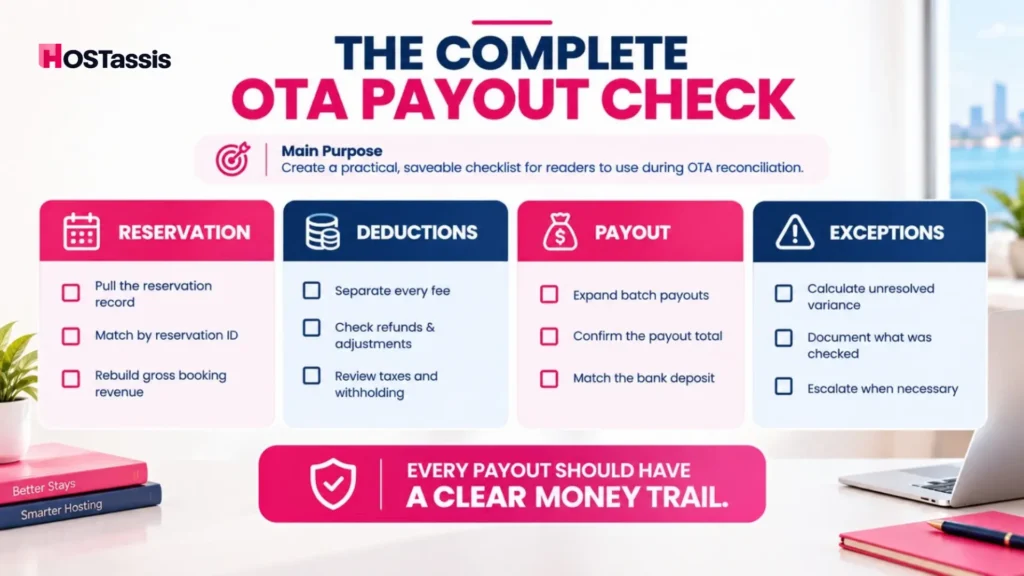
An OTA reconciliation checklist exists to make sure every booking, virtual credit card (VCC) payout, and commission actually matches between your PMS and the OTA’s financial statements.
- Pull the reservation record before looking at the bank deposit
- Match by reservation ID, not guest name
- Rebuild the full gross booking amount
- List every deduction as a separate line item
- Check for refunds and adjustments in later payouts
- Expand batch payouts into individual reservations
- Confirm the payout total before clearing the bank deposit
- Document any unresolved variance instead of forcing a match
OTA Reconciliation FAQs
What is OTA reconciliation in vacation rental accounting?
It’s the process of matching reservations, channel payment activity, and bank deposits so that every payout and every deduction can be explained, rather than assumed.
How do I match OTA payouts to reservations?
Begin with the reservation ID and recreate the gross booking amount, list each fee or adjustment separately, determine the expected payout and compare that to what was actually deposited into your bank account.
Why is my Airbnb or Vrbo payout lower than the reservation amount?
The reservation quantity is gross and the payout is internet. Verify platform charges, refunds, and tax withholding earlier than treating the distinction as an error.
Can one Airbnb payout include multiple reservations?
Yes. Airbnb batches multiple bookings into one payout, and the activity report helps to reconcile it. 2. Yes. Airbnb batches multiple bookings into one payout, and the activity report helps to reconcile it.
Should I reconcile OTA revenue to the booking date or the payout date?
These are two separate things and are not interchangeable. The booking/stay date is when the booking took place, but the payout date is when the cash moved. Payout date is not always the same as the revenue date, so keep them both tracked separately rather than assuming one is a substitute for the other.
What happens if a refund appears in a later payout?
Link it back to the original reservation instead of recording it as an unexplained drop in the current period’s revenue.
Do I need a PMS to reconcile OTA payouts?
Not for a very small portfolio. As booking volume grows across channels, manual exports become harder to keep consistent, and a PMS starts to earn its place.
The Bottom Line
Clean vacation rental payout reconciliation means every bank deposit can be traced back to the exact bookings, fees, and adjustments that created it, with no unexplained lines. If short-term rental payout reconciliation is currently taking your team hours every month across three or four channels, HOSTassis handles the back-office work so nothing slips through a batch payout unnoticed.