Airbnb automation helps hosts manage daily tasks with less manual work. Guest messages, price changes, check-in instructions, cleaning schedules, and review requests can take up hours each week. The right tools help you complete these tasks faster, reduce mistakes, and keep every booking organized.
A smart automation setup can also improve the guest experience and increase revenue. Features such as automated messaging, dynamic pricing, smart locks, and cleaning alerts help your property run smoothly.
This guide covers 15 Airbnb tasks every host should automate to save time, improve occupancy, and earn more from each stay. Let’s learn in depth:
What Is Airbnb Automation?
Airbnb automation means using tools, software, and smart systems to handle routine hosting tasks automatically. These tasks may include guest messages, pricing updates, check-in instructions, cleaning schedules, calendar sync, and review requests.
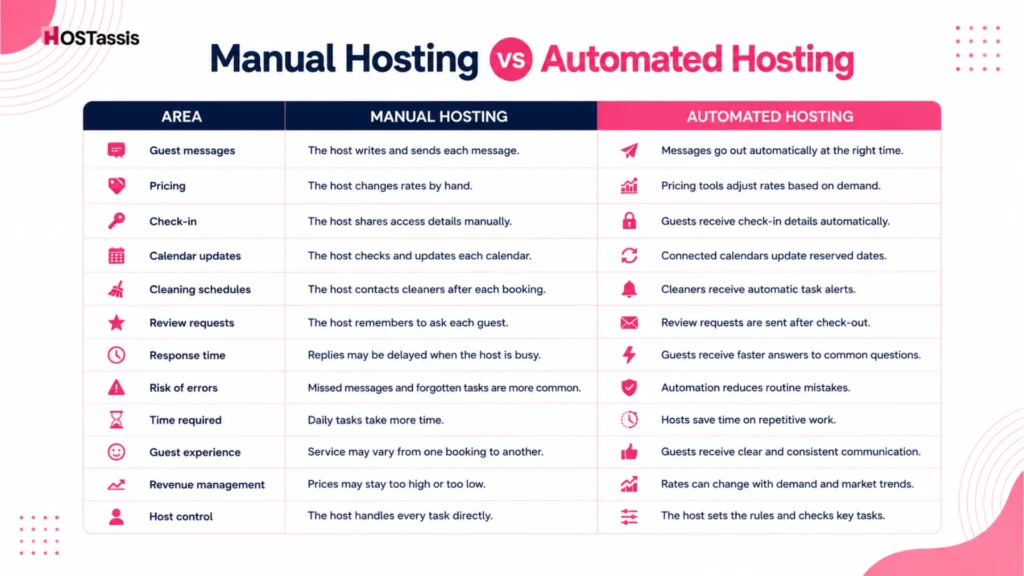
Manual Hosting vs Automated Hosting
Manual hosting requires you to manage each task yourself, while automated hosting uses tools to handle routine work. The comparison below shows how Automation can save time, reduce errors, and improve daily operations.
Why Automation Matters
Airbnb automation helps hosts manage routine tasks with less effort. It keeps daily operations organized, reduces delays, and gives hosts more time to focus on guests and property growth.
- Saves time on repetitive tasks
- Reduces missed messages and human errors
- Speeds up guest responses
- Keeps check-in details clear and timely
- Helps cleaners stay on schedule
- Updates prices based on demand
- Prevents calendar conflicts and double bookings
- Creates a consistent guest experience
- Makes it easier to manage multiple listings
- Helps hosts improve occupancy and revenue
Benefits of Automating Your Airbnb Business
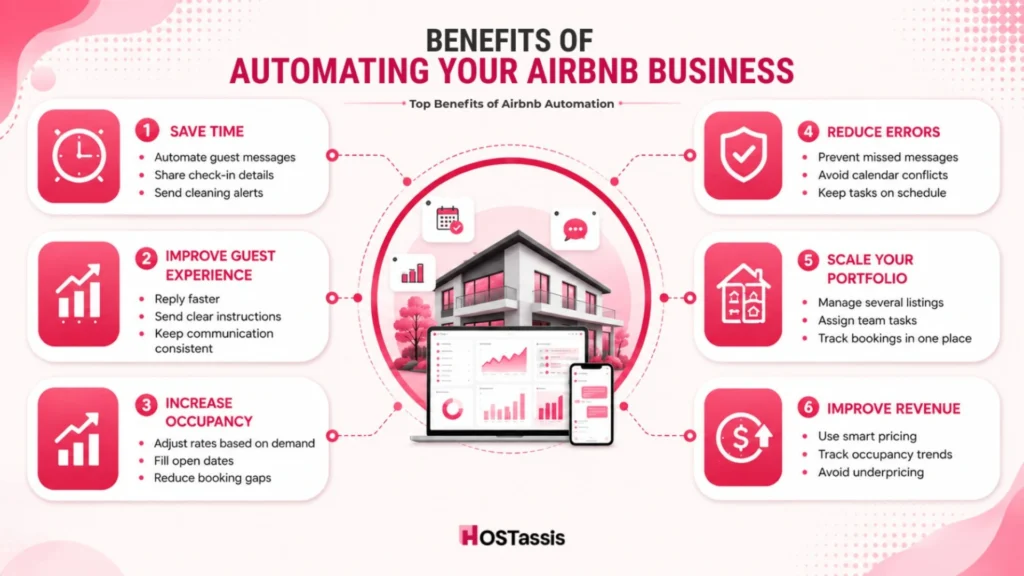
Airbnb automation helps you run your rental business with less manual work. It can save time, improve guest service, reduce mistakes, and support steady growth across one or more listings.
Save Time
Automation handles routine tasks such as guest messages, check-in details, review requests, and cleaning alerts. This gives you more time to focus on property care, guest needs, and business growth.
- Sends scheduled guest messages
- Shares check-in and check-out details
- Updates cleaning teams after each booking
- Reduces daily admin work
- Keeps tasks organized in one place
- Frees up time for higher-value work
Improve Guest Experience
Fast and clear communication helps guests feel informed throughout their stay. Automated Airbnb messages make sure each guest receives the right information at the right time.
- Provides faster response times
- Sends clear arrival instructions
- Shares house rules before check-in
- Answers common questions quickly
- Keeps communication consistent
- Sends useful reminders during the stay
- Encourages more positive guest reviews
Increase Occupancy
Airbnb automation tools can help you keep prices competitive and dates available. Dynamic pricing and calendar tools support more bookings without constant manual updates.
- Adjusts nightly rates based on demand
- Helps fill open dates
- Updates minimum stay rules
- Reduces long gaps between bookings
- Syncs calendars across booking platforms
- Supports last-minute booking strategies
- Improves revenue during busy periods
Reduces Human Errors
Manual work can lead to missed messages, wrong prices, or forgotten tasks. Automation follows set rules and helps your team complete each step on time.
- Reduces missed guest messages
- Prevents calendar conflicts
- Lowers the risk of double bookings
- Sends the correct access details
- Keeps cleaning schedules accurate
- Reduces pricing mistakes
- Tracks routine tasks and reminders
Scale Your Portfolio
A clear automation system makes it easier to manage more Airbnb listings. You can grow your portfolio without adding the same amount of manual work for every new property.
- Manages several listings from one system
- Keeps guest communication consistent
- Assigns tasks to cleaners and team members
- Tracks reservations across properties
- Supports remote property management
- Makes staff training easier
- Helps maintain service quality as you grow
Improve Revenue Management
Smart pricing and performance tools help you make better decisions. You can respond to market demand, local events, and booking trends with less guesswork.
- Updates rates based on market demand
- Tracks occupancy and booking trends
- Helps protect rates during high-demand dates
- Supports discounts for slow periods
- Improves revenue per available night
- Reduces the risk of underpricing your listing
15 Airbnb Tasks You Should Automate
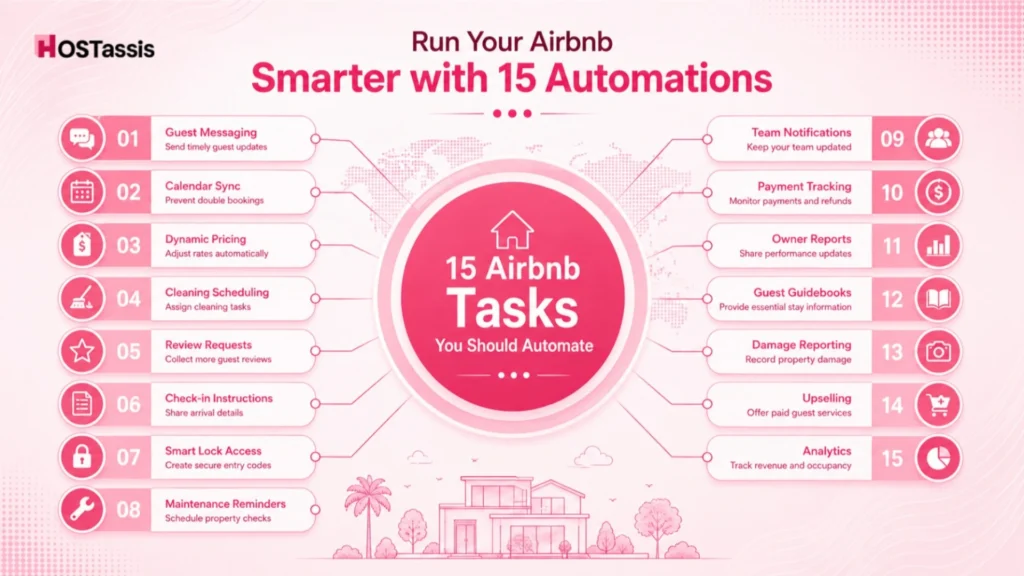
Airbnb automation can take care of routine work that often slows hosts down. These 15 tasks can help you save time, reduce mistakes, and run each booking more smoothly.
1. Guest messaging
Automated guest messaging works best when it responds to guest actions instead of following a fixed schedule. Most experienced hosts automate booking confirmations, pre-arrival, mid-stay, checkout, and review messages. This keeps responses fast while still allowing personal replies when guests have special requests.
2. Calendar sync
Calendar automation helps prevent booking conflicts across Airbnb, Vrbo, Booking.com, and direct booking channels. The best setup keeps one calendar as the main source of availability and updates changes across every platform. Once a single double booking costs more than the software, a channel manager is usually the better choice.
3. Dynamic pricing
Dynamic pricing works best with clear limits instead of running on full autopilot. Experienced hosts set a base rate, minimum rate, and maximum rate, then adjust prices for weekends, holidays, concerts, and local events. They also review occupancy and ADR together to make better pricing decisions.
4. Cleaning scheduling
Cleaning automation helps avoid turnover mistakes that guests notice immediately. Experienced hosts connect bookings directly to cleaning tasks so cleaners receive the schedule, property details, and special instructions automatically. Many also keep a backup cleaner ready for emergencies.
5. Review requests
Review requests work best when they are sent soon after checkout while the stay is still fresh in the guest’s mind. A short, friendly reminder usually gets better results than multiple follow-ups. Many hosts also include a simple thank-you message.
6. Check-in instructions
Automated check-in instructions reduce arrival stress and late-night questions. Experienced hosts send them before check-in and include everything guests need, such as entry details, parking, Wi-Fi, and important house rules. They also keep the information updated whenever anything changes.
7. Smart lock access
Smart locks make check-in easier and improve security. Many hosts create a unique code for every reservation and let it expire automatically after checkout. This is safer than using the same code or handing out physical keys.
8. Maintenance reminders
Maintenance reminders help catch small problems before guests notice them. Experienced hosts schedule regular checks for smoke alarms, filters, appliances, pest control, and other routine maintenance. Many also adjust these reminders based on the season.
9. Team notifications
Automatic team notifications help everyone stay informed. Booking updates, cleaning schedules, and maintenance requests go directly to the right person, so there is less confusion and fewer missed tasks.
10. Payment tracking
Payment automation helps keep your finances organized. Experienced hosts track deposits, refunds, cleaning fees, late checkout charges, and extra payments in one place. This makes it easier to manage payments and avoid missed charges.
11. Owner reports
Automated owner reports save time and build trust. They give property owners regular updates on revenue, occupancy, expenses, and performance. The best reports explain what changed and what actions are planned next.
12. Guest guidebooks
Digital guidebooks answer common guest questions before they need to ask. They usually include Wi-Fi details, appliance instructions, house rules, local recommendations, and emergency contacts. The best guidebooks are simple, mobile-friendly, and easy to read.
13. Damage reporting
A simple damage reporting system makes it easier to deal with issues quickly. Many hosts use forms with photos, timestamps, and notes to record damage and speed up repairs or claims. It also helps separate normal wear from actual damage.
14. Upselling
Upsells work best when they offer real value to guests. Many hosts automate offers for early check-in, late checkout, airport transfers, or extra cleaning at the right time during the guest journey. Keep the offers relevant and easy to accept.
15. Analytics
Analytics help you understand how your business is performing. The most useful metrics include occupancy, ADR, revenue, booking sources, lead time, and seasonal trends. Experienced hosts use this data to improve pricing, stay rules, promotions, and overall performance.
Best Airbnb Automation Tools
The right Airbnb automation tools depend on your portfolio size, budget, and daily needs. Some platforms manage the full business, while others focus on pricing, cleaning, access, or guest communication.
- Hostaway: A complete property management system for calendar sync, guest messages, channel management, tasks, and reports.
- Hospitable: Automates guest communication, calendars, cleaning tasks, smart locks, and daily hosting workflows.
- Guesty: Helps hosts manage reservations, payments, messages, listings, and operations from one platform.
- PriceLabs: Adjusts nightly rates based on demand, local trends, booking pace, and your pricing rules.
- Lodgify: Syncs booking calendars, automates guest messages, manages direct bookings, and supports daily tasks.
- OwnerRez: Automates messages, payments, rental agreements, reviews, cleaning alerts, door codes, and owner reports.
- Turno: Creates cleaning tasks from your booking calendar and sends automatic schedules and updates to cleaners.
- Breezeway: Helps teams manage property cleaning, inspections, maintenance, and operational tasks.
- Minut: Monitors noise, occupancy, smoking, temperature, and humidity without the use of indoor cameras.
- Touch Stay: Creates digital guest guidebooks with check-in details, Wi-Fi information, house rules, and local tips.
- RemoteLock: Automates guest access and lets hosts manage smart lock codes across one or several properties.
Common Automation Mistakes
Airbnb automation can save time, but poor setup can create new problems. A clear system still needs regular checks, accurate information, and human oversight.
- Automating every guest interaction
- Using messages that sound too generic
- Sending the wrong message at the wrong time
- Failing to update check-in instructions
- Ignoring calendar sync delays
- Setting dynamic pricing without limits
- Overlooking local events and seasonal demand
- Giving smart lock codes too early
- Forgetting to remove expired access codes
- Using too many disconnected tools
- Failing to test each automation
- Ignoring failed payments or refunds
- Missing cleaning schedule changes
- Relying on automation during emergencies
- Forgetting to review reports and analytics
- Keeping outdated house rules or guidebooks
- Failing to train cleaners and team members
- Skipping regular system checks
- Losing the personal touch with guests
Frequently Asked Questions
Here are some important questions that can help you avoid common automation mistakes.
1. Can Airbnb messages be automated?
Yes. You can schedule booking confirmations, check-in details, reminders, and review requests.
2. Should every guest message be automated?
No. Use automation for routine updates, but handle complaints and special requests personally.
3. Can automation prevent double bookings?
Yes. Calendar sync can block reserved dates across connected booking platforms.
4. Can smart locks create guest codes automatically?
Yes. Many smart lock systems can create unique codes for each reservation.
5. Do Airbnb automation tools need regular checks?
Yes. Review your messages, prices, calendars, access codes, and team tasks often.
6. Can cleaning schedules be automated?
Yes. Cleaning tools can send automatic tasks when guests book, cancel, or change dates.
7. Is Airbnb automation expensive?
No. Many affordable tools are available, and the time saved can often cover the cost.
8. Can automation replace a co-host or property manager?
No. It handles routine work, but people are still needed for guest issues and property care.
9. Is Airbnb automation useful for one listing?
Yes. Even one listing can benefit from faster messages, better pricing, and fewer missed tasks.
Conclusion
Airbnb automation can help hosts save time, reduce errors, and manage daily tasks more efficiently.
Guest messages, calendar updates, pricing, cleaning schedules, smart lock access, review requests, and reports can all run with less manual work. The right tools also help create a smoother guest experience and keep each booking more organized.
Automation works best when you use it for routine tasks while maintaining human control over important decisions. Regular checks, clear message templates, accurate settings, and team oversight are still necessary. Start with the tasks that take the most time, test each system carefully, and add more automation as your Airbnb business grows.