Picking a self check-in method for your Airbnb really depends on three things: how much you want to spend, where your property is, and how comfortable you are managing technology.
A smart lock is an electronic deadbolt that you control through an app or Wi-Fi. It lets you set temporary codes for each guest and see who comes and goes from anywhere. A keypad lock is simpler: guests type a number code on the door, and there is usually no app involved. A lockbox is a small portable box that holds a physical key, and guests open it with a combination.
What Is Airbnb Self Check-In?
Airbnb self check-in means guests let themselves in. No meeting the host, no key handoff. You set up a smart lock, keypad, or lockbox, then send the guest instructions and an access code before they arrive.
Picture a 10:45 p.m. arrival after a delayed flight. Without self check-in, someone has to stand at the door holding a key. With it, the guest walks up and types in a code.
Hosts like it for obvious reasons. Nobody coordinates arrival times, nobody carries keys around, and a remote owner doesn’t have to live nearby. Guests like it because they get to arrive when they actually arrive.
Below, we compare the three usual setups, help you pick one, and cover what to do on the night the door won’t open.
Smart Lock vs Keypad vs Lockbox: Quick Comparison
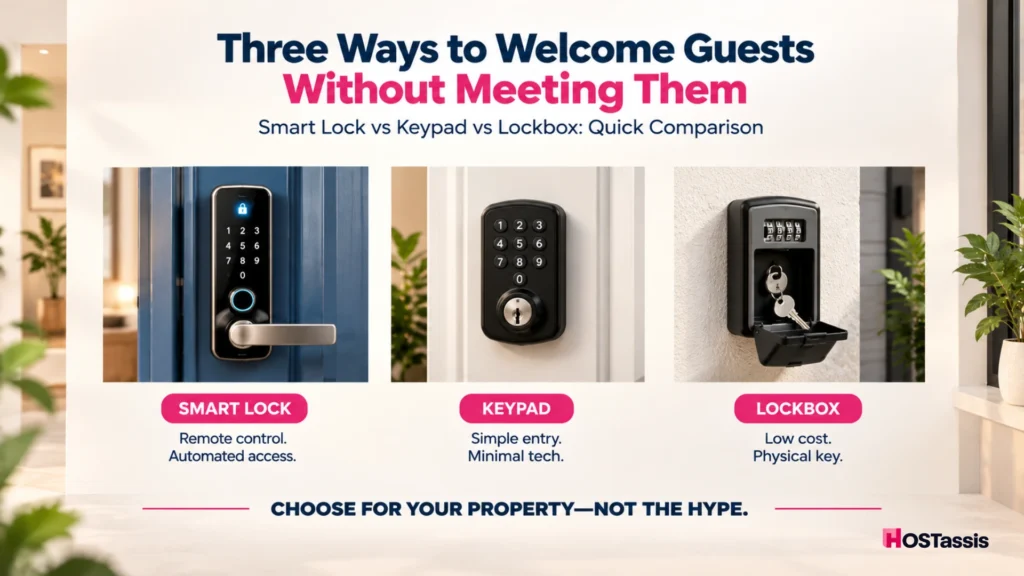
Smart locks win on automation and scale. Keypads win on simplicity. Lockboxes win when money is tight, the internet is bad, or the landlord won’t let you touch the door. Pick based on your property, not the hype.
A quick note on terms. “Keypad” in this table means a standalone keypad lock that stores codes inside the lock. A keypad lock that connects to an app or Wi-Fi counts as a smart lock here.
| Feature | Smart Lock | Keypad | Lockbox |
| Physical key required | Usually no | Usually no | Yes |
| Remote code management | Usually yes | Usually no | No |
| Unique guest codes | Easy | Possible manually | Combination must be changed |
| Internet required | Depends on model and features | Usually no | No |
| Access history | Often available | Usually limited | No |
| PMS automation | Best option | Limited | Very limited |
| Backup complexity | Medium | Low | Low |
| Upfront cost | Highest | Medium | Lowest |
| Best for | Remote or multi-property hosts | Simple properties | Budget or backup access |
If you’re stuck on smart lock vs lockbox for Airbnb, look at three rows first: remote code management, access history, and PMS automation. That’s where the gap is widest. Cost and installation matter too, but they’re easier to live with than a lockbox you forgot to reset.
How Does a Smart Lock Work for Airbnb?
A smart lock is an electronic lock with connected features like remote code management, temporary PINs, or activity tracking. What it can do depends on the model, so check the specs before you buy.
What Makes a Smart Lock Different?
Most smart locks let you create or remove codes from your phone. Some plug into Airbnb or a property management system (PMS) and generate guest codes on their own. Others only work through the manufacturer’s app, which means you create and send every code yourself.
A lot of smart locks have a keypad on the front, and that’s where people get confused. The keypad is just the part guests touch. The difference is behind it: a standalone keypad stores a code, while a smart lock can be managed from anywhere.
Airbnb also has its own smart lock connection. With a compatible lock and a smart lock account, guests get a unique door code with every booking, and the code is only active during the trip. This is limited to certain hosts with listings in the US or Canada, so check Airbnb’s current list of eligible hosts and compatible locks before buying anything.
One catch once you’re connected. If you change or delete a guest’s code in the lock’s own app, it won’t change on Airbnb, and the original code can come back when the lock syncs. Make code changes from Airbnb instead.
Main Advantages of a Smart Lock
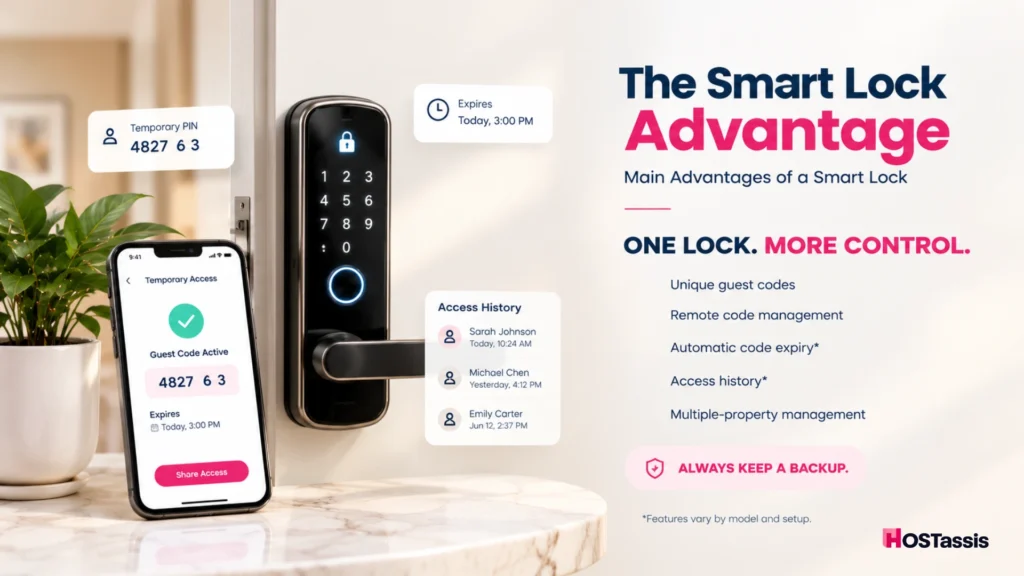
Smart locks save time by giving each guest a code you can manage from anywhere.
- Every reservation gets its own code
- Codes can be set to expire after checkout
- You can change codes remotely
- Guests don’t need a physical key
- Many systems keep an access log
- One person can manage several listings
Main Drawbacks
The downsides are cost, battery and connection problems, and the need for a backup entry.
- Batteries die, usually at a bad time
- Connected features need a working connection
- It costs the most up front
- Not every lock works with every platform
- Some doors can’t take one
- You still need a backup way in
So, are smart locks good for Airbnb? For remote or multi-property hosts, yes. They cut down on code juggling and key handling. Just don’t skip the backup plan, because batteries, hardware, and connections all fail eventually.
How Does a Keypad Work for Airbnb Self Check-In?
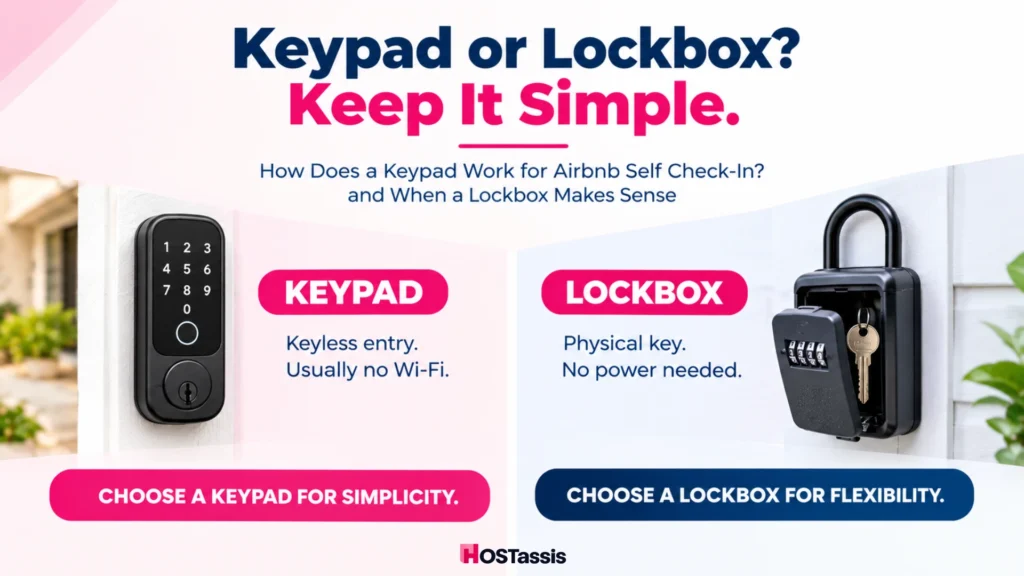
An Airbnb keypad is a standalone coded lock. Guests type a PIN on the door, and the code lives inside the lock, so it usually works without Wi-Fi or any cloud software.
What Is an Airbnb Keypad?
Nothing talks to the internet here. The guest enters the PIN and the door opens. That’s about it, and for plenty of hosts that’s the appeal.
Compare it with a connected smart lock. A smart lock can get a new code from your phone while you’re on another continent. A standalone keypad usually needs you at the door, or someone you trust, to change a code.
Why Hosts Choose Keypads
Keypads suit hosts who want simple keyless entry without depending on apps or the internet.
- Guests never handle a key
- The guest experience is dead simple
- Wi-Fi often isn’t needed
- Fewer things can go wrong with the tech
- Setup is easier than a connected lock
Keypad Limitations
Keypads are easy to use, but code changes, tracking, and scaling take more manual effort.
- Code changes are often manual
- Automation options are thin
- Basic models log little or nothing
- Forget to update a code and you’ve got a security gap
- It gets painful across many properties
Does an Airbnb keypad need Wi-Fi? Many standalone ones don’t, since the code is stored in the lock. Wi-Fi or Bluetooth usually only matters for remote management on fancier models.
How Does an Airbnb Lockbox Work?
A lockbox is a secure box holding the property’s physical key. The guest enters a combination, grabs the key, and opens the door. Nothing electronic goes on the door itself.
What Is a Lockbox?
It hangs on or mounts near the entrance. Guests open it with a combination and use the key inside. Because it’s mechanical, it works with no power and no internet.
When a Lockbox Makes Sense
A lockbox works best when the door can’t be changed or your budget and internet are limited.
- The door can’t take new hardware
- Your landlord or building says no to changes
- The internet is unreliable
- You’re on a tight budget
- You want a spare key for another system
Main Lockbox Risks
Lockboxes are cheap and simple, but they need regular resets and offer little security tracking.
- A past guest may remember the combination
- Keys get lost or copied
- There’s no access log
- Guests sometimes can’t find the box
- Weather and wear cause sticking
- Someone has to reset the code every time
That last one trips up most hosts. A lockbox is only as secure as your habit of resetting it, and that habit gets harder as turnovers pile up.
Is a lockbox safe for Airbnb? It can be, if it’s mounted well, placed sensibly, and reset between guests. It still gives you less control and fewer records than most smart locks.
Which Airbnb Self Check-In Method Is Best for Your Property?
The best self check-in for Airbnb depends on how you run the place. Smart locks suit automation, keypads suit simple keyless entry, and lockboxes suit restricted or low-budget setups.
Choose a Smart Lock If You Manage Remotely
Choose a smart lock if you manage remotely and want automation, codes, and access records.
- You manage from a distance
- You run more than one property
- Bookings turn over fast
- You want codes created automatically
- You care about access logs or PMS integration
Choose a Keypad If You Want Simple Keyless Entry
Choose a keypad if you want simple keyless entry with fewer tech problems to manage.
- You want keyless entry without extra tech
- Your connection is patchy
- You have one or a few listings
- Changing codes by hand won’t bother you
Choose a Lockbox If You Can’t Change the Door
Choose a lockbox if the door can’t change and you need a simple, cheap backup.
- You can’t modify the door
- Install rules are strict
- Money is limited
- You already use a physical key
- You need an emergency backup
In practice, it usually comes down to two things: how many properties you manage and how far away you live. One unit ten minutes from your house is a different job than five units across two time zones.
Quick Rule to Pick the Right Method
Let your biggest need decide: automation, simple keyless entry, or physical-key access with minimal installation.
- Need automation? Smart lock.
- Want keyless access without heavy tech? Keypad.
- Want a physical key with minimal installation? Lockbox.
Should Every Airbnb Guest Get a Different Access Code?
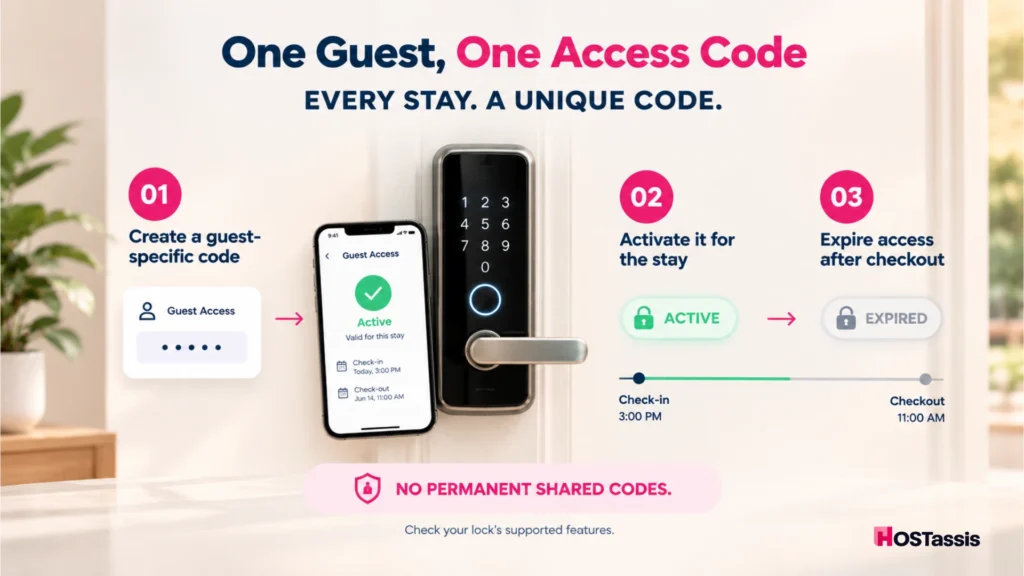
Yes. Use a unique code for each reservation whenever your lock allows it, and make sure it stops working after checkout. A shared permanent code means old guests can walk back in.
Here’s why it matters:
- Former guests lose access
- Security gets better
- It’s easier to see who used which code
- Accidental entries drop
- Turnovers are easier to control
Codes can be set to expire after checkout on systems that support timed access, but it isn’t identical on every model, so check this when you install the lock. With Airbnb’s connected smart lock feature, hosts can choose when codes become active and when they expire after checkout.
For mechanical lockboxes, change the combination between stays where you can. If that’s unrealistic on a busy property, a lockbox probably shouldn’t be your main method.
When Should Airbnb Guests Receive Their Check-In Code?
Guests should get access details early enough to plan their arrival, but the code should only work during the intended window. Airbnb generally shares detailed check-in instructions 48 hours before check-in.
For self check-in, Airbnb emails and messages the door or lockbox code 48 hours before arrival. Connected smart locks can work earlier. Airbnb shares the code and lock instructions in the guest’s account once the booking is confirmed, though the code is only active during the trip. Timing differs by setup, so confirm how yours behaves.
Before every arrival, run through this:
- Keep entry codes out of the public listing description
- Test the code yourself
- Make sure the code starts at check-in time
- Confirm temporary access expires after checkout
A code nobody tested, or one that starts at the wrong hour, is one possible cause of late-night access problems. A quick check beforehand is cheap, and it beats fixing the problem from another country.
What Should Airbnb Self Check-In Instructions Include?
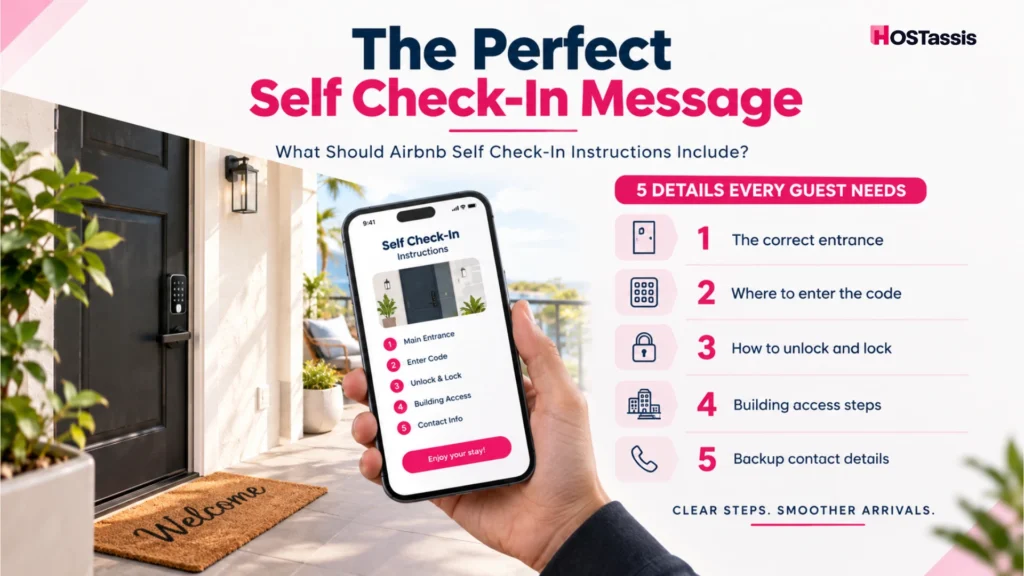
Good Airbnb self check-in instructions answer five questions: which door, where to type the code, how to open and lock it, how to get through each building stage, and who to contact if access fails.
- Identify the Correct Entrance: Add a photo or a clear description of the right door or building entrance. Guests often arrive tired and in the dark, so a picture saves a lot of guessing.
- Explain Exactly Where to Enter the Code: “Use the keypad” is too vague. Say where the keypad is, what it looks like, and whether guests need to press a button or wake the screen first.
- Explain How to Unlock and Lock the Door: Plenty of problems start after the code works. Guests don’t know whether to turn the handle, press a button, or push the door. Tell them which, and explain how to lock up when they leave.
- Include Building Access Separately: Got a gate, a lobby door, an elevator, and then the apartment door? Give each stage its own line. Don’t cram them into one long sentence.
- Provide a Backup Contact Method: Give guests a number or message route for access failure only. If you use a connected smart lock on Airbnb, you can add backup entry instructions that are only shown to confirmed guests when a lock problem stops them getting in.
Keep every step short. Guests standing outside with luggage won’t read three paragraphs.
What Happens if the Smart Lock, Keypad, or Lockbox Fails?
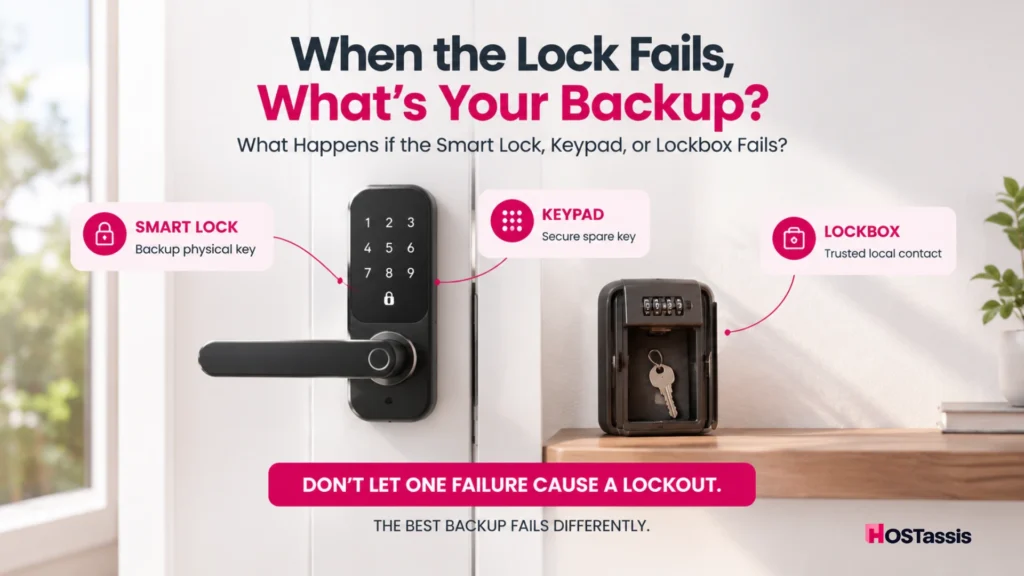
When access fails, you need a second way that doesn’t depend on the same weak point. Plan the backup before the first booking, not after the first lockout.
Smart Lock Failure
The usual suspects are a dead battery, a lock that dropped offline, a code that didn’t sync, or a jammed mechanism. Good backups include an emergency physical key, a secondary lockbox, or a local contact or co-host.
Offline doesn’t always mean locked out. If a connected lock goes offline before a last-minute booking, Airbnb sends the guest a backup code that works without Wi-Fi. A dead battery is different, because no code can open a lock with no power.
Keypad Failure
Keypad failures usually come down to dead batteries, a wrong or outdated code, or a keypad that stops responding. Test the code after every cleaning visit and swap batteries on a schedule. Whatever backup you choose, keep it separate from the keypad. A spare key in a lockbox works well.
Lockbox Failure
Wrong code, stuck mechanism, lost key, or a guest who can’t find the box.
If the lockbox won’t open, ask the guest to double-check the combination and follow your opening steps without forcing anything. If it still won’t budge, arrange entry through a secure spare key, a local co-host, or another reliable backup.
The Backup Access Rule
Your backup should fail differently from your primary method. If a smart lock loses Wi-Fi, locally stored codes may still work, so connectivity isn’t always the culprit. A dead battery or broken keypad is another story.
In that case, a physical key in a separate lockbox is the stronger backup. A second system that depends on the same battery or the same Wi-Fi isn’t really a backup at all.
Self Check-In Mistakes That Create Guest Problems
Most access problems come from six avoidable habits involving codes, instructions, and upkeep. Fixing them can help cut down on preventable lockouts.
- Using one code for every guest: Past guests keep access.
- Writing instructions that run too long: Guests skim and miss the one line they needed.
- Skipping the entrance photo: People try the wrong door.
- Having no backup way in: One failure turns into a lockout.
- Not testing access after a cleaner or maintenance visit: Codes get changed and locks get bumped.
- Waiting on the low-battery warning: Replace batteries early, on a schedule.
All six are about access failure, not general guest experience, and none costs much to fix.
Can Airbnb Self Check-In Help With Remote Property Management?
Yes. Self check-in removes the in-person key handoff, so hosts, co-hosts, and virtual teams can support arrivals from anywhere. The property stays accessible without someone standing at the door.
Here’s where it helps most:
- Late arrivals no longer need anyone on site
- Owners can run a property from another city or country
- Portfolios are easier to coordinate
- Cleaners and vendors can get temporary access
- Fewer physical keys change hands
Someone still has to watch arrivals. A remote team should confirm the code works before check-in, track who arrives and when, and react fast if a door won’t open. That matters most across time zones, where a lockout can land in the middle of your night.
That’s where HOSTassis comes in. Our Airbnb virtual assistant service covers 24/7 guest communication and check-in coordination, so a locked door at midnight gets handled quickly. For the bigger picture, read Can You Run an Airbnb Without Being There?
Airbnb Self Check-In FAQs
Is self check-in allowed on Airbnb?
Yes. Airbnb supports self check-in through smart locks, keypads, and lockboxes, as long as guests can get in without the host there. Building rules, landlord restrictions, and local requirements may limit which method you can use, so check those first.
Is a smart lock better than a lockbox for Airbnb?
Usually. Smart locks offer automation, temporary codes, and access tracking. A lockbox costs less and works offline, but it depends on a physical key and gives you less say over what past guests can still do.
Can I use the same Airbnb door code for every guest?
It’s better not to. Create a unique code for each reservation. A permanent shared code means previous guests may still know how to get in.
What happens if an Airbnb smart lock battery dies?
Replace batteries before they run low, and keep a separate backup way in, like an emergency key or a secure backup lockbox. A code can’t open a lock that has no power.
Does a smart lock need Wi-Fi for Airbnb?
Not always. Many locks accept locally stored PINs without Wi-Fi. Creating codes remotely, monitoring activity, and integrations usually need an internet connection.
Where should an Airbnb lockbox be placed?
Mount it securely and shield it from weather. Make it easy for confirmed guests to find using your instructions, without leaving it in plain public view.
Can Airbnb automatically send a smart-lock code?
Some supported locks, PMS platforms, and integrations can create and send reservation-specific codes on their own. Airbnb’s own connection is limited to certain hosts in the US and Canada, so compatibility depends on your hardware, software, and market.
Smart Lock, Keypad, or Lockbox: Final Choice
Smart locks are best for automation and scale. Keypads are best for simple, reliable keyless entry. Lockboxes are best for low cost and limited installation. Pick the one that fits how you actually run the property.
The best Airbnb self check-in system isn’t the most advanced lock. It’s the one guests understand quickly, hosts can manage securely, and the property can still open when the main system fails.
If you want help with remote check-in coordination and guest support, talk to HOSTassis.