FIFA World Cup 2026™ is happening across North America from June 11 to July 19, 2026, and it’s going to bring in a huge number of visitors. Spread across 11 host cities in the US, Mexico, and Canada. Hotels in these cities will fill up fast, and prices will climb way higher than normal. This is why so many homeowners are choosing to list their primary home for short-term rental during the tournament.
If you live in or near a host city, your place could earn far more in a few weeks than it normally would in months. You don’t need a second property to make this work; your regular home can become a solid source of income while fans are in town for the World Cup.
Let’s get clear about this more specifically.
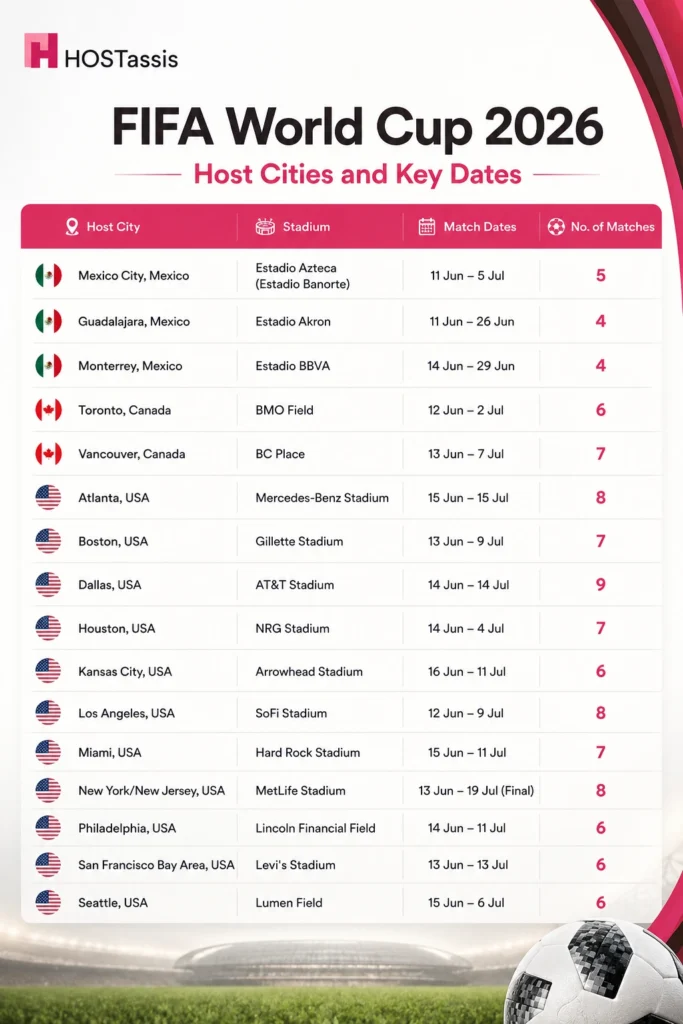
FIFA World Cup 2026 Host Cities and Key Dates
The US will host 11 of the 16 FIFA World Cup 2026™ host cities and 78 of the 104 matches. If your home is in one of these cities, you are in a high-demand Host City market.
How to Price Your Primary Home on Airbnb for FIFA World Cup 2026
Don’t use your usual nightly rate. Compare nearby hotel prices during match weeks and price your listing slightly lower to stay competitive.
Key Factors Behind World Cup Airbnb Rates
World Cup pricing depends on the match calendar. You can usually charge more near game dates, busy match weeks, or knockout rounds.
Airbnb Prices Across Each World Cup Stage
Use this table as a simple guide to adjust your pricing based on each stage of the FIFA World Cup, when demand changes the most.
| Stage | Typical Demand | Suggested Pricing Approach |
| Group Stage | Strong demand, especially around host cities with multiple matches in one week | Price above your normal rate, but stay close to local hotel prices to remain competitive |
| Knockout Stage | Higher demand because matches become more important and fans often stay longer | Increase rates more confidently, especially for dates 1–2 nights before and after match day |
| Final | Peak demand with the highest visitor pressure and limited accommodation | Use premium pricing, compare with top hotel rates, and avoid pricing your home too low. |
How to Check What Comparable Listings are Actually Booking at
You can follow these steps to understand what guests are actually paying, so you can price your home with confidence during the World Cup.
1. Find similar homes in your area. Look for 3–5 listings that are similar to yours in size, location, and amenities.
2. Check which dates are already booked. If a home is unavailable during World Cup week, it means a guest was willing to pay that price, not just that it was listed.
3. Use market data tools. Platforms like AirDNA or Rabbu can show average nightly rates and booking trends based on real reservation data.
4. Compare booked and available listings. Sold-out homes reveal price points that attract guests, while available homes can indicate where prices may be too high.
5. Watch how prices change. If hosts keep lowering their rates but still aren’t getting bookings, it gives you a good idea of the price limit for your market.
Why Overpricing Can Hurt Your Visibility
Platforms like Airbnb track how many people view your listing and how many actually book. If your price is too high, people may leave without booking, which can lower your ranking in search results.
Over time, even guests searching for your exact dates and area may not see your listing. A slightly lower price that gets booked is usually better than a higher price that leaves your calendar empty.
Realistic Earnings; What Hosts Can Actually Expect
Based on Deloitte research commissioned by Airbnb, here are the projected average earnings per host during the FIFA World Cup 2026™:
| Host City | Estimated Average Earnings per Host (USD) |
| New York / New Jersey | $5,700 |
| Boston | $5,200 |
| Los Angeles | $5,100 |
| Miami | $5,000 |
| Dallas | $4,400 |
| Seattle | $3,800 |
| Kansas City | $3,500 |
| Average Across U.S. Host Cities | ~$4,000 |
Deloitte analysis commissioned by Airbnb. Actual earnings vary based on your home’s location, size, amenities, pricing strategy, and the number of nights you host during the tournament.
What Cancellation Policy Should You Choose for World Cup Bookings?
Compare Airbnb’s policy types, learn if you can use different policies for tournament dates, understand the 24-hour grace period and Major Disruptive Events policy, and find out which option is best for the World Cup.
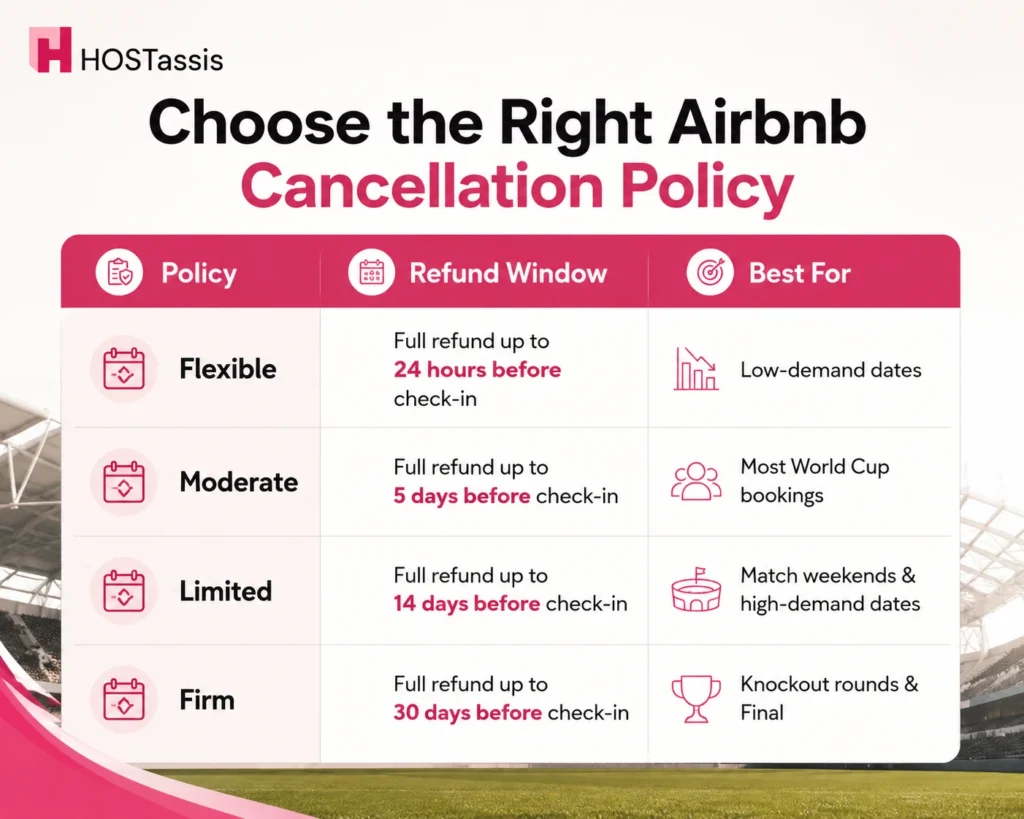
Airbnb Cancellation Policy Types With Comparison
Airbnb offers four cancellation policies: Flexible, Moderate, Limited, and Firm. For World Cup bookings, choose a policy that protects you from last-minute cancellations, as they can be difficult to rebook.
Can You Set a Different Cancellation Policy Just for World Cup Dates?
Yes. Airbnb lets you apply a different cancellation policy just for specific date ranges, such as the World Cup.
How to do it:
- Go to your listing’s Calendar.
- Select the World Cup dates.
- Open Custom Settings for those dates.
- Choose a cancellation policy: Flexible, Moderate, Limited, or Firm.
- Save your changes.
How the 24-hour Grace Period and Major Disruptive Events Policy Affect Hosts
Airbnb’s 24-hour grace period lets guests cancel penalty-free right after booking, while the Major Disruptive Events policy may override host cancellation terms entirely.
24-hour grace period: Guests can cancel within 24 hours of booking for a full refund, even if they use the Firm cancellation policy, as long as they booked at least 7 days before check-in. Hosts cannot turn off this Airbnb rule.
Major Disruptive Events (MDE) policy: If a major event such as a natural disaster, government travel restriction, or serious safety issue affects travel, Airbnb may override your cancellation policy. In these cases, guests may receive a full or partial refund, even if you have a Firm cancellation policy.
What this means for hosts:
- A Firm cancellation policy does not guarantee full protection; it has some exceptions.
- Guests can still cancel within 24 hours of booking if they meet Airbnb’s grace period rules.
- If a major disruption happens (such as severe weather, a security issue, or travel restrictions), Airbnb may override your cancellation policy and decide whether guests receive a refund.
- In some cases, Airbnb may also recover money that has already been paid to the host if the policy is overridden.
Flexible vs. Strict: Which Wins More World Cup Bookings?
Flexible usually wins more bookings, but strict protects more revenue per booking.
Here is why:
Flexible: Flexibility reduces guest hesitation. During high-demand events like the World Cup, many travelers are still unsure about tickets, travel plans, or work schedules. A flexible policy makes them more comfortable booking early.
Firm: A Firm cancellation policy gives you more protection if guests cancel at the last minute. However, it may discourage some guests who are still unsure about their travel plans.
What Cancellation Policy Should You Look For?
Choose a Flexible or Moderate cancellation policy if your World Cup plans may change. These options give you a better chance of a refund if your tickets, travel dates, or plans change.
Choose a Firm policy only if your travel plans are fixed. It may be cheaper, but canceling later can cost you more.
How to Check a Listing’s Cancellation Policy Before Booking
Here are the steps:
- Open the listing and scroll to the “Cancellation policy” section (below pricing, above reviews)
- Or check during checkout, it’s shown clearly before you confirm and pay
- Look for the policy name: Flexible, Moderate, Firm, or Non-refundable
- Click “Learn more” next to the policy for exact refund deadlines and percentages
- Check your confirmation email,the policy is listed there too
What Happens if Your Travel Plans or Visa Change
If your visa or travel plans change, your host’s cancellation policy still applies, with refunds depending on timing and policy type. Contact your host directly. Some hosts may be willing to offer extra flexibility beyond the standard cancellation policy.
Refund Timelines; What to Expect
If you are eligible for a refund, Airbnb usually processes it as soon as your cancellation is confirmed. The time it takes to receive the money depends on your payment method and bank. Most refunds arrive within a few business days, while some payment methods may take longer.
Accessibility Features That Matter for World Cup Hosts and Guests
Key accessibility features include step-free access, accessible parking, step-free bathroom and bedroom access, grab bars, a roll-in shower, shower chair, wide doorways, and well-lit paths to the entrance.
Most-Searched Accessibility Features
Add these accessibility features to your listing if available to help more guests find your property and book with confidence.
- Step-free entry. No stairs from the street to the unit
- Wide doorways. Accommodates wheelchairs and mobility aids
- Roll-in shower. No curb or step to enter
- Grab bars. In the bathroom, near the toilet and shower
- Accessible parking. Close to the entrance, marked or reserved
- Elevator access. For units above the ground floor
- Well-lit pathways. Clear, obstacle-free walkways
- Lever-style door handles. Easier grip than round knobs
- Bed height accessibility. Accommodates transfers from wheelchairs
- Visual/audio alerts. For guests with hearing or vision needs
How to Add and Verify Accessibility Features on Your Listing
Follow these steps to add accessibility features to your listing and have them verified by Airbnb.
- Go to Your Listings and select the listing you want to edit.
- Open the Amenities or Accessibility section in the listing editor.
- Add all accessibility features your property offers (such as step-free access, wide doorways, or a roll-in shower).
- Upload clear photos showing each accessibility feature from different angles.
- Save your changes and submit them if Airbnb asks for verification.
- Once approved, the verified accessibility features will appear on your listing.
Getting Support from Airbnb’s Accessibility Team
Airbnb has a dedicated accessibility team that helps make the website and app easier to use, verifies accessibility features in listings, and supports hosts and guests with accessibility-related questions and requests.
Eligibility:
- Any host or guest can contact the accessibility team; no special qualifications are needed to ask a question or raise a concern.
- Hosts who can’t meet an accessibility-related requirement (such as allowing a service animal) can request an exemption. Airbnb reviews each request individually and applies any approved exemption only to that specific listing.
- Guests can ask Airbnb for help if a host does not cooperate with a reasonable accessibility request.
How to request support:
- General accessibility questions or concerns (policy, listing features, reasonable adjustment disputes): contact Airbnb Community Support through the Help Center
- Digital/website/app accessibility issues (screen reader problems, app usability bugs): email digital-accessibility@airbnb.com
- Exemption requests: contact the Airbnb team directly through Community Support to have your case reviewed
How Guests Can Search for Accessible World Cup Stays
Guests can use Airbnb’s search filters under “Accessibility features” to narrow listings by step-free entry, wide doorways, accessible parking, roll-in showers, and other specific needs.
Here are the steps:
- Go to Airbnb.com or the app and search for your World Cup destination and dates.
- Click Filters.
- Scroll to the Accessibility features section.
- Check the features you need: step-free entry, wide doorways, roll-in shower, accessible parking, elevator access, etc.
- Apply filters to see only matching listings.
Quick-Reference Checklist: Pricing, Cancellation, and Accessibility Before Match Day
Use this checklist before booking to avoid unexpected costs, cancellation issues, and accessibility problems. It only takes a few minutes and can save you trouble later.
Pricing
- Compare prices with non-event dates to see how much rates increase during the World Cup.
- Check all extra costs, including cleaning fees, service fees, and local taxes, before booking.
- Book early, as prices usually increase closer to match day.
Cancellation
- Check the listing ’s cancellation policy: Flexible, Moderate, Firm, or Non-refundable.
- Note the exact refund deadline and refund amount for your booking dates.
- Remember, the 24-hour grace period may apply if you cancel within 24 hours of booking and booked at least 7 days before check-in.
- Understand that Major Disruptive Events may override normal policies, but Airbnb decides this on a case-by-case basis.
- Save a screenshot or confirmation email of the cancellation policy for your records.
Accessibility
- Use Airbnb’s filters to search for the accessibility features you need.
- Choose listings with photo-verified accessibility features when possible.
- Message the host to confirm any accessibility details that are not listed.
- Ask about step-free access, doorway width, bathroom setup, or accessible parking if needed.
- Contact Airbnb Community Support if a host cannot accommodate a reasonable accessibility request.
Frequently Asked Questions
1. Should Hosts Lower Prices If a World Cup Listing Isn’t Getting Booked?
Not right away. First, adjust your cancellation policy or accessibility details. If bookings are still slow one or two weeks before the date, then consider a small price drop.
2. Which Cancellation Policy Gets the Most World Cup Bookings?
Flexible and Moderate policies usually attract more bookings, while a Firm policy offers more protection but may reduce bookings.
3. Does the 24-hour Cancellation Grace Period Apply During the World Cup?
Yes. Guests can cancel within 24 hours of booking and receive a full refund if they booked at least 7 days before check-in.
4. Can Hosts Apply Different Cancellation Policies to Different Date Ranges?
Yes. Airbnb’s Seasonal Cancellation Policies feature lets hosts set a custom policy for specific dates directly from the calendar, while all other dates keep the default listing policy.
5. How Long Do World Cup Booking Refunds Take to Process?
Refunds typically process within 5–10 business days after approval, though the exact timing depends on the bank and payment method.
6. Do Accessibility Features Actually Increase Bookings?
Yes. Clear, photo-verified accessibility features help your listing appear in more guest searches and can attract more bookings.
7. What Happens If a Guest Cancels Close to a Match Date?
Refunds depend on the host’s cancellation policy. Flexible and Moderate offer better refunds, while Firm and Non-refundable offer fewer or none.
Conclusion
Success during the World Cup isn’t just about getting bookings, it is about managing them well. The right settings can help you earn more while reducing last-minute surprises. With the right pricing, cancellation policy, and listing setup, you can maximize bookings while protecting your earnings.
World Cup hosting can be easier than many people expect. Seasonal cancellation policies can help protect your earnings, and Airbnb offers support if unexpected issues arise. Even if you are new to hosting, this is a good opportunity to try it during one of the world’s biggest travel events.