Airbnb Business SOPs are essential before hiring because they train cleaners and VAs quickly, protect 5-star quality, save time by preventing late-night calls, and expose workflow flaws. Key areas: guest messaging, cleaning, access control, and emergency contacts.
Most Airbnb hosts hire help for one reason: they’re tired of doing everything themselves. A cleaner takes the turnovers off your plate. A co-host or virtual assistant answers guest messages while you sleep. On paper, it sounds like relief. In practice, a lot of hosts hire someone and the chaos doesn’t go away, it just changes shape. The cleaner skips the balcony because nobody told them to check it. The new co-host answers a pricing question differently than you would have. A maintenance request sits in someone’s inbox for three days because nobody was clearly responsible for it.
None of that happens because the person you hired is bad at their job. It happens because you handed them a task without handing them a process. That gap is exactly what a Standard Operating Procedure is built to close, and it’s the difference between a team that adds capacity and a team that adds confusion.
What Is an Airbnb Standard Operating Procedure (SOP)?
An Airbnb Standard Operating Procedure (SOP) is a documented, step by step playbook that spells out exactly how recurring hosting tasks such as cleaning, guest messaging, or check in should be carried out, ensuring consistency, quality, and efficiency no matter who is performing the task.
Think of the difference between saying “clean the apartment” and handing someone a document that shows exactly which rooms to check, in what order, with photos of what “done” looks like. The first depends on guesswork. The second doesn’t. If you vanished for a week, could your team still follow it without calling you once? That’s the real test.
The real purpose behind an SOP is bigger than any single task, though. It exists to give you five things at once: consistency across every stay, training material you don’t have to rebuild from scratch each time you hire, safe delegation because the process (not your memory) carries the standard, clear accountability since every step has an owner, and scalability, because a business built on documented systems can grow without your personal bandwidth being the ceiling.
- It documents how a task is done, not just what the task is
- It removes guesswork by spelling out the exact sequence of steps
- It works the same whether your best cleaner does it or your newest hire does it
- It becomes the training material for every person you bring on afterward
Why SOPs Matter More Than Hiring More People?
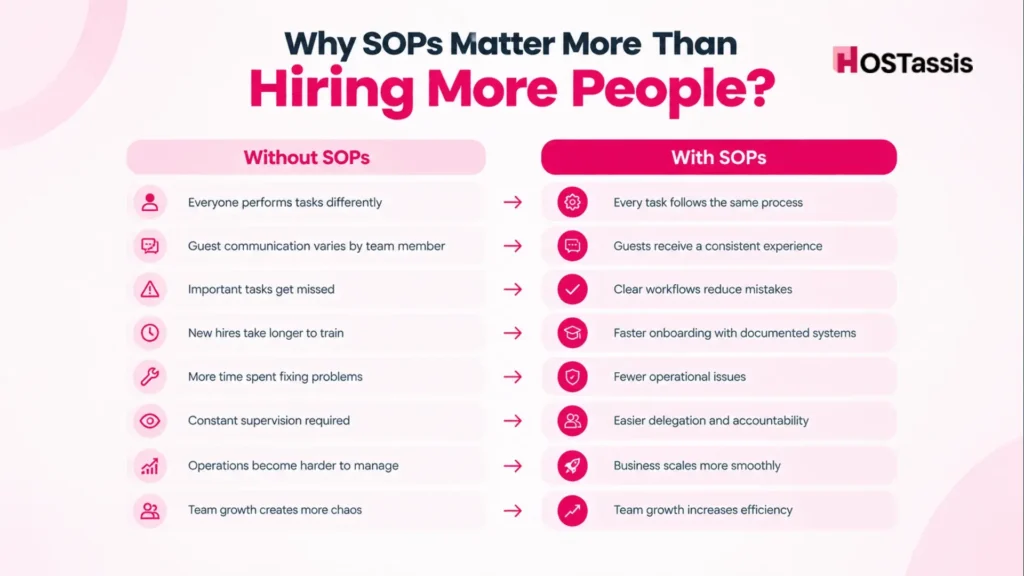
Standard Operating Procedures matter more than hiring extra staff because they fix broken processes first, while adding people to a chaotic system only multiplies existing problems further.
Here’s what usually happens when a host scales up the team without scaling up the systems first. Task A gets done one way by person one, and a slightly different way by person two. A guest who stayed last month gets a different check-in message than a guest staying this weekend, because two different people wrote it from memory instead of a template. Small inconsistencies pile up, and eventually they show up in a review: “communication was confusing” or “the place wasn’t quite ready when we arrived.”
Without SOPs, the pattern usually looks like this:
- Inconsistent processes: everyone does the task their own way
- Missed tasks: nothing catches what one person forgets
- Guest confusion: different answers to the same question
- Negative reviews: small issues that were never anyone’s clear job to fix
- Higher operating costs: more time spent re-doing or fixing things
With SOPs in place, the same hire produces a very different outcome:
- Consistent service: every guest gets the same standard, regardless of who’s on shift
- Faster onboarding: new hires have a document to follow from day one
- Clear accountability: each task has a named owner and a defined standard
- Easier delegation: you’re handing off a process, not just a responsibility
- Scalable operations: the business keeps running smoothly as it grows
Signs Your Airbnb Business Needs SOPs
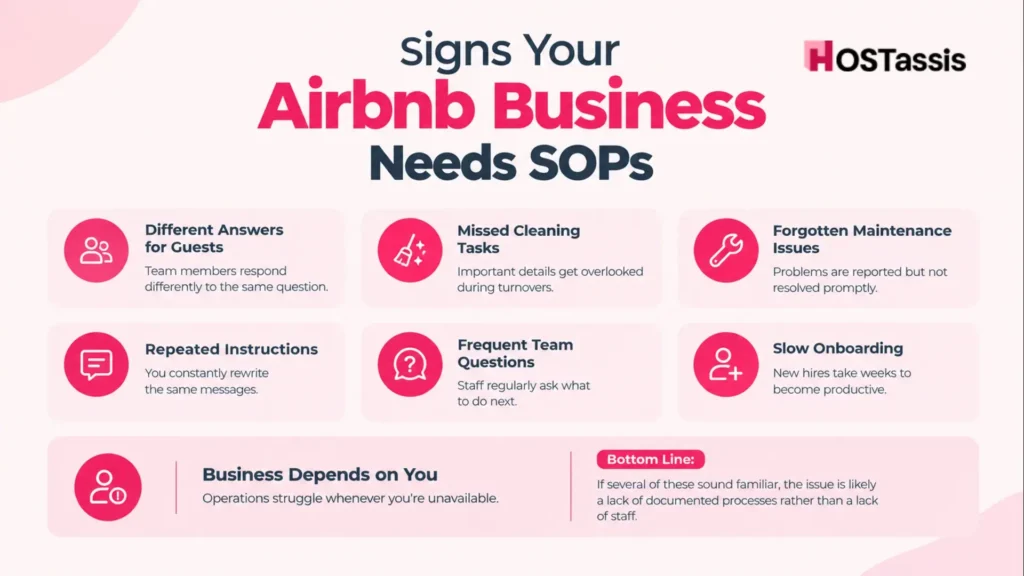
Your Airbnb business needs Standard Operating Procedures when daily tasks depend entirely on your memory and you spend hours answering the same repeat questions from cleaners or guests.
Ask yourself if any of these sound familiar:
- Two guests ask the same question and get two different answers from your team
- Your cleaner forgets something (restocking towels, checking under the bed, wiping the stovetop) that a checklist would have caught
- A maintenance issue gets reported and then quietly forgotten for days
- You find yourself typing out the same check-in instructions from scratch every single time
- Team members text or call you constantly asking “what should I do here?”
- A new hire takes weeks to get up to speed instead of days
- The moment you go offline (a flight, a weekend away, a family emergency) something falls through
If you nodded along to even two or three of these, it’s not a staffing problem. It’s a documentation gap, and it’s fixable long before you hire your next person.
Essential Airbnb SOPs Every Host Should Create
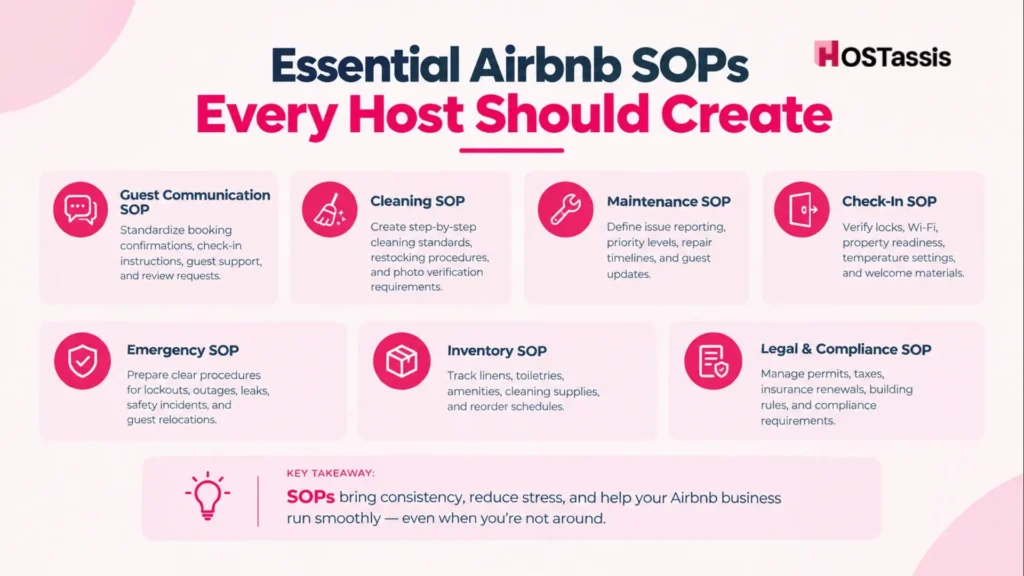
Creating clear Standard Operating Procedures helps you run your rental like a five star hotel while freeing you from constantly repeating the same instructions and tasks.
The SOPs worth documenting first are the ones that directly touch the guest experience or the physical property, because those are the tasks where inconsistency costs you the most: in reviews, in repeat bookings, and in your own peace of mind.
Guest Communication SOP
This covers the full conversation arc with a guest: the booking confirmation message, pre-arrival instructions, the check-in text, how questions during the stay get handled, check-out reminders, and the review request. Script the tone and timing for each so every guest gets the same warm, professional experience regardless of who’s answering.
Cleaning SOP
This is the one that protects your star rating the fastest. It should walk through bedroom inspection, bathroom sanitation, kitchen cleaning, linen replacement, restocking amenities, a final walkthrough, and photo verification before the listing is marked ready.
Photo verification only works if it’s specific. Define exactly which spots the cleaner has to photograph (made beds, the inside of the oven, the bathroom counter, restocked amenities) and who reviews those photos before the listing gets marked ready for the next guest. Without that structure, “photo verification” just means a random picture of the living room, which doesn’t actually confirm anything.
Maintenance SOP
Covers how an issue gets reported, how it’s prioritized, who it gets assigned to, expected repair timelines, follow-up inspection, and how and when the guest gets updated.
Priority levels only work if they’re defined with real examples, not just labeled “high” or “low.” A workable breakdown looks like this:
- Emergency (respond within the hour): gas smell, major water leak, no heat in freezing weather, security or lock failure
- High priority (same day): broken AC or heating, no hot water, appliance failure that affects the stay
- Routine (within a few days): a loose door handle, a squeaky cabinet, minor cosmetic wear
A broken AC handled within two hours reads completely differently in a review than one that sits untouched for a day.
Check-In SOP
Before any guest walks through the door, someone needs to actually test the smart lock or lockbox instead of assuming it still works from last time. Walk the property, confirm it’s genuinely ready, check that the welcome guide still matches reality, test the Wi-Fi, and set the temperature to something comfortable. None of this takes long, but skipping it means the guest becomes the one who finds out something’s broken, and that’s never a good first impression.
Emergency SOP
Water leaks, power outages, internet dropping out, guests locked out, a gas smell, a fire emergency, or the rare case where a guest needs to be relocated entirely. None of these come up often, which is exactly the problem. When something rare finally happens, nobody remembers the right steps under pressure. Writing the process down ahead of time means whoever’s handling it that day isn’t guessing their way through a situation that actually matters.
Inventory SOP
This one tracks the boring stuff that causes real problems when it’s ignored: linen counts, kitchen supplies, toiletries, cleaning products. Pair it with a monthly audit and a simple reorder process, and your cleaner stops walking into a unit only to discover the towels are gone or the coffee ran out two guests ago. It’s a small system, but it quietly prevents a surprising number of bad reviews.
SOP vs Checklist: What’s the Difference?
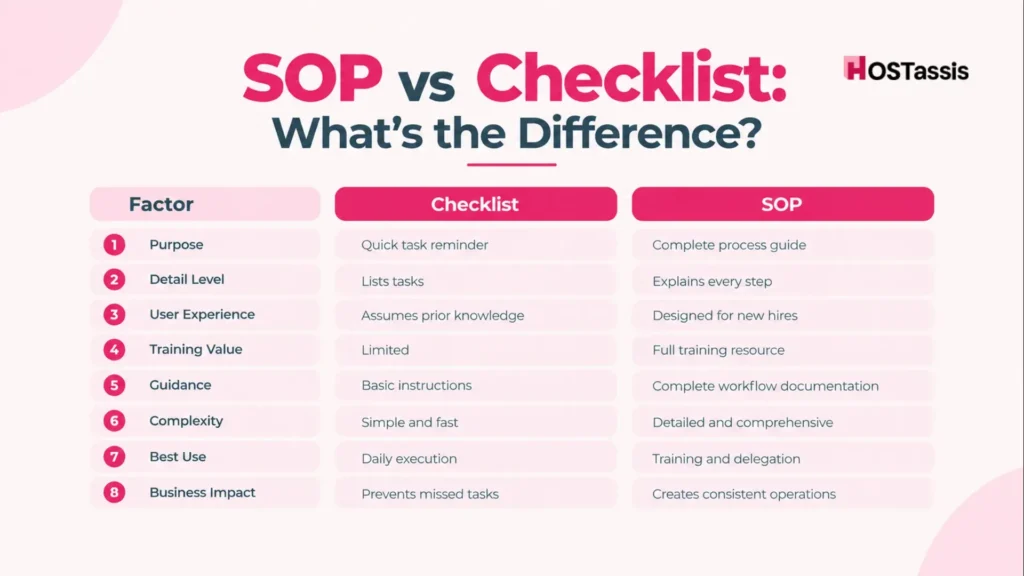
A Standard Operating Procedure explains how and why a task is done in detail, while a checklist is a short memory aid confirming that the necessary steps are completed in the correct order.
| Checklist | SOP |
| Lists the tasks | Explains every step of each task |
| Works as a quick reminder | Works as detailed instruction |
| Assumes the person already knows how | Written for someone with zero prior knowledge |
| Offers limited guidance | Documents the complete workflow |
| Simple | Comprehensive |
A checklist is what an experienced team member glances at before leaving the property. An SOP is what you hand a brand-new hire on their first day so they don’t need you standing next to them. Most well-run Airbnb operations actually use both: the SOP to train, and the checklist to execute quickly once the process is second nature.
How SOPs Improve Guest Reviews?
Standard Operating Procedures improve guest reviews by removing inconsistency, maintaining high cleanliness standards, and streamlining every touchpoint of the guest journey from booking to checkout.
When your cleaning, check-in, and communication all follow the same documented standard, guests stop encountering the small, avoidable problems that quietly drag review scores down: a late reply, a lockbox code that doesn’t work, a bathroom that wasn’t quite finished. SOPs show up in reviews as things guests rarely mention by name but always notice: a clean arrival, fast answers, and a property that felt taken care of.
- Cleanliness stays consistent from one turnover to the next
- Communication feels reliable instead of hit-or-miss
- Issues get resolved before the guest has to escalate them
- Maintenance response feels prompt rather than ignored
- Check-in goes smoothly without last-minute scrambling
- Overall satisfaction, and your star rating, climbs steadily
How SOPs Save Time and Reduce Mistakes?
Standard Operating Procedures save time and reduce mistakes by providing clear, repeatable instructions that eliminate guesswork and remove inconsistency from daily operations.
Once the process is written down, the time savings show up in very specific, noticeable ways:
- Fewer phone calls: the answer is already documented, so nobody needs to call you to ask
- Less micromanagement: the standard lives in the SOP, not in your head
- Faster onboarding: new hires get productive in days instead of weeks
- Easier delegation: you’re handing off a proven process, not taking a risk on someone’s judgment
- Better accountability: it’s clear exactly who owns each task and what “done right” looks like
- Reduced operational stress: fewer fires to put out because fewer things are being improvised
How to Create Airbnb SOPs Step by Step?
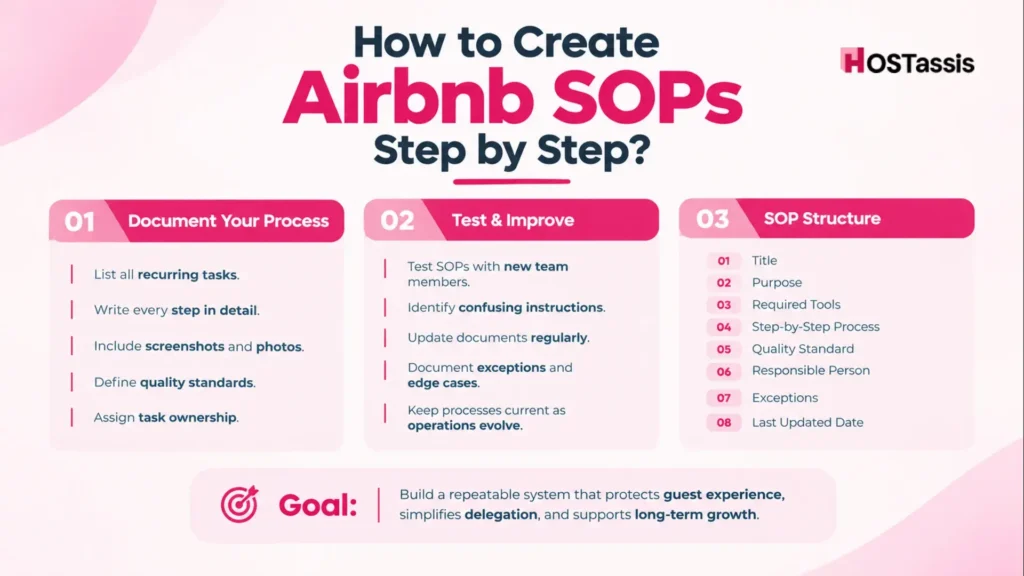
Building your first SOPs doesn’t require a big project or special software, it starts with documenting the tasks you already repeat constantly, then refining the wording until someone with zero context could follow it without asking you a single question.
- List your recurring tasks. Write down every task that happens more than once a month: cleaning, check-in, guest messaging, restocking, and so on.
- Write out every step. Don’t skip anything you consider “obvious.” What’s obvious to you after two years of hosting isn’t obvious to someone on day one.
- Add screenshots or photos. A photo of a properly made bed or a correctly staged kitchen removes almost all ambiguity from a written instruction.
- Assign responsibility. Name exactly who owns each task, so there’s never confusion about who’s supposed to be doing it.
- Test it with a new team member. Hand the SOP to someone who’s never done the task and watch where they get stuck, that’s exactly where the document needs more detail.
- Update it regularly. Properties change, tools change, and your standards improve. An SOP that hasn’t been touched in a year is usually out of date.
It also helps to keep every SOP in the same basic shape, so your whole library stays easy to navigate as it grows:
Title → Purpose → Required tools or supplies → Step-by-step process → Quality standard (what “done” looks like) → Responsible person → Exceptions or edge cases → Last updated date. That last field alone will save you from relying on outdated instructions six months from now.
7 Common SOP Mistakes Airbnb Hosts Make
Even hosts who take the time to write SOPs often undercut their own effort by making the documents too vague, too outdated, or too complicated for a team member to actually follow under real conditions.
- Writing instructions that are too vague to act on (“clean thoroughly” instead of a defined checklist)
- Skipping quality control, so nobody verifies the SOP was actually followed
- Never revisiting or updating the document as the property or process changes
- Overcomplicating a simple task with unnecessary steps
- Handing someone an SOP without ever walking them through it in person
- Failing to document exceptions: what to do when something doesn’t go as planned
- Ignoring guest feedback that points directly at a process gap
An SOP that’s never reviewed against real-world results is just a document sitting in a folder. The ones that actually work get revised every time something breaks.
Best Tools for Managing Airbnb SOPs
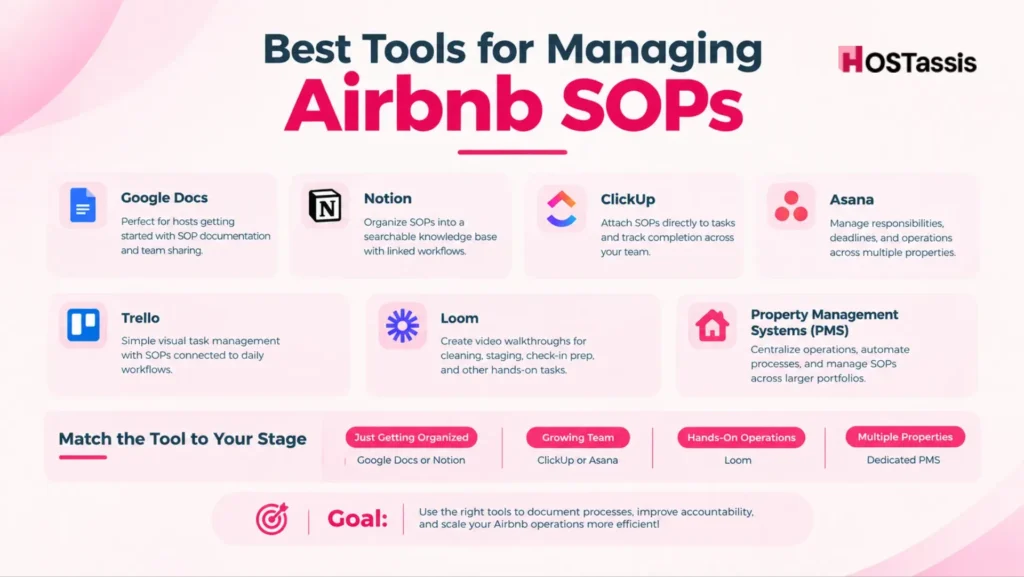
The best tools for managing Airbnb SOPs range from structured documentation hubs to workflow automation software that turns plain text rules into trigger based actions.
Google Docs works well for hosts just starting out, since it is free, simple, and easy to share with a link. Notion is a strong step up once you have multiple SOPs. Letting you organize everything into a searchable, linked knowledge base. ClickUp and Trello suit hosts who want to attach SOPs directly to tasks and track whether they were actually completed. Asana fits larger teams that need clear task ownership and deadlines across several properties. Loom is worth using specifically for physical tasks like cleaning or check-in prep, since a short video often communicates a standard faster than a page of text. A dedicated Property Management System becomes worthwhile once you are managing enough units that manual tracking starts to break down.
If you are not sure where to start, match the tool to where you are right now:
- Small host, just getting organized: Google Docs or Notion
- Growing team with several people to coordinate: ClickUp or Asana
- Anything hands-on, like cleaning or staging: Loom video walkthroughs
- Multiple properties under one operation: a dedicated PMS
Legal and Compliance SOP
A Legal and Compliance SOP is a documented framework that outlines how a business identifies the laws that apply to it, manages regulatory risk, and keeps every department consistent in following them.
- Track permit and license renewal dates with reminders set thirty days early
- Log occupancy tax collection and filing deadlines
- Note HOA or building rules that apply to the property
- Record insurance policy renewal dates and coverage limits
- List required guest disclosures such as noise monitors or pool safety notices
- Assign one person to own the compliance calendar
- Define a calm, documented response for neighbor or city complaints
6 Damage and Incident Reporting SOP
A Damage and Incident Reporting SOP follows a clear process to document what happened, address the hazard, and prevent similar incidents from happening again, keeping the property and guests safe throughout.
- Take timestamped photos of damage before touching anything
- Log the date, unit condition, and estimated repair cost
- Contact the guest with a clear, factual account of the issue
- File claims through Airbnb’s Resolution Center or the insurance provider before the deadline
- Set an escalation path for who decides between a claim and a direct conversation with the guest
- Keep the process consistent across every staff member handling incidents
How Professional Airbnb Management Companies Use SOPs?
Professional Airbnb management companies use Standard Operating Procedures to turn daily chaos into a predictable, repeatable system that scales smoothly across multiple properties.
At HOSTassis, this is exactly the approach behind every account we manage. Daily operations, cleaning standards, maintenance coordination, guest messaging, vendor management, quality inspections, owner reporting, and emergency response all run against a documented standard, not a co-host’s memory. It’s the reason a virtual assistant handling your guest messages tonight can deliver the exact same experience as one handling them next week, and it’s the same principle that lets a management company scale from one listing to fifty without the guest experience slipping. If you’re hiring your first co-host or VA, borrowing this approach (document first, then delegate) will save you the growing pains most hosts learn the hard way.
Frequently Asked Questions
What Is an Airbnb SOP?
It’s a written, step-by-step process for a recurring task in your rental business, detailed enough that anyone can follow it and get the same result you would.
Why Are Standard Operating Procedures Important for Airbnb Hosts?
They keep the guest experience consistent, make training new hires faster, and let your business run smoothly even when you’re not personally handling every task.
What’s the Difference Between an SOP and a Checklist?
A checklist reminds someone what to do; an SOP explains exactly how to do it, in enough detail for someone with no prior experience.
When Should I Create SOPs?
Ideally before you hire anyone, but if you already have a team, the next best time is right now, starting with your most frequent tasks.
Can a Small Airbnb Business Benefit from SOPs?
Yes. Even a single-property host benefits, because SOPs remove the mental load of re-deciding the same process every week and make it far easier to hire help later.
How Often Should SOPs Be Updated?
Whenever your property, tools, or standards change, and at minimum, every time a new hire’s questions reveal a gap in the document.
What Tasks Should Have SOPs?
Start with guest communication, cleaning, check-in, maintenance, emergencies, and inventory: the tasks that most directly affect the guest experience.
Which Software Is Best for Managing Airbnb SOPs?
It depends on your scale: Google Docs or Notion for a handful of SOPs, ClickUp or Asana once you’re managing a team, and a PMS once you’re running multiple properties.
Build the System Before You Build the Team
Standard Operating Procedures aren’t paperwork, they’re the foundation that lets an Airbnb business grow without the owner burning out in the process. They cut down on mistakes, keep the guest experience consistent no matter who’s on shift, and turn hiring from a gamble into a repeatable system.
Whether you’re managing one listing or building toward a portfolio, the hosts who document their operations before they scale their team are the ones who scale smoothly. The ones who skip that step usually end up rebuilding their systems later, under pressure, after a few bad reviews have already landed. Start with your most repeated task this week, write it down properly, and build from there.