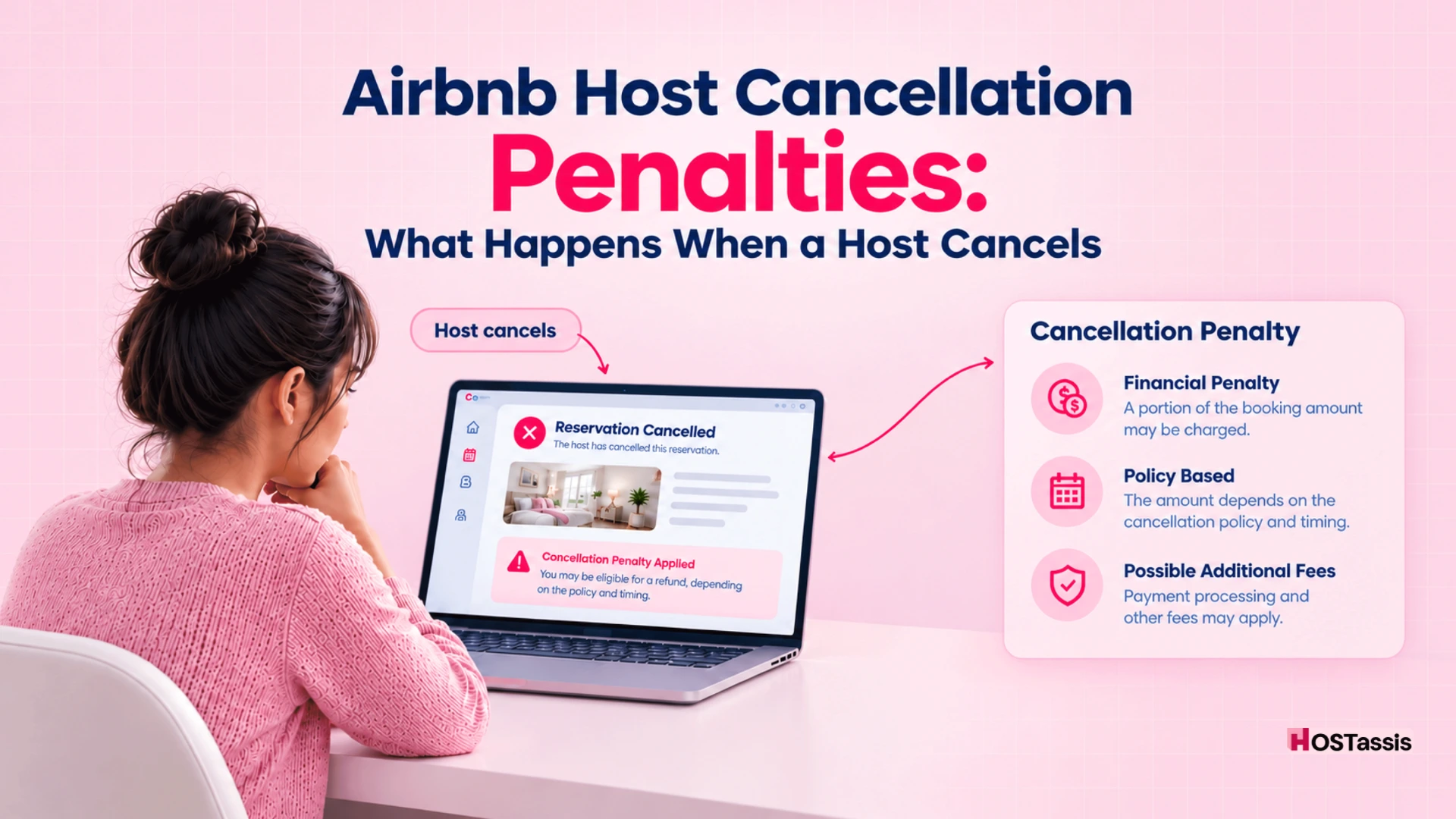
Many Airbnb hosts cancel a confirmed reservation without a valid reason, and that is a major mistake. They can lose the booking payout, pay a cancellation fee, have the canceled dates blocked on Airbnb, and face additional consequences, including impacts on Superhost status or, for repeated or serious issues, listing or account action.
When an Airbnb host cancels a confirmed reservation, the penalty fee starts at a minimum of $50 and increases based on how close to check-in the cancellation occurs: you will be charged 10% of the total reservation amount if canceled more than 30 days in advance, 25% if canceled between 48 hours and 30 days before check-in, and 50% for any unstayed nights if canceled within 48 hours of check-in or after the stay has already begun.
And the fee is only part of it. Your guest gets a full refund, Airbnb may help them rebook elsewhere, and the canceled dates can be blocked on your calendar, so you may not be able to replace that income.
The guest cancellation policy and the Airbnb host cancellation penalty are not the same. Guest policies decide how much money a guest gets back when they cancel; host cancellation penalties apply when you, the host, cancel a confirmed booking.
Many hosts don’t clearly understand how Airbnb cancellation policies work. For this, you can visit.
Airbnb Cancellation Policies in 2026: Flexible vs Moderate vs Limited vs Firm
How Much Is the Airbnb Host Cancellation Fee?
Airbnb’s host cancellation fee comes down to one simple thing: your timing. The closer you get to the check-in date, the more it costs you. While the minimum fee is $50, the actual amount is a percentage of what you would have earned from the stay.
That calculation includes your nightly rate, cleaning fee, and pet fee, but leaves out taxes and guest fees. Canceling well ahead of time keeps the penalty pretty light, but pulling out right before check-in or during a guest’s stay means you will lose a major chunk of your payout.
| When Host Cancels | Airbnb Cancellation Fee |
| More than 30 days before check-in | 10% of the reservation amount |
| 48 hours to 30 days before check-in | 25% of the reservation amount |
| 48 hours or less before check-in | 50% of affected unstayed nights |
| After check-in | 50% of affected unstayed nights |
| Minimum fee | $50 USD |
Example: A $1,000 booking canceled 20 days before check-in carries a $250 fee. Cancel that same booking on check-in day, and the penalty can reach $500 for the unstayed nights, before counting the payout you already lose.
What Amount Is the Percentage Based On?
Airbnb calculates the host cancellation fee as a percentage of the reservation amount, not the payout you receive. That distinction matters because the fee can be larger than hosts expect.
The calculation generally includes:
- Base accommodation rate
- Cleaning fee
- Pet fee
It generally excludes:
- Taxes
- Guest service fees
For example, if a guest pays $1,000 total, but $120 is guest service fees and taxes, your fee percentage is based on the $880 reservation amount, not the full $1,000. For long stays of 28 nights or more, Airbnb may calculate the fee using the non-refundable portion of the reservation for up to 30 days after cancellation.
Airbnb Host Cancellation Fee Examples
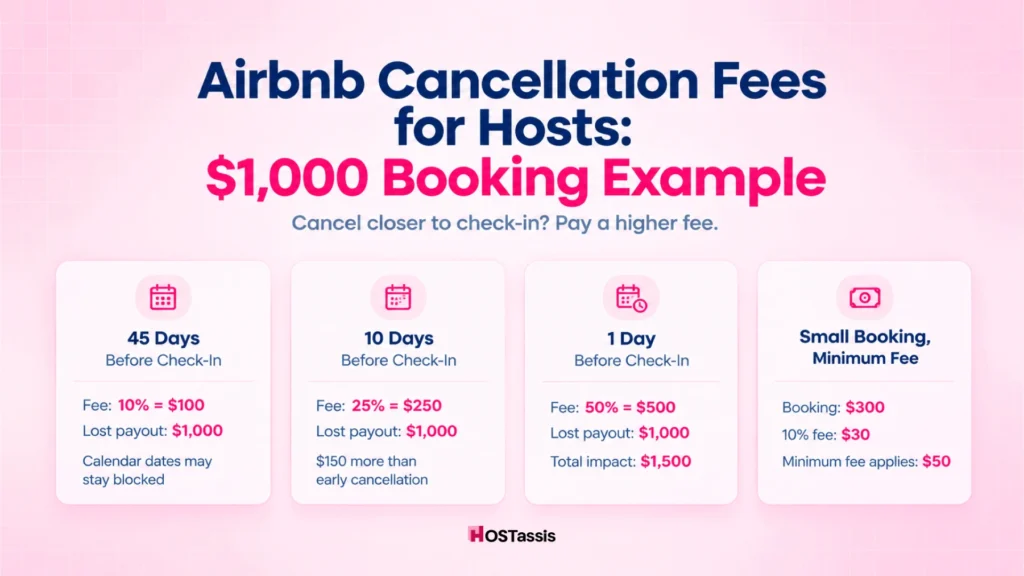
Let’s make it clearer with real-life examples:
Host Cancels 45 Days Before Check-In
If the host cancels more than 30 days before arrival, Airbnb charges 10% of the reservation amount.
- Reservation amount: $1,000
- Cancellation fee: 10%
- Fee: $100
You also lose the $1,000 payout for that stay. The dates may be blocked on your Airbnb calendar, so you’re not guaranteed to replace that income.
Host Cancels 10 Days Before Check-In
Ten days before check-in falls within the 48-hour-to-30-day window. The fee rises to 25%.
- Reservation amount: $1,000
- Cancellation fee: 25%
- Fee: $250
That is $150 more than canceling 45 days out: same booking, same guest, very different cost.
Host Cancels One Day Before Check-In
One day before check-in falls within the 48-hour window. Airbnb charges 50% of the value of the affected, unstayed nights.
- Reservation amount: $1,000
- Cancellation fee: 50%
- Fee: $500
Half the booking value goes to the fee, and the payout is gone too. This is why a last-minute cancellation is one of the most expensive mistakes a host can make.
Small booking example: Now suppose the reservation is $300.
At 10% of $300, the calculated fee is only $30. But Airbnb applies a $50 minimum cancellation fee, so you would still pay $50.
That matters for lower-priced stays. A small booking does not always mean a small penalty. The bigger loss is usually the payout. When you cancel, Airbnb says you will not receive payment for the canceled reservation. On a $1,000 booking, that can mean losing the full $1,000 payout, before you even count the cancellation fee.
Your calendar may stay blocked. Airbnb can block the dates tied to the canceled booking, which stops you from replacing that income with another reservation.
Does the Host Still Get Paid After Canceling?
Generally, no. If you cancel before the guest’s trip starts, Airbnb refunds the guest in full, and you do not receive a payout for that reservation.
If you cancel after check-in and Airbnb has already released your payout, the guest may still receive a full or partial refund. Airbnb then deducts the refunded amount from your future payouts until it collects the full balance. You can see that adjustment in your earnings dashboard.
So the loss isn’t just the cancellation fee. You can lose the booking payout, and if the money was already paid out, Airbnb can take it back from money you expected later.
What Happens to the Airbnb Calendar After a Host Cancellation?
Airbnb may keep the canceled reservation dates blocked on your calendar. You cannot manually unblock those nights, so you cannot simply cancel one booking and immediately accept another Airbnb reservation for the same dates.
This matters if you are tempted to cancel a lower-priced booking because a better opportunity comes along. You may lose the original payout, pay a cancellation fee, and still be unable to rebook those exact Airbnb dates.
In other words, canceling does not automatically free up the calendar. Treat a confirmed reservation as locked-in availability, because the dates may stay unavailable even after the booking is gone.
Can a Host Cancellation Affect Superhost Status?
Yes. Airbnb requires Superhosts to keep their host cancellation rate below 1%, except in cases of Major Disruptive Events and other valid reasons. Airbnb checks this every three months using your performance from the previous 12 months.
One cancellation does not automatically remove Superhost status. But it can put you over the limit if you have a smaller booking volume. For example, with 10 reservations in the year, one host cancellation is a 10% cancellation rate. With hundreds of reservations, the same cancellation has much less impact.
Airbnb can take away your Superhost status if you cancel on guests too often. Even if the percentage seems minor, letting cancellations add up can really damage your standing.
The practical takeaway: Avoid canceling unless it’s a total emergency. Keep your calendar up to date, have a backup plan for cleaning and repairs, and do everything you can to honor every reservation.
Can Host Cancellations Affect Guest Favorite or Listing Quality Signals?
Yes. Airbnb includes reliability in its Guest Favorite signals, and that reliability record covers host cancellations and quality-related customer service issues. Guest Favorites generally average below 1%.
So a host cancellation isn’t just a financial problem. If it happens repeatedly, Airbnb stops viewing your listing as reliable, which can drag down your overall ranking in search results.
Keep cancellations rare. Stay on top of your availability, line up reliable backups for cleaning and maintenance, and fix issues right away so you don’t have to cancel on a guest.
Can Airbnb Suspend a Listing for Host Cancellations?
A single cancellation does not automatically mean Airbnb will suspend your listing. But Airbnb says hosts who cancel confirmed reservations without a valid reason may face additional consequences, depending on the situation and any pattern of violations.
Those consequences can include listing suspension, listing removal, or suspension or removal of the host account. Airbnb does not publish a universal number of cancellations that triggers each penalty, so avoid assuming that a set number of cancellations leads to a ban.
The safe approach is simple: only cancel for a qualifying reason, document the issue, and, when possible, contact Airbnb Support before canceling.
When Can an Airbnb Host Cancel Without Penalties?
If a cancellation is truly out of your hands, Airbnb might waive the fees and other penalties.
Major Property Damage or Emergency Repairs
A gas leak, burst pipe, major damage, or a condition that makes the home unsafe or unusable can qualify. Airbnb lists emergency repairs and major property damage as valid reasons for hosts.
Serious Personal Illness
A serious illness can qualify if it truly prevents you from hosting. Airbnb may ask for a doctor’s letter or other documentation to support the cancellation.
Evidence the Guest Intends to Break House Rules
You may be able to cancel without consequences if you have proof that a guest plans to break an important house rule, hold an unauthorized party, or violate Airbnb’s Party and Events Policy. Airbnb specifically says it may ask for guest messages and other supporting evidence.
Major Disruptive Events
Qualifying large-scale events, such as declared public health emergencies or government travel restrictions, may also allow a penalty-free cancellation under Airbnb’s separate policy.
Airbnb May Ask for Evidence
Save the photos, videos, repair estimates, doctor’s notes and Airbnb messages. Note that they might ask for evidence before or after the cancellation, and they expect you to cancel as soon as possible so that they can accommodate another guest.
Hosts should not assume a fee will automatically be waived simply because they select an emergency cancellation reason.
Does a Penalty-Free Cancellation Mean Nothing Happens?
No. Airbnb may waive the cancellation fee for a valid reason, but it still says other consequences can apply. The most common example is that the listing calendar may remain blocked for the affected dates.
You also will not receive the payout for the canceled reservation, even if Airbnb waives the fee. If the payout was already released, Airbnb can withhold that amount from your next payout.
So “penalty-free” usually means no cancellation fee, not a cancellation with no impact. You may still lose the booking income and the ability to accept another reservation for those dates.
What About Instant Book Cancellations?
Instant Book does not give you unlimited freedom to cancel. Airbnb says you can cancel a reservation if you are uncomfortable, but fees or other consequences may still apply.
Airbnb does recognize certain valid reasons. For example, you may cancel without consequences if a guest clearly indicates they are likely to break one of your house rules. Airbnb also lets you set Instant Book requirements so only guests with a positive track record can book automatically.
Other warning signs include poor reviews or insufficient profile information that raises genuine concern. But use Airbnb’s process and keep evidence such as guest messages. Never cancel for a reason that violates Airbnb’s nondiscrimination policy.
Too many instant-booking cancellations can also lead Airbnb to turn off the feature for your listing. If you have regular availability issues, it is wiser to approve booking requests manually rather than allow automatic approvals.
Can a Host Ask the Guest to Cancel Instead?
No. If you cannot honor a reservation, do not pressure, suggest, or “encourage” the guest to cancel on your behalf. Airbnb treats that as the host causing the cancellation, even if the guest clicks the cancel button.
Airbnb is clear on both sides: guests are told not to cancel for a host,and hosts are told not to ask them to do it. So you can’t cancel for a guest on their behalf, and hosts aren’t allowed to ask. If they find out the host is trying to get around this rule, they may cancel the request and issue a refund. They may also deduct payments from him, block his dates, and revoke his status as a Superhost. Finally, they could ban him from using the service entirely.
Can You Move the Guest Instead of Canceling?
Yes. If something comes up, like a scheduling conflict or sudden home maintenance, it’s usually better to change the reservation than cancel it.
Airbnb lets you adjust the dates or price, or even move the guest to another one of your properties, but the guest must agree first.
Here is the best way to handle it:
- Message the guest right away. Message the guest. Tell them briefly what happened. Suggest alternatives, like a different date or a different place you host.
- Get their approval. Let them know they can be a part of this new solution.
- Update the booking. Go to the reservation, click Change reservation, update the details (dates, price, or listing), and send the official request.
If the guest agrees to different dates, Airbnb allows hosts to send a trip change request instead of simply canceling.
What If the Host Needs to Cancel Within 24 Hours of Check-In?
If you need to cancel within 24 hours of check-in or after the stay has started, Airbnb treats it as an emergency. You cannot cancel through the normal app settings; you must contact Airbnb Support so they can help manage the cancellation, refund, and guest rebooking.
First, contact the guest, explain the situation, apologize for any inconvenience, and assure them you will notify Airbnb immediately so they can find alternative accommodation and receive a refund.
A late cancellation leaves the guest stranded; therefore, Airbnb waives fewer penalties and charges higher fees for cancellations with short notice before check-in or during the stay. In a genuine, documented emergency, contact Airbnb before canceling to see if they will waive any charges.
What Happens With 28+ Night Reservations?
For reservations of 28 nights or longer, Airbnb does not calculate the host cancellation fee on the entire booking. It uses a modified calculation based on the non-refundable portion at the time you cancel.
The fee percentage still depends on when you cancel: 50% within 48 hours of check-in or after check-in, 25% between 48 hours and 30 days before check-in, and 10% more than 30 days out. For long stays, that percentage applies only to the non-refundable portion covering up to 30 days after the cancellation date, not the full reservation amount.
Airbnb also applies a $50 USD minimum cancellation fee. The reservation amount includes the base rate, cleaning fee, and pet fees, but excludes taxes and guest fees.
Can Airbnb Treat It as a Host Cancellation Even If the Guest Cancels?
Yes. Airbnb can treat a cancellation as a host cancellation even if the guest clicked the cancel button. If Airbnb finds that you caused the problem, the Host Cancellation Policy can still apply, along with fees and other consequences.
This can happen when the cancellation results from a double booking, an attempt to substitute another property, major listing inaccuracies, or a property that is materially different from what the guest booked. Airbnb specifically says a host may be responsible when listing conditions differ significantly from the description at booking, regardless of who initiates the cancellation.
Before You Cancel: Use This 5-Minute Decision Check
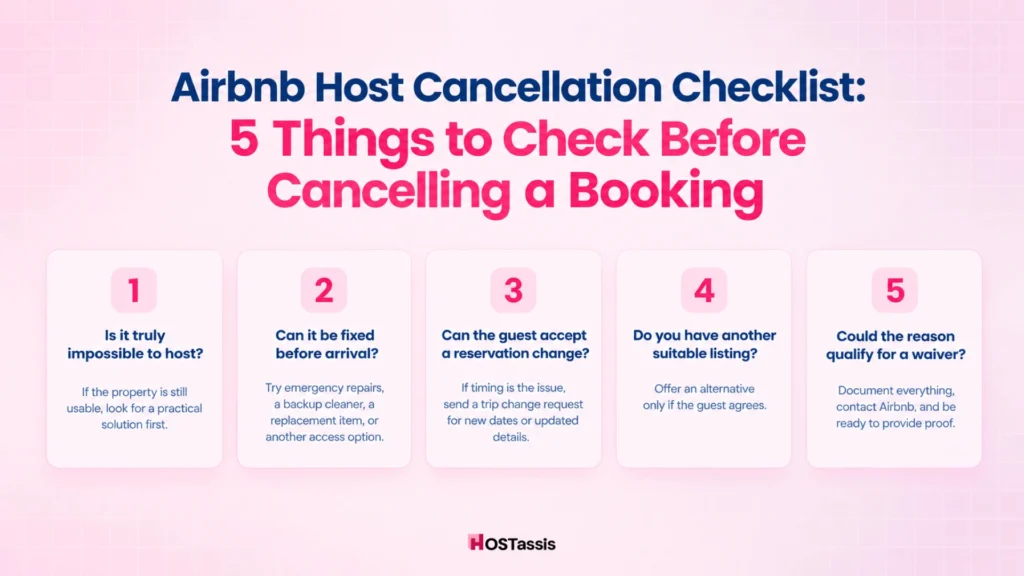
Before you cancel, spend five minutes checking whether the problem can be solved another way. A reservation change, a backup solution, or a documented valid reason may protect your payout and help you avoid Airbnb’s cancellation fees.
1. Is the Property Actually Impossible to Host?
Ask yourself whether the problem truly prevents you from staying. If the home is still usable, find an effective solution before canceling the reservation.
2. Can the Problem Be Fixed Before Arrival?
Always try to keep an emergency repair, a backup cleaner, a replacement appliance, or an alternative access method. Airbnb recognizes emergency repairs as a possible valid reason for a waiver, but only when you can prove it with evidence.
3. Can the Guest Accept a Reservation Change?
If the issue is timing, propose different dates through a trip change request. Airbnb lets hosts change dates, guest count, price, or the listing, and the guest must accept the request.
4. Do You Have Another Suitable Listing?
If you have another suitable property, offer it transparently to the guest. But never change the property without their true consent.
5. Could the Reason Qualify for a Waiver?
If yes, document first, contact Airbnb, explain the situation, and follow their procedure. Airbnb may waive fees for valid reasons beyond your control, such as emergency repairs or serious illness, but you must be ready to prove it with real evidence.
How to Prevent Airbnb Host Cancellations
Most host cancellations are operational failures, not random emergencies. Synced calendars, reliable vendors, and a clear escalation process stop small problems from becoming cancellations, lost payouts, and Airbnb penalties.
1. Keep Calendars Synced
Sync Airbnb with Vrbo, Booking.com, direct-booking software, and your personal calendar. Airbnb specifically recommends syncing your calendar to prevent double bookings and avoid cancellations that trigger fees.
2. Block Owner Dates Immediately
Block personal stays, maintenance windows, and owner visits as soon as you know about them. Waiting until a reservation appears creates avoidable conflicts.
3. Maintain a Backup Cleaner
A cleaner calling in sick should not cancel a guest’s stay. Keep at least one trained backup cleaner and share turn instructions, access details, and linen inventory.
4. Maintain Emergency Vendors
Build a contact list for a plumber, electrician, HVAC technician, and locksmith. Airbnb advises hosts to provide guests with a primary and backup emergency contact.
5. Inspect High-Risk Maintenance Items
Check hot water, HVAC, locks, and leaks before high-occupancy periods. Airbnb recommends annual servicing for water heaters and furnaces, and says hosts must address known hazards before accepting reservations.
6. Audit Availability Before Peak Events
Review pricing, minimum stays, and calendar availability before holidays, concerts, and local events. This reduces accidental underpricing and double-booking pressure.
7. Create a Cancellation Escalation SOP
Give your VA or co-host a clear path: problem → attempt recovery → manager approval → Airbnb Support. Do not let a team member cancel without approval.
Airbnb Host Cancellation FAQs
Here are more issues that you should know:
How much does Airbnb charge a host for canceling?
The current home-host fee is generally 10%, 25% or 50% depending on how close the cancellation occurs to check-in, with a minimum fee of $50.
Does Airbnb punish hosts for canceling?
Airbnb may apply a fee, withhold the booking payout, block the canceled dates and apply other consequences depending on the reason and cancellation history.
Does the guest get a full refund if the host cancels?
Yes. When the host cancels before check-in, Airbnb says the guest receives a full refund and may receive rebooking assistance.
Can a host cancel Airbnb because of a broken appliance?
It depends on severity. A minor appliance issue may not make hosting impossible, while serious damage or emergency repairs that prevent safe hosting may qualify for a waiver.
Does Airbnb block dates after a host cancels?
Airbnb may block the affected dates so the host cannot simply accept another Airbnb reservation for those dates.
Can Airbnb hosts cancel Instant Book reservations without penalty?
Sometimes, where qualifying concerns or policy conditions apply, but it is not an unlimited right to cancel Instant Book reservations.
Can a host cancel because the guest has bad reviews?
For Instant Book reservations, Airbnb lists certain guest-related concerns, including unfavorable reviews, among circumstances that may permit cancellation without consequences, subject to Airbnb’s process.
Can a host cancel because they found a higher-paying guest?
That would generally not be a qualifying reason to avoid Airbnb’s cancellation penalties, and the canceled dates may be blocked anyway.
Conclusion
Treat cancellation as your last option, not your first move. Before canceling, look for a solution to save the booking, and if your situation deserves any support, contact Airbnb.
Use this sequence every time:
Problem discovered. First ask whether the problem can be fixed. If not, ask whether you can fix it; if you cannot, see whether the reservation can be changed or whether another legitimate solution will work.
A quick repair, backup cleaner, replacement appliance, or alternate access method may be enough to keep the reservation in place.
If the issue is dates, price, guest count, or the property itself, consider requesting to move the guests. Airbnb allows either party to propose a change, but the guest must accept it before the reservation updates.