Airbnb Co-Host Permissions Explained: Full Access vs Messaging vs Calendar
Airbnb co-host permissions come in tiers that control exactly what a co-host can do on your listing, ranging from full administrative control down to simple schedule viewing. Most hosts turn on co-host access without checking what each permission level actually controls, and that gap causes two common problems: the co-host can’t do the job they were hired for, or they end up with far more control than the role needs. Airbnb runs three distinct permission levels, and picking the wrong one creates friction on both sides. Today we will talk about what each level allows, what none of them allow, and which one fits which role. Full Access gives the co-host the broadest control, including managing reservations, pricing, availability, listing details, and guest communication; Messaging Access is limited mainly to communicating with guests and handling messages, without control over important listing settings; and Calendar Access allows the co-host to view and manage availability on the calendar, but not necessarily change other listing or financial settings.
What Are the 3 Airbnb Co-Host Permission Levels?
Quick Answer : Airbnb gives co-hosts three permission tiers, each setting different limits on what they can see and manage.
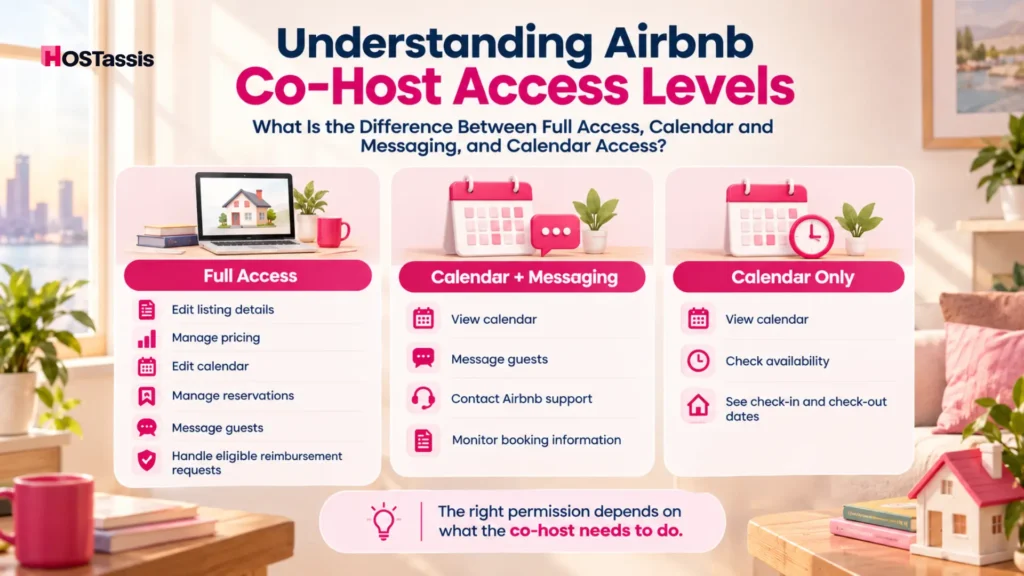
Airbnb gives hosts three permission tiers: Full Access, Calendar and Messaging Access, and Calendar Access. Each one controls a different slice of the listing, and the right choice depends entirely on what the co-host is actually responsible for doing.
- Full Access covers listing details, pricing, calendar edits, reservations, guest messaging, and select reimbursement requests
- Calendar and Messaging Access covers guest communication plus calendar viewing, with no editing
- Calendar Access covers calendar viewing only, nothing else
These aren’t job titles. They’re system permissions. What the co-host actually does day to day still needs to be agreed on separately with the host.
What Is the Difference Between Full Access, Calendar and Messaging, and Calendar Access?
Airbnb splits co-host roles into three tiers: Full Access, Calendar and Messaging, and Calendar Access.
Full Access lets a co-host manage the listing, pricing, calendar, reservations, guest messages, and certain reimbursement requests. Calendar and Messaging Access lets a co-host communicate with guests and view, but not edit, the calendar. Calendar Access is view only for the calendar and does not include guest messaging. Only the listing owner can set up or edit a co-host’s payout, regardless of which permission level is assigned.
What Are Airbnb Co-Host Permissions?
Co-host permissions decide how much a collaborator can control on a listing, covering the calendar, messages, pricing and payouts.
A permission level is not a job description. It only defines what a co-host can click, edit, or view inside the Airbnb dashboard. It says nothing about their actual duties, working hours, or scope of responsibility.
This distinction trips up a lot of hosts. Giving someone Full Access doesn’t mean they’re now responsible for pricing strategy or guest relations, it just means the system won’t block them from touching those areas. The reverse is also true: a co-host with Calendar Access might still be fully responsible for coordinating cleaning schedules offline, even though the platform itself gives them nothing beyond a calendar view.
Two things need to happen separately:
- The host sets the Airbnb permission level based on what the co-host needs system access to
- The host and co-host agree, outside the platform, on the actual scope of work, hours, and expectations
Treating permission level as the full agreement is where most co-hosting arrangements break down.
Airbnb Co-Host Permissions Comparison at a Glance
Airbnb offers three co-host permission tiers: full access, calendar and messaging, and calendar only, letting hosts hand over exactly the right amount of control, whether that means guest chats, calendar edits or pricing decisions.
Here is a clear comparison table and guide based on your notes, organized professionally in English.
Airbnb Co-Host Permission Levels
| Airbnb Task | Full Access | Calendar + Messaging | Calendar Only |
| View calendar | Yes | Yes | Yes |
| Edit calendar | Yes | No | No |
| Message guests | Yes | Yes | No |
| Change pricing | Yes | No | No |
| Edit listing details | Yes | No | No |
| Accept/decline trip requests | Yes | No | No |
| Change/cancel reservations | Yes | No | No |
| Contact Airbnb about guest or reservation issues | Yes | Yes | No |
| Resolution Center (send/request money) | Yes | No | No |
| Manage damage reimbursement requests | Yes | No | No |
| Write guest reviews | Yes | No | No |
| View own Earnings dashboard | Yes | No | No |
| Receive configured co-host payouts | Yes | Yes | Yes |
| Set co-host payout amount | No | No | No |
| Manage limited-access co-hosts | Yes | No | No |
| Set eligible primary host | Yes | No | No |
Notice that payout amounts sit outside every single permission level. That control belongs only to the listing owner, regardless of how much access a co-host has.
What Can a Full Access Airbnb Co-Host Do?
A full access Airbnb co-host can handle nearly every day to day task and listing detail for the owner, apart from viewing private tax details or changing the main payout account setup.
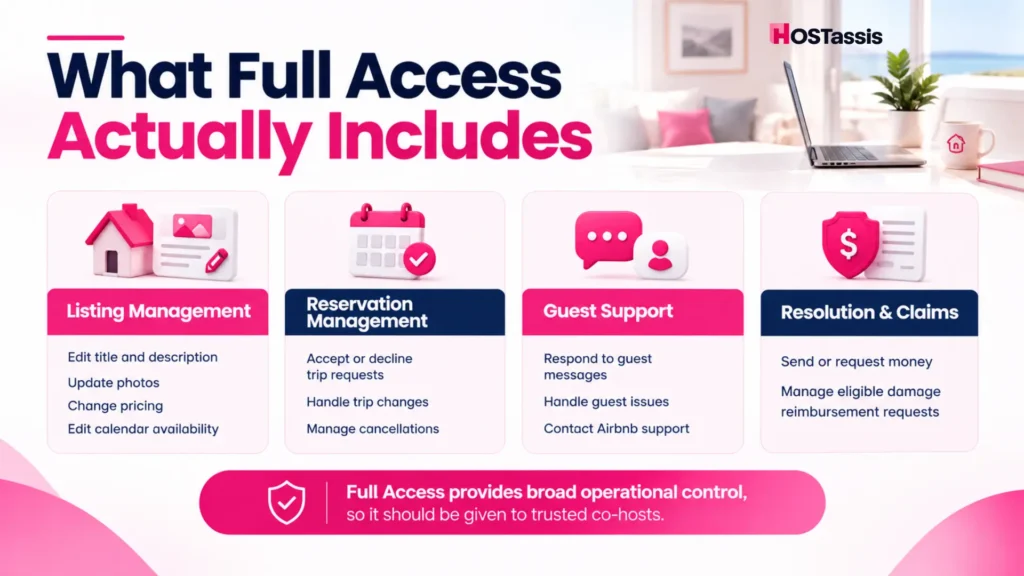
- Manage the Listing, Pricing and Calendar: A Full Access co-host can adjust price settings, set seasonal pricing and longer stay discounts, edit the title, description, and photos, and change calendar availability directly.
- Manage Reservations and Guest Communication: They can accept or decline trip requests, respond to trip change requests involving dates, guest count, or cancellations, and handle guest messages from start to finish.
- Handle Resolution Center and Damage Requests: Full Access allows sending or requesting money through the Resolution Center and managing eligible damage reimbursement claims. There is one notable exception: co-hosts of listings located in Japan cannot start, manage, or resolve damage or missing item requests in the Resolution Center, or reimbursement requests under Host damage protection, on the host’s behalf. For those listings, the host has to handle these requests directly.
- Manage Co-Hosts, Earnings Visibility and Primary Host Status: A Full Access co-host can view their own Earnings dashboard, see co-host payout settings the owner has configured, manage permissions for co-hosts with Calendar or Calendar and Messaging access, and be designated as an eligible primary host. One limit worth flagging: a Full Access co-host cannot add another Full Access co-host. Only the listing owner can grant that level.
Because this level covers so much ground, it should go to people the host trusts with real decision making power, not simply whoever needs to message guests.
What Can a Co-Host With Calendar and Messaging Access Do?
A co-host with calendar and messaging access on Airbnb can see the booking calendar and communicate directly with guests.
This is usually where hosts get tripped up. The assumption is that “messaging access” must mean some calendar control too, shifting a date here, blocking off a night there. It doesn’t work that way.
- Can message guests directly and respond to inquiries
- Can view the calendar to check dates, availability, and booking status
- Can contact Airbnb support about a guest or reservation issue
- Cannot edit the calendar, change pricing, or manage reservations
So can a Calendar and Messaging co-host actually change availability? No, not at all. Viewing and editing are two separate things on Airbnb, and this tier only covers the viewing part. If editing is needed, Full Access is the only permission level that allows it, there’s nothing in between.
This setup works well for someone whose job is purely guest facing, answering questions, sorting out check-in details, flagging anything that comes up, without giving them any say over how the listing itself runs.
What Can a Co-Host With Calendar Access Do?
A co-host with calendar access on Airbnb can see the listing’s availability, booking schedule, and check-in or checkout dates.
- Can view the calendar, including check in and check out timing
- Cannot message guests under this permission
- Cannot edit the calendar in any way
- Is not shown publicly as a co-host on the listing, since Airbnb only displays co-hosts with messaging or full access on the listing page
This level fits people who need scheduling visibility and nothing more: cleaners, maintenance coordinators, or anyone whose job depends entirely on knowing the stay dates rather than interacting with guests or the listing itself.
What Can No Airbnb Co-Host Do, Even With Full Access?
A co-host with calendar access on Airbnb can see the listing’s availability, booking schedule, and check-in or checkout dates.
- Cannot view the listing owner’s payout method
- Cannot view or change the listing owner’s taxpayer information
- Cannot view or change another co-host’s payout method or taxpayer information
- Cannot set up or edit their own co-host payout. Only the listing owner can do this
This is the clearest line between access and ownership. A Full Access co-host can run nearly every operational aspect of a listing, but the financial infrastructure behind it stays entirely with the person who owns the account.
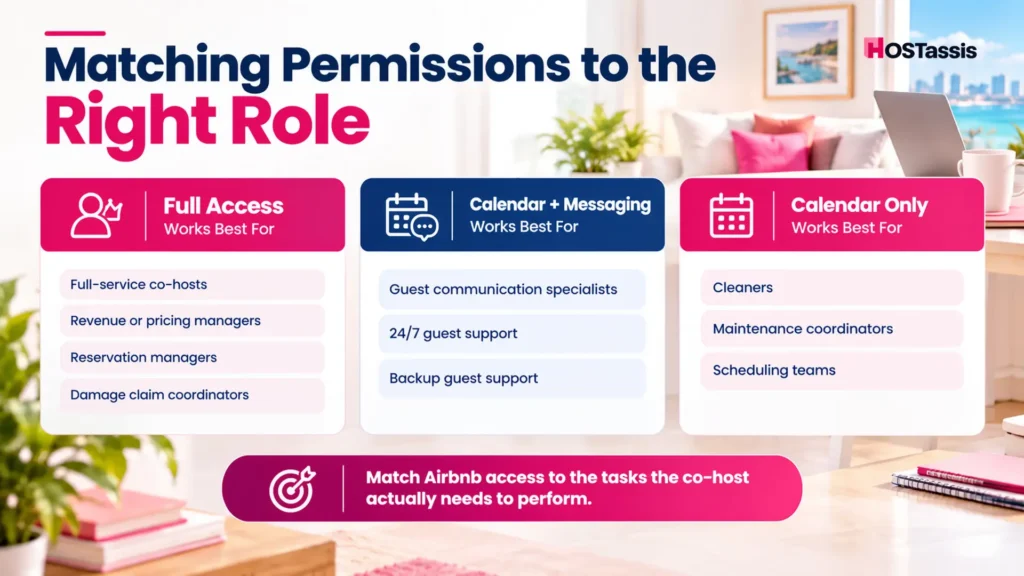
Which Airbnb Co-Host Permission Should You Choose?
The right permission level depends on the actual role, not on convenience. Matching access to responsibility avoids both underpowered co-hosts and unnecessary security exposure.
Co-Host Roles & Permission Mapping
| Co-Host Role | Likely Permission Level | Why |
| Full-service co-host | Full Access | Needs reservations, pricing, calendar, and listing control |
| 24/7 guest communication specialist | Calendar + Messaging | Needs guest conversations and booking visibility |
| Cleaner needing arrival/departure dates | Calendar Only | Doesn’t need guest or listing controls |
| Maintenance coordinator | Calendar Only | View-only access is usually sufficient |
| Revenue or pricing manager | Full Access | Airbnb has no pricing-only permission tier |
| Co-host managing damage claims | Full Access | Resolution Center access requires it |
| Backup guest support | Calendar + Messaging | Communication without broader control |
These are starting points, not rules. A host running a single listing with one trusted person might default to Full Access for simplicity. A host managing multiple properties with a larger team usually benefits from splitting access by role, reducing how much any one person can touch.
Full Access Co-Host vs Primary Host: What’s the Difference?
A primary host is simply the main owner or account holder tied to the property, whereas a full access co-host is someone trusted enough to be handed broad control over the day to day running of things.
A Full Access co-host can actually be set as the primary host too, which means guests will see them as the listing’s main point of contact. That said, neither Full Access nor Primary Host status hands over actual ownership of the listing, and it doesn’t touch the financial controls that come with owning it either. No matter who’s holding primary host status or running things with Full Access, that ownership stays exactly where it started, with the listing owner.
How to Change a Co-Host’s Permissions on Airbnb?
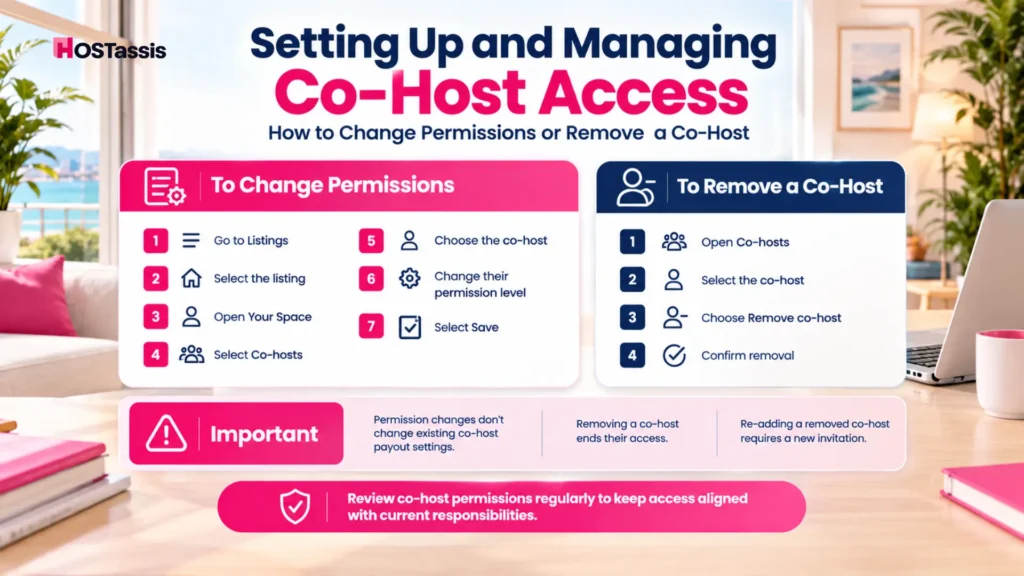
To change a co-host’s permissions on Airbnb, open your Listings tab, choose the listing you want, and adjust their access level under the Co-Hosts section. Changing permission levels is a short process inside the Airbnb dashboard.
- Go to Listings, then select the listing
- Open Your Space
- Select Co-hosts
- Choose the person whose access needs updating
- Change their permission level and select Save
Changing a co-host’s permission level does not change their existing co-host payout settings.
How to Remove a Co-Host From an Airbnb Listing?
Removing a co-host takes about the same number of steps as changing their permissions, nothing complicated about it.
- Go to Listings, then select the listing in question
- Open Your Space
- Select Co-hosts
- Choose the co-host you want to remove
- Select Remove co-host and confirm
Access disappears the moment removal is confirmed. Calendar visibility, guest messaging, editing rights, all of it ends immediately for that person. If a payout share was set up for them, that stops too going forward, though anything already paid out before the removal stays as is. Want to bring the same person back later on? There is no way to restore their old access. A fresh invitation has to be sent, same as adding anyone new.
Do Airbnb Co-Hosts Get Notifications?
Notifications come down to what permission level a co-host holds. Full Access co-hosts get notified much like the owner does, new bookings, guest messages, reservation changes, since they are the ones expected to handle these as they come in. Someone with Calendar and Messaging access gets pinged when a guest writes in, but pricing or listing update alerts never reach them, simply because that side of things sits outside what they can touch. Calendar Access sits at the lower end here, mostly limited to check-in and check-out timing rather than anything tied to messages or bookings.
There’s also a personal settings factor at play. Two co-hosts holding identical permission levels can still see different notifications depending on how they’ve set up their own app or email preferences. A host counting on quick guest responses from a co-host should check both things, the permission level itself and whether notifications are actually switched on for that person.
Airbnb Permissions vs PMS and Other STR Tools
Airbnb’s native permissions, meaning co-host roles and team access, handle the human side of tasks within Airbnb, while a Property Management System or other short-term rental tools rely on official API scopes to automate data across several booking channels.
Granting someone Full Access on Airbnb says nothing about what they can see or change in a channel manager, a dynamic pricing tool, or a smart lock app connected to the property. Each of those systems has its own permission structure, and hosts running a multi tool stack need to manage access across all of them individually, not just inside Airbnb.
5 Common Airbnb Co-Host Permission Mistakes
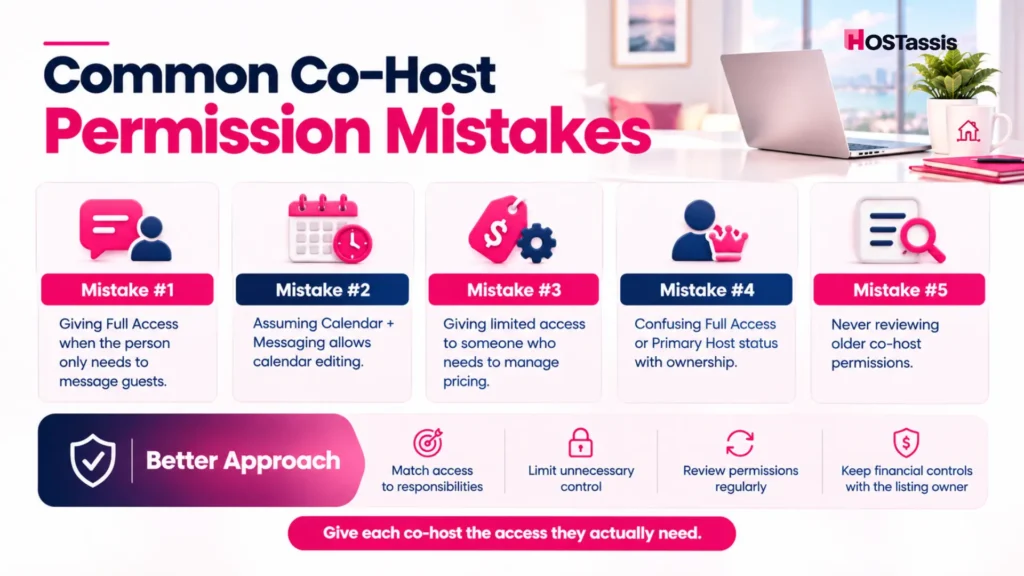
Most permission problems come from defaulting to the widest access instead of matching it to the role. A few patterns show up repeatedly.
- Giving Full Access when messaging only is needed. This hands over pricing and reservation control to someone who was only ever supposed to answer guest messages.
- Assuming Calendar and Messaging allows calendar edits. It doesn’t. Viewing and editing are two separate capabilities.
- Assigning limited access to someone handling pricing. They’ll hit a wall the moment they try to adjust a rate, since there’s no pricing only tier.
- Confusing Full Access or Primary Host with listing ownership. Neither one transfers account ownership or financial control.
- Never reviewing old co-host permissions. Co-hosts added before May 3, 2023 have full access permissions by default, so long running hosts should check whether those older grants still make sense today.
Why Choose Us for Airbnb Co-Hosting?
Setting up co-host access sounds simple until permission levels start getting mixed up, someone ends up with too much control, someone else can’t even message a guest properly, and the whole arrangement starts causing more friction than it solves. That’s usually where a bit of outside experience makes a real difference.
Our team has worked through this exact problem across dozens of listings, matching the right permission tier to the actual role instead of defaulting to whatever seems easiest at the time. A cleaner doesn’t need pricing access. A guest communication specialist doesn’t need to touch the Resolution Center. Getting that balance right from the start saves hosts from having to untangle a messy setup months down the line.
- Permission structures built around what each co-host actually does, not guesswork
- Support for hosts running single listings as well as larger multi property portfolios
- Guidance on when Full Access makes sense versus when a limited tier is safer
- Help auditing older co-host accounts, especially ones added before Airbnb’s May 2023 default changes
- A team that stays current on Airbnb’s permission updates so hosts don’t have to track every platform change themselves
Whether it’s setting up a brand new co-hosting team or fixing an access structure that’s grown messy over time, we work directly with hosts to get the permissions matching the people holding them.
Airbnb Co-Host Permissions FAQs
Can an Airbnb co-host change the price?
Yes, but only with Full Access. Limited access co-hosts cannot manage pricing.
Can an Airbnb co-host cancel a reservation?
Only a Full Access co-host can manage trip change requests, including cancellations.
Can Airbnb co-hosts see guest messages?
Full Access and Calendar and Messaging co-hosts can message guests. Calendar only co-hosts cannot, though all co-hosts can message the host or other co-hosts on the same listing.
Can an Airbnb co-host see payouts?
A Full Access co-host can view their own Earnings dashboard and see co-host payout settings the owner configured, but not the owner’s or another co-host’s payout method or tax information.
Can a co-host change their own payout percentage?
No. Only the listing owner can set up or edit a co-host payout.
Can a Full Access co-host add another co-host?
Yes, but with a limit. They can add or update co-hosts with Calendar or Calendar and Messaging access, but they cannot add another Full Access co-host.
Can a co-host become the primary host?
Yes, an eligible Full Access co-host can be designated primary host. This does not transfer listing ownership.
How many co-hosts can a listing have?
Up to 10 per listing.
Does changing a co-host’s permission affect their payout?
No. Permission changes and payout settings are managed separately.
Getting Co-Host Access Right
Permission level and job responsibility are two different decisions, and treating them as one is where most co-hosting setups go wrong. Match the access to what the role actually requires, not to whatever feels easiest to set up on day one. If you’re building out a co-hosting team and want help figuring out the right access structure for each role, our HOSTassis co-host services team works with hosts on exactly this kind of setup.