Quick Answer : Airbnb AI search for Hosts, launched in the US in its 2026 Fall Update, lets guests describe the stay they want in their own words or by voice, and type keywords into AI filters. To get found, hosts should tick every amenity that’s truly available, write specific, factual descriptions instead of vague hype, name who the place is perfect for, keep photos and room details complete, and fix anything inaccurate. Airbnb hasn’t published how AI search ranks listings, so the safest strategy is simple: make your listing the clearest, most detailed and most honest answer to the questions guests actually ask.
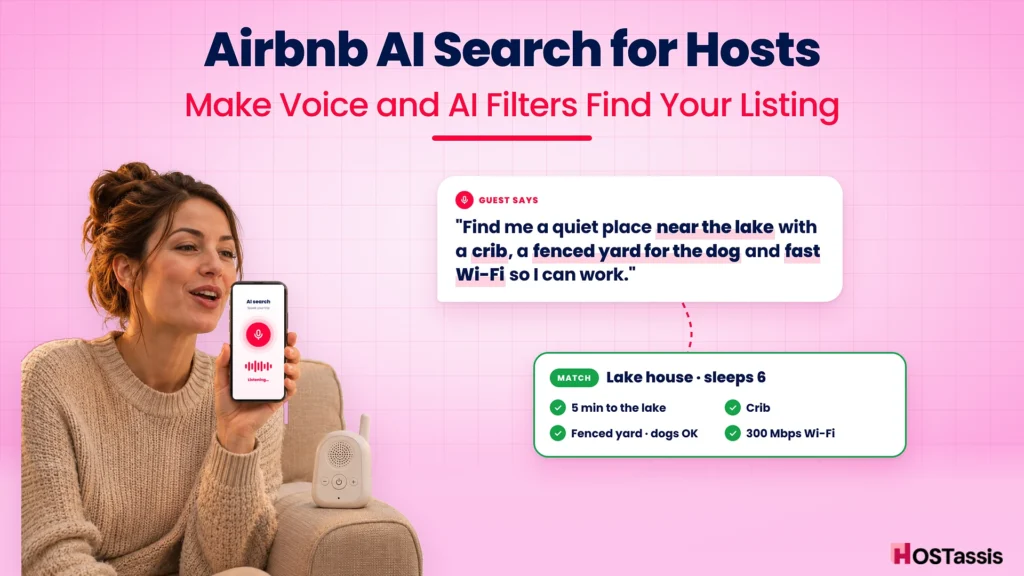
Picture a parent on the couch at 10 p.m., phone in one hand, baby monitor in the other. They don’t type “Austin 3 bedroom” anymore. They say it out loud:
“Find me a quiet place near the lake with a crib, a fenced yard for the dog and fast Wi-Fi so I can work.”
That’s the new Airbnb search bar. And here’s the uncomfortable part for hosts: if your listing has a crib in the closet but you never ticked the box, or your description says “perfect for everyone” instead of “fenced backyard, dogs welcome,” you might not show up for that guest at all.
This guide walks you through exactly what changed, what Airbnb has and hasn’t said, and how to update your listing step by step, with before-and-after examples, a voice-search section, an amenity table and a 30-minute audit you can do tonight.
What Is Airbnb AI Search?
Airbnb AI search is the new search bar that lets guests describe what they want in plain language, typed or spoken, instead of only picking a location, dates and filters. Airbnb announced it on September 30, 2026, as part of its Fall Update, starting in the US.
What Airbnb announced, in its own words
Here’s exactly what Airbnb said about the search features that affect hosts (Airbnb Newsroom):
| Feature | What Airbnb says |
|---|---|
| AI search | “Search across homes, experiences, and services using your own words or voice with our new search bar.” |
| AI filters | “You can now type keywords within filters, and instantly find the ones that best match your search. For instance, ‘baby’ will surface related filters such as cribs, playgrounds or children’s books and toys.” |
| AI listing descriptions | “Search results now include AI-powered descriptions to highlight key features of a home.” |
| AI wishlist comparison | “Compare homes from your wishlist in an all-new, side-by-side display, with AI summaries of key features.” |
| 3D floor plans | “Give guests a better understanding of the layout of a home before they book with interactive 3D floor plans.” |
We covered the rest of the update, including new host dashboards and dynamic pricing, in our post on Airbnb’s Fall Update.
Why this is a bigger deal than it looks
For years, Airbnb search worked like a set of checkboxes. Location, dates, guests, then filters. Guests did the narrowing down themselves.
AI search flips that. The guest describes the trip, and Airbnb does the narrowing. As Rental Scale-Up points out, spoken searches tend to be longer and more specific than typed ones, so “the more detail a guest gives, the more a listing has to match on Rental Scale-Up.
There’s a second shift, too. Guests may now meet your listing through an AI-written summary in the search results, and again in a side-by-side wishlist comparison, before they ever read a word you wrote. That makes the accuracy of your listing data more important than ever.
Who gets it, and when
Airbnb says AI search is starting in the US. It hasn’t published a timeline for other countries. If you host outside the US, it’s still worth preparing now: everything in this guide also helps with today’s search and with guests who read carefully.
How AI Search Reads a Guest’s Request
The easiest way to understand AI search is to break one request apart. A single spoken sentence usually contains several separate needs, and each one has to be answered somewhere in your listing.
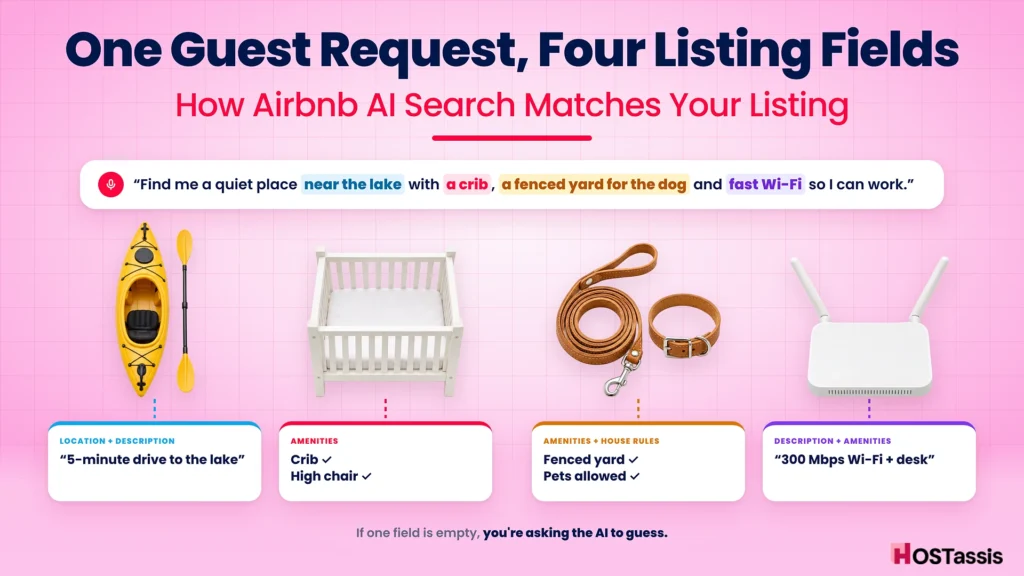
how one spoken request maps to four listing fields
If any one of those fields is empty, you’re asking the AI to guess. Maybe it does. Maybe it shows the listing next door instead.
Why vague listings lose
A listing that says “close to nature, perfect for everyone, all the comforts of home” doesn’t give AI search anything concrete to match. It doesn’t mention a lake, a crib, a dog or Wi-Fi. A guest asking for all four has no reason to see it.
Why specific listings win
Now compare a listing that says: “5-minute drive to the lake. Travel crib and high chair. Fully fenced backyard, dogs welcome. Dedicated desk and 300 Mbps Wi-Fi.” Every part of the request has a clear answer. That’s the listing you want to be.
What Airbnb Has (and Hasn’t) Said About Ranking
Let’s be honest about something most guides skip: Airbnb has not published how AI search decides which listings to show first. Anyone claiming to know the “AI search algorithm” is guessing.
What Airbnb has published is how search results work in general. Its Help Center says “the quality, popularity, price, and, for homes, location of a listing heavily influence how a listing appears in search results” (Airbnb Help).
| Factor | What Airbnb includes |
|---|---|
| Quality | Photos and videos, ratings and reviews, host–guest communication, listing characteristics, customer service and cancellation info, amenities |
| Popularity | How often guests save the listing to a wishlist, book it and message the host |
| Price | Total price compared with similar listings for the same dates |
| Location | Places guests like to stay tend to rank higher |
| Availability | More open dates make a listing more likely to match a guest’s plans |
One line in that article matters a lot for AI search. Airbnb says some guests look for specific amenities “like a crib, hot tub, step-free entrance, or a listing that allows pets,” and that adding sought-after amenities “can make the listing more attractive to guests and improve visibility in searches for listings with those amenities” (Airbnb Help).
Notice the crib. It’s the same example Airbnb used for its new AI filters.
What we can safely say
- Accurate, complete listing data helps matching. Hostaway’s advice after the update was blunt: “Complete and accurate listing data matters more than ever.
- Specific beats vague. “A vague paragraph saying a property has ‘everything you need for the perfect stay’ tells an AI, and a guest, very little.
- The old ranking factors still apply. Reviews, response speed, price and availability didn’t stop mattering. If you want the full picture, read our breakdown of how the Airbnb search algorithm works.
What we can’t say (yet)
- Whether AI search reads your photos, your reviews, or only your text and amenity fields.
- Where the AI listing summaries come from, or whether hosts can edit them.
- Whether AI search changes the order of results, or only which listings match.
We’ll update this guide when Airbnb shares more. Until then, every step below is based on what Airbnb has actually said, plus plain common sense: make your listing easy to understand, for people and machines.
How to Update Your Airbnb Listing for AI Search: Step by Step
You don’t need to rewrite your whole listing tonight. Work through these steps in order. The first two usually make the biggest difference.
Step 1: Tick every amenity you really have
This is the most important step, and the one hosts skip most often. Open your listing, go to amenities and go through every category slowly. Crib, high chair, dedicated workspace, EV charger, free parking on premises, fenced yard, step-free entrance, hot tub, beach essentials, coffee maker, outdoor dining area.
If it’s there and guests can use it, tick it. If it isn’t, don’t. A ticked amenity that doesn’t exist is a fast route to a bad review.
Not sure what’s worth adding? Our guide to amenities that increase bookings covers the ones guests search for most.
Step 2: Rewrite your description in specifics
AI search is matching what a guest asks for against what your listing says. So say it plainly. Replace adjectives with facts:
- Not “spacious” but “1,800 sq ft with 3 bedrooms and 2 full bathrooms.”
- Not “close to everything” but “8-minute walk to Main Street cafes and 2 miles to the lake.”
- Not “great for families” but “crib, high chair, baby gate on the stairs and a fenced backyard.”
- Not “fast Wi-Fi” but “300 Mbps fiber Wi-Fi and a desk with a second monitor.”
Keep your first two or three sentences for the things that make your place different. If Airbnb’s AI picks out “key features” for its summary, you want those features to be clear and early.
Step 3: Name who your place is perfect for
Guests increasingly search by trip type: a work trip, a family reunion, a dog-friendly weekend, a ski trip. Say who your home suits, and why, in your description.
“Best for: families with young kids, remote workers, and groups of up to 6 friends. Not ideal for: large parties or guests who need step-free access.”
The “not ideal for” line feels risky, but it saves you from the wrong bookings and the reviews that come with them.
Step 4: Fill in the space and room details
Every bedroom, bed type, bathroom and shared space you describe in Airbnb’s room-by-room details gives guests (and Airbnb’s systems) something concrete to work with. If you have a LiDAR-equipped iPhone Pro or iPad, consider adding a 3D floor plan as well, so guests can see the layout before they book.
Step 5: Caption your photos
Captions turn a picture into words. “Kitchen” is a wasted caption. “Full kitchen with dishwasher, espresso machine and seating for 6” tells a guest exactly what they’re looking at. Make sure every amenity you’ve ticked appears in at least one photo.
Step 6: Write clear house rules and access details
Pets, quiet hours, parking, stairs, check-in method. These are exactly the things guests ask about in natural-language searches (“dog-friendly, self check-in, no stairs”). Put them in your listing details and your house rules, and if you offer keyless entry, see our self check-in guide to describe it properly.
Step 7: Update your title last
With the description sorted, write a title that leads with your strongest, most searchable feature. “Lake House with Hot Tub, Fenced Yard & Fast Wi-Fi” says far more than “Cozy Getaway Retreat.” Keep it readable. A title stuffed with keywords looks spammy to guests, and Airbnb has never said keyword-stuffing helps.
Before and After: Listing Copy Examples
It’s easier to see than to explain. Here are three common listing sections, rewritten for AI search.
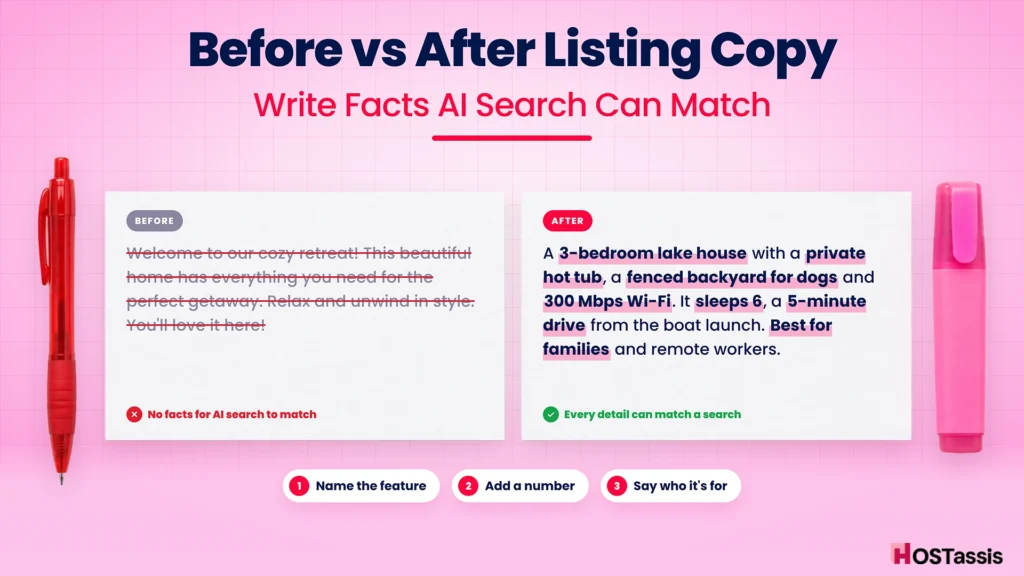
Example 1: The opening of your description
Before
Welcome to our cozy retreat! This beautiful home has everything you need for the perfect getaway. Relax and unwind in style. You’ll love it here!
After
A 3-bedroom lake house with a private hot tub, a fenced backyard for dogs and 300 Mbps Wi-Fi. It sleeps 6 (one king, one queen, two twins) and sits a 5-minute drive from the public boat launch. Best for families, remote workers and dog owners.
The “before” version has no facts in it at all. Nothing in it could match a guest’s search for a hot tub, dogs, Wi-Fi or a lake.
Example 2: The “family-friendly” claim
Before
Perfect for families!
After
Set up for little ones: travel crib and high chair, baby gate at the top of the stairs, outlet covers, a box of kids’ books and board games, and a playground 3 blocks away.
Remember Airbnb’s own example: a guest typing “baby” into AI filters sees cribs, playgrounds and children’s books and toys (Airbnb Newsroom). The “after” version names all three.
Example 3: The workspace
Before
Great for working from home.
After
Dedicated office with a desk, ergonomic chair, 27-inch monitor (USB-C) and a door that closes. Fiber Wi-Fi tested at 300 Mbps download.
The pattern behind all three
Every “after” example does the same three things:
- It names the feature in the words a guest would use.
- It adds a number or detail that proves it (300 Mbps, sleeps 6, 3 blocks away).
- It says who it’s for, so the right guest recognizes themselves.
If you’re not sure where to start, re-read your last 10 guest messages. The questions guests ask you before booking are the questions your listing should already answer.
Writing for Voice Search and Natural-Language Queries
Voice search changes how people ask. Typed searches are short. Spoken ones sound like a conversation.
| Typed search (old way) | Spoken search (new way) |
|---|---|
| “Asheville cabin” | “A cabin near Asheville with a hot tub and mountain views for a couples weekend” |
| “Orlando pool home” | “A house near Disney with a private pool that sleeps 10 and has a crib” |
| “Denver apartment” | “Somewhere quiet in Denver with a desk and parking for a week-long work trip” |
You can’t predict every sentence a guest will say. But you can make sure your listing contains the building blocks they use.
The five building blocks guests mention
- Who’s coming: couples, families, kids, babies, dogs, a group of friends, a work team.
- What they want to do: work, ski, hike, swim, celebrate, rest.
- What must be there: hot tub, pool, crib, parking, EV charger, workspace, fireplace.
- What it’s near: a lake, downtown, the beach, a stadium, a hospital, the airport.
- What it feels like: quiet, private, walkable, mountain views, kid-proofed.
Go through your description and check that each block is covered in plain words. If a guest would say it, it should be in your listing.
Use “near” with real distances
Natural-language searches often include a place: “near the convention center”, “close to the lake”. Give real distances and travel modes for the 3–5 places your guests care about most, such as “12-minute walk to the convention center” or “2 miles to Lake Travis.” Vague phrases like “minutes from everything” don’t match anything.
Don’t write for robots
It’s tempting to stuff your listing with every phrase you think AI might want. Resist that. Airbnb hasn’t said keyword stuffing helps, and guests still read the listing before booking. Hostaway’s reminder is worth repeating: “More information isn’t automatically better. More useful information is Hostaway.
AI Filters: Which Amenity Fields to Fill In
AI filters let guests type a word and see related filters. Airbnb’s example: “baby” surfaces cribs, playgrounds and children’s books and toys. Rental Scale-Up reads this as filters drawing on the amenities hosts tick. Airbnb hasn’t confirmed the exact mechanics, but the takeaway is clear: if you don’t tick it, you’re relying on luck.
Here’s a planning table of common guest keywords and the amenity fields worth checking. Field names in your Airbnb dashboard may differ slightly.
| What a guest might type | Amenities and details to check |
|---|---|
| baby, toddler, kids | Crib, high chair, children’s books and toys, baby safety gates, outlet covers, playground nearby |
| dog, pet | Pets allowed, fenced yard, pet bowls, nearby dog park (in description) |
| work, remote, laptop | Dedicated workspace, Wi-Fi speed, monitor, quiet hours |
| parking, car, EV | Free parking on premises, street parking, EV charger, garage |
| accessible, wheelchair, no stairs | Step-free entrance, step-free path to bedroom and bathroom, wide doorways, accessible-height bed |
| hot tub, pool | Hot tub, private or shared pool, pool heating and season (in description) |
| beach, lake | Waterfront, beach access, beach essentials, kayaks, distance to water |
| ski, mountain | Ski-in/ski-out, distance to lifts, gear storage, fireplace, heating |
| cooking, kitchen | Full kitchen, oven, dishwasher, coffee maker, cooking basics, BBQ grill |
| long stay, month | Washer and dryer, long-term stays allowed, workspace, monthly discount |
| quiet, private | Private entrance, no shared spaces, quiet hours (in house rules) |
| party, celebration | Group size limits and party rules (be clear if events aren’t allowed) |
Two extra tips:
- Accessibility details deserve extra care. Only list features you can stand behind, and add photos. A guest who relies on a step-free entrance will notice immediately if it’s wrong.
- Stock what you claim. If “cooking basics” is ticked, check the oil, salt and pepper are really there. Our cupboard checklist is a handy reference.
AI-Generated Listing Descriptions: How to Influence What Guests See
This is the change hosts talk about least, and it may matter most. Airbnb says search results “now include AI-powered descriptions to highlight key features of a home” (Airbnb Newsroom). The same goes for the new wishlist comparison, which shows “AI summaries of key features” side by side.
In other words, some guests will see Airbnb’s short summary of your home before they see your own words.
What we know
- The summaries highlight “key features”.
- They appear in search results and in wishlist comparisons.
- They’re written by Airbnb, not by you.
What we don’t know
Airbnb hasn’t said which parts of your listing the summaries are built from, whether hosts can see or edit them, or whether they draw on reviews. Treat any guide that claims to know as speculation.
How to influence them anyway
You can’t write the summary, but you control what it has to work with:
- Lead with your best features. Put your 3–5 strongest, most specific selling points near the start of your description.
- Be consistent. If your title, description, amenities and photos all say “hot tub,” there’s little room for a summary to miss it.
- Remove outdated details. If the pool is closed for winter or the fire pit is gone, update every mention. You don’t want an AI summary to promise something you removed.
- Check how your listing appears. Search for your own area like a guest, find your listing, and read the summary if one appears. If it highlights the wrong things, adjust your listing so your best features are clearer.
- Earn the reviews that back it up. Whether or not summaries use reviews, guests do. Reviews that mention the same features you lead with build trust, and they help with badges like Guest Favorite.
7 Mistakes That Can Hide Your Listing From AI Search
These are the slip-ups that make a perfectly good home hard to match.
1. Leaving amenities unticked. The crib is in the closet, but the box isn’t checked. It’s the most common gap, and the easiest to fix.
2. Writing in adjectives. “Charming,” “stunning,” “cozy” and “amazing” describe a feeling, not a feature. They don’t match a search for a hot tub or a workspace.
3. Burying the best feature. If your private dock is mentioned in paragraph five, it’s not doing much work. Move it to the first sentence.
4. Contradicting yourself. The title says “sleeps 8,” the details say 6. The description says “pets welcome,” the house rules say no pets. Mixed signals confuse guests and machines alike.
5. Claiming what you don’t have. Ticking “pool” for a community pool that’s closed half the year, or “workspace” for a kitchen stool, leads to disappointed guests and lower ratings.
6. Keyword stuffing. “Lake House Lake View Lakefront Lake Getaway Lake Retreat” reads like spam. Write for a person, and include each important detail once or twice, clearly.
7. Setting it and forgetting it. Seasons change, appliances break, you add a hot tub. If your listing doesn’t keep up, neither will the matches. Review it every few months, and every time something at the property changes.
If you’ve fixed all of these and bookings are still slow, the problem may be price, photos or reviews rather than search. Our checklist on what to do when bookings are slowing down covers the other levers, including dynamic pricing and your cleaning fee.
Your 30-Minute AI Search Listing Audit
Set a timer and work through this list for each listing. Tick each item as you go.
Amenities (10 minutes)
- Every amenity category reviewed, top to bottom
- Family items ticked if available (crib, high chair, gates, toys)
- Work items ticked (dedicated workspace, Wi-Fi) and Wi-Fi speed added to the description
- Parking type and EV charging marked correctly
- Accessibility features accurate and photographed
- Nothing ticked that isn’t really there
Description (10 minutes)
- First 2–3 sentences name the top features with specifics
- A “best for” line (and “not ideal for” if needed)
- Real distances to 3–5 key places
- Bed setup and guest count match the listing details
- No outdated or seasonal claims
Photos and details (5 minutes)
- Every photo captioned with what it shows
- Each ticked amenity visible in at least one photo
- Room-by-room details complete; 3D floor plan considered if you have a LiDAR device
Rules and final check (5 minutes)
- Pets, parties, quiet hours and check-in method clear
- Title leads with the strongest searchable feature
- Searched your area as a guest and checked how your listing appears
If you manage several listings, run the audit on your lowest-performing one first. That’s usually where the biggest gaps hide.
Frequently Asked Questions
How does Airbnb’s AI search work?
Guests describe the stay they want in their own words or by voice, and Airbnb shows matching homes, experiences and services. Airbnb launched it in the US in its 2026 Fall Update. It hasn’t published the technical details of how listings are matched or ranked.
Does AI search change Airbnb SEO?
It shifts the focus toward specific, accurate listing details, because guests now describe exactly what they want. The basics Airbnb lists in its Help Center, such as quality, reviews, price, location and availability, still apply.
What should hosts write in their listings now?
Specific facts guests would ask about: amenities, bed setup, Wi-Fi speed, parking, distances to key places, who the home suits and any limits. Lead with your strongest features and avoid vague adjectives.
Do Airbnb AI filters use my amenities?
Airbnb says guests can type keywords into filters, such as “baby” to surface cribs, playgrounds and children’s books and toys. Analysts expect filters to draw on the amenities hosts select. Either way, ticking every real amenity is the safest move.
Can I edit the AI-generated description Airbnb shows in search?
Airbnb hasn’t said hosts can edit those summaries. You can influence them by keeping your listing accurate, consistent and clear about its key features.
Is AI search available outside the US?
Airbnb says it’s starting in the US and hasn’t announced dates for other countries. Updating your listing now still helps with today’s search and with guests who read carefully.
Should I use ChatGPT to rewrite my Airbnb listing?
It can help with a first draft, but check every fact. AI writing tools tend to add the same vague adjectives that AI search can’t do much with. The details that win matches come from you.
Conclusion
Airbnb’s AI search doesn’t reward clever wording. It rewards clear, complete, honest listings. Guests now say exactly what they want, and your job is to make sure your listing says exactly what you offer, with the amenities ticked, the facts written down and the best features up front.
The hosts who do well with this change won’t be the ones chasing secret tricks. They’ll be the ones who spent 30 minutes tonight checking boxes, replacing “cozy” with “300 Mbps Wi-Fi and a fenced yard,” and keeping it updated every season.
If you’d rather not do it alone, listing optimization is part of what a good team handles, as we explain in how a co-host can boost your listing performance. Our Airbnb virtual assistant team can audit your listings, rewrite descriptions and keep amenities and details up to date as Airbnb’s AI tools roll out.
Want your listing ready for AI search? Book a free listing review and we’ll show you exactly what to fix first.