Three Hours Is a Long Time
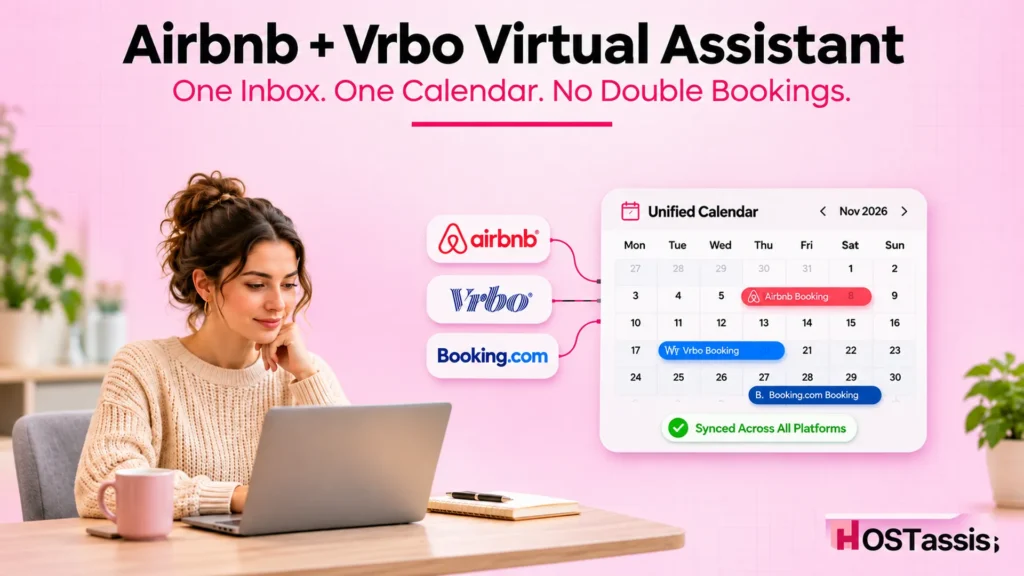
Airbnb refreshes an imported calendar automatically every 3 hours (Airbnb Help). That’s eight refreshes a day. In between, a guest on Vrbo can book Saturday night, and for a while Airbnb has no idea. If someone books the same Saturday on Airbnb in that gap, you’ve got two families with one key.
Most hosts find out about this the hard way. The listing goes up on a second platform “for more exposure,” bookings go up, and then one Friday evening there’s a message from a guest who’s already on the highway, and a second confirmation for the same dates sitting in the other inbox.
Adding Vrbo or Booking.com is still one of the smartest moves a host can make. It just turns the job into air traffic control. That’s where a virtual assistant who knows all three platforms earns their keep.
Quick answer: yes, one virtual assistant can run Airbnb and Vrbo (and usually Booking.com) together, as long as two things are in place. First, a single source of truth for availability, ideally a channel manager or PMS rather than iCal links alone, because iCal only refreshes every few hours. Second, a daily routine: one unified inbox, calendar checks at set times, and a written plan for the first hour after a double booking. Each platform also gives assistants access differently, so set that up properly before day one.
This guide is the operating manual: how the platforms differ, where double bookings come from, how to give a VA safe access on each one, the daily checklist we use, and exactly what to do when two bookings land on the same night. If you only list on Airbnb today and you’re wondering whether to add more channels, read Airbnb direct bookings vs Airbnb too.
Why Two Platforms Feel Like Three Times the Work
You’d think adding Vrbo to Airbnb doubles the work. In practice it often feels like more, because the platforms don’t just add messages. They add different rules, different screens and different guest habits, and your assistant has to switch between them dozens of times a day.
| Airbnb | Vrbo | Booking.com | |
|---|---|---|---|
| Typical guest | Couples, friends, small families, often comparing several listings | Larger families and groups, often booking whole homes further ahead | Travelers used to hotels, often booking instantly and messaging afterward |
| Where messages live | Airbnb inbox | Vrbo owner dashboard | Extranet inbox (“Booking.com messages”) |
| How you add a helper | Co-host with three permission levels | No Airbnb-style co-host levels; extra logins are added as property managers | Extra users with specific permissions per property |
| What the VA must watch | Response rate, booking requests, reviews | Inquiries and quotes, booking requests | Arrival questions, card and payment issues, change requests |
Treat the guest-type row as a tendency, not a rule. The point is that the same message (“Can we check in early?”) may need a different tone on each platform, and your assistant needs to know which inbox a question came from before they answer it.
The real cost: context switching
Without a unified inbox, a VA spends a surprising share of their shift logging in, refreshing, and checking whether a question in one place was already answered in another. Every switch is a chance to miss something. That’s why the tools matter more on multi-channel listings than on Airbnb-only ones.
What doesn’t change
Your property, your house rules and your standards. Write them once in a house manual and use it everywhere. A guest from Vrbo should get the same check-in instructions, the same Wi-Fi password and the same answer about pets as a guest from Airbnb. If your listings disagree with each other, fix that before you hire anyone. Our Airbnb SOP guide shows how to write it down.
Where Double Bookings Actually Come From
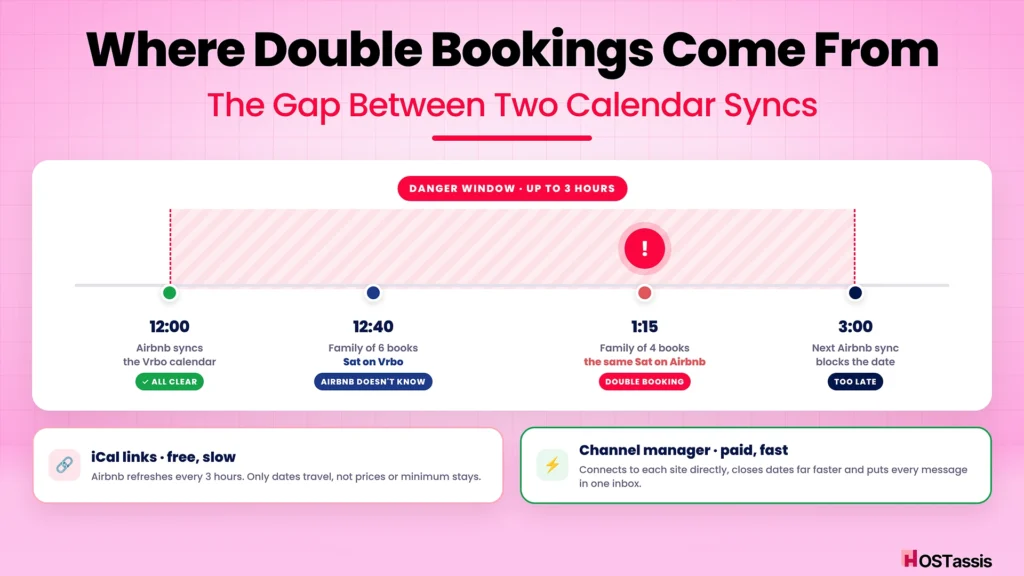
Most double bookings aren’t anyone’s fault in the moment. They come from the gap between when a booking happens on one site and when the other site finds out. The size of that gap depends on how your calendars are connected.
Option 1: iCal links (free, slow)
iCal is the free “copy this link, paste it there” method every platform supports. Airbnb’s rules for it are worth knowing in detail (Airbnb Help):
- Airbnb refreshes imported calendars automatically every 3 hours. There’s a manual refresh button, but Airbnb limits how often it can pull updates.
- Booked and blocked nights come across. Nights booked elsewhere are blocked on Airbnb automatically.
- Blocks made on the other site may or may not block Airbnb, because prep time and advance-notice settings can differ between platforms.
- Airbnb imports up to 2 years of data, and you can’t pause an imported calendar. To stop it, you disconnect it.
Vrbo’s side has its own delay. One PMS company’s guide describes Vrbo’s iCal updates as taking anywhere from 15 minutes to several hours. Put the two together and a popular weekend can sit open on two sites for hours at a time.
iCal also only carries dates. Prices, minimum stays and discounts don’t travel with it, so your assistant has to update those on each site by hand.
Option 2: a channel manager or PMS (paid, fast)
A channel manager connects to the booking sites directly instead of through iCal links, so a booking on one site closes the dates on the others far faster. Tools like Guesty also pull every guest message into one inbox and push rates from one place, which is exactly what a multi-channel VA needs. Pair it with a pricing tool like PriceLabs and rates stay consistent across sites too.
Which one do you need?
| Situation | iCal is probably fine | Get a channel manager |
|---|---|---|
| Listings | 1 listing | 2 or more |
| Platforms | Airbnb plus one other | Three or more, or a direct-booking site |
| Booking pattern | Bookings made weeks ahead | Lots of last-minute and same-day bookings |
| Who manages it | You check calendars daily | A VA or team works across platforms |
If you stay on iCal for now, your assistant becomes the safety net. The checklist further down is built for exactly that.
One more source of double bookings: your own listings
If you list a private room and the whole home separately in the same house, they can double-book each other even on a single platform. Airbnb lets you link their calendars, but only for listings with the same primary host, and co-hosts can’t do the linking (Airbnb Help). More on this in our guide to Airbnb calendar management and avoiding double bookings.
Giving Your VA Access Without Handing Over the Keys
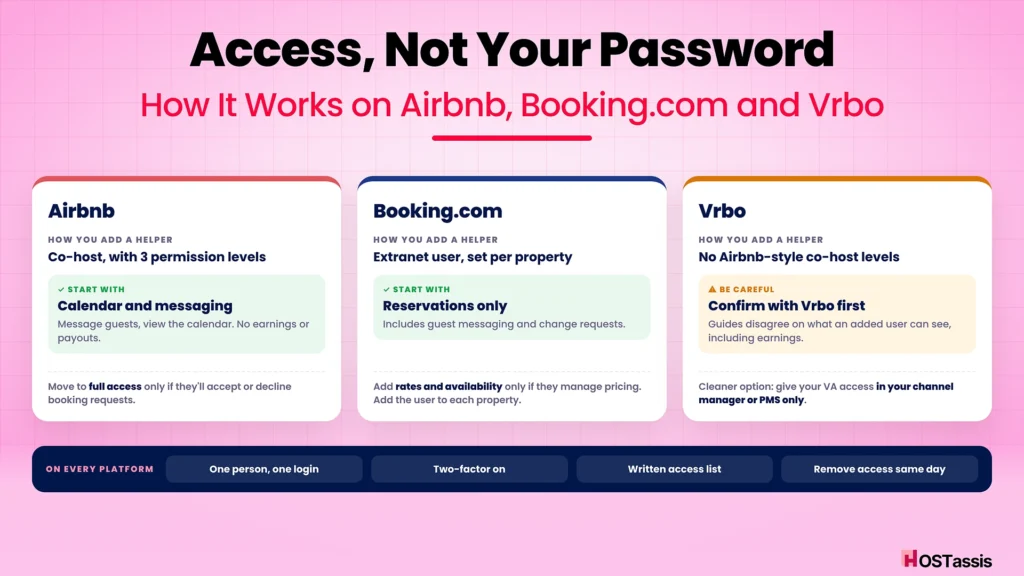
Each platform handles team access differently, and the differences matter. The rule that works across all three: your VA gets their own login, with the least access that lets them do the job, and you never share your own password.
Airbnb: co-host permissions
Airbnb is the most flexible. You add your assistant as a co-host and choose a level. Calendar and messaging access lets them message guests and view the calendar, without seeing your earnings or payouts. Full access adds pricing, listing edits, accepting and declining bookings, and the earnings dashboard (Airbnb Help). Start with calendar and messaging; move up only if they’ll be handling booking requests. Our co-host permissions guide shows each level in detail.
Booking.com: extranet users
Booking.com lets the primary or admin account create extra users, and each user can be given specific permissions (Booking.com Partner Help). The permission areas include reservations (with change requests, charges and guest messaging), rates and availability, property details and finance. For a messaging VA, reservations is usually enough; add rates and availability only if they manage pricing. If you run several properties, you add the user to each one.
Vrbo: be careful here
Vrbo doesn’t have Airbnb-style co-host levels. PMS guides describe two routes: adding someone as a property manager through the owner dashboard, where every added manager gets the same access, or contacting Vrbo support. Guides disagree on what an added user can see, including earnings. Before you add anyone, confirm with Vrbo support exactly what that login will be able to do. If you use a channel manager, the cleaner option is often to give your VA access in the PMS only, so they never need a Vrbo login at all.
Four habits for every platform
- One person, one login. Shared logins make it impossible to know who did what.
- Two-factor authentication on every account. Booking.com, for example, can ask for a PIN by app or text, so decide in advance whose phone receives it.
- A written list of who has access to what, updated when anyone joins or leaves.
- Remove access the same day someone leaves. On Airbnb, that’s removing the co-host; on Booking.com, deleting the user.
The Daily Multi-Channel Checklist
This is the routine we give assistants who cover more than one platform. It’s built for the iCal setup, where the VA is the safety net. With a channel manager, some steps take seconds, but don’t skip them; sync tools fail quietly too.
Start of shift (first 30 minutes)
- Open every inbox: Airbnb, Vrbo, Booking.com (or the PMS unified inbox). Answer anything urgent first: arrivals today, problems in-stay.
- Compare the next 14 days across all calendars. Every booked night on one site should be blocked on the others.
- Hit refresh on Airbnb’s imported calendars if anything looks off.
- Check today’s and tomorrow’s check-ins: codes sent, cleaner confirmed, no same-day bookings still unconfirmed.
- Look for new booking requests or inquiries waiting on a decision. On Airbnb, anything unanswered close to 24 hours goes to the top (Airbnb Help).
Every time a booking comes in
- Confirm the dates are now closed on every other platform. Don’t wait for the next sync.
- If you’re on iCal, block the dates by hand on the other sites as a belt-and-braces step, and note it so it can be removed if the guest cancels.
- Tell the cleaner. Update the turnover schedule.
- Send the platform’s welcome message, or check the scheduled one fired.
Middle of shift
- Inbox sweep on every platform. Reply, or log why something’s waiting for the owner.
- Check that prices and minimum stays match across sites for the next 30 days. If you use PriceLabs, confirm it’s pushing to every channel.
End of shift handover
- Second calendar comparison, next 14 days.
- Note any open threads, with platform and guest name, for the next shift.
- Flag anything that needs the owner’s decision tomorrow.
Once a week
- Compare calendars for the next 90 days.
- Remove any manual blocks that are no longer needed (cancelled bookings leave ghosts).
- Check reviews on every platform and draft replies for approval.
- Send the owner a short report: bookings by platform, issues, reviews, anything that cost money.
It looks like a lot. Once it’s routine, the calendar comparison takes a few minutes a day, and it’s the cheapest insurance you’ll ever buy. For the wider set of tasks an Airbnb VA usually handles, see Airbnb automation: 15 tasks every host should automate.
It Happened Anyway: The First Hour After a Double Booking
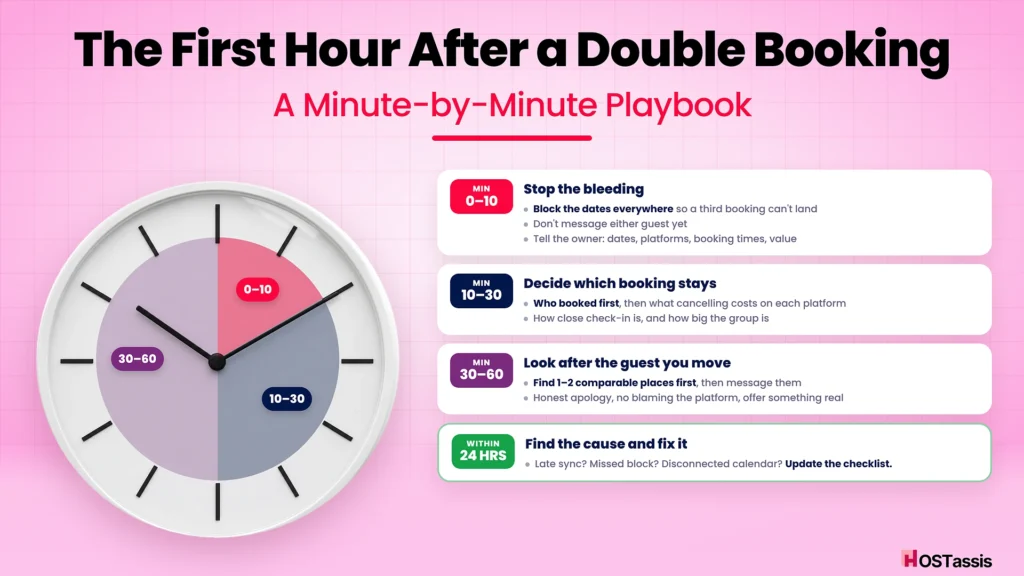
Even with good habits, it can happen. What separates a bad week from a disaster is the first hour. Here’s the playbook we hand every assistant, in order.
Minutes 0 to 10: stop the bleeding
- Block the dates everywhere else, now. Make sure a third booking can’t land on the same night.
- Don’t message either guest yet. A rushed “sorry, we’ve double-booked” message is how you end up with two angry guests instead of one.
- Tell the owner. One short message: which dates, which platforms, when each booking was made, and the value of each.
Minutes 10 to 30: decide which booking stays
The owner makes the call, but the VA should arrive with a recommendation. The factors, roughly in this order:
- Who booked first. Honoring the earlier booking is the easiest position to defend.
- What cancelling costs on each platform. Host cancellations can bring fees, calendar blocks and effects on your status, and the rules aren’t the same on every site. Check each platform’s host cancellation policy before choosing. For Airbnb, see Airbnb host cancellation penalties.
- How close the check-in is. A guest arriving tomorrow has far fewer options than one arriving in two months.
- Group size and needs. A family of eight is much harder to rehouse than a couple.
Minutes 30 to 60: look after the guest you’re moving
- Find them a comparable place first. Before you contact the guest, have one or two real alternatives nearby, ideally at the same price or better.
- Call the platform’s support if your policy needs them involved in the cancellation, and ask what can be done to soften the impact for the guest.
- Message the guest with an honest explanation, a sincere apology and the alternatives. Keep it short and specific. Don’t blame the platform or the software.
- Offer something real if the owner agrees: covering a price difference, or a discount on a future stay.
Within 24 hours: find the cause
- Which sync was late, or which manual block was missed?
- Was a calendar disconnected, or a listing duplicated?
- What change to the checklist stops it happening again?
Write the answer down. Double bookings are rarely random; they usually point to one weak link that can be fixed.
A message template for the guest you’re moving
Hi [Name], I’m really sorry to send this. Because of a calendar error on our side, your dates at [property] were booked twice, and we’re not able to host you as planned. I know this is frustrating, especially [this close to your trip]. I’ve found two nearby homes that match what you booked: [option 1] and [option 2]. [We’ll cover the difference in price / offer.] If neither works, we’ll make sure your refund is processed straight away. Again, I’m sorry, and I’m here to help you get rebooked today.
If the stay does go ahead with a guest who isn’t happy about the shuffle, the next risk is a harsh review. Our guide to Airbnb review removal explains which reviews Airbnb will take down and which it won’t.
Hiring a VA Who Can Handle More Than Airbnb
Plenty of assistants list “Airbnb, Vrbo, Booking.com” on their profile. Far fewer have actually worked all three at once. A short, practical test tells you more than any CV.
Five skills to test before you hire
| Skill | How to test it | What a good answer shows |
|---|---|---|
| Platform knowledge | “Where do Booking.com guest messages live, and how do you add a user there?” | They name the extranet inbox and explain user permissions without guessing |
| Calendar sense | Show two calendar screenshots with one night booked on Vrbo and still open on Airbnb | They spot it in seconds and say they’d block it immediately |
| Judgment under pressure | “Two bookings for the same Saturday, check-in is in 3 days. What do you do first?” | They block other dates and tell you before messaging any guest |
| Writing | Answer a Vrbo inquiry from a family of eight asking about parking for two cars | Clear, warm, correct, and in your house style |
| Organization | “How would you hand over to the next shift?” | A written note with open threads by platform |
If you’d rather not run this yourself, ask any agency how they test for it. A good one will describe a similar process without being prompted.
How many hours does a multi-channel listing need?
In our breakdown of Airbnb virtual assistant costs, a single listing usually needs about 5 to 8 hours of VA time a week for messaging, bookings and cleaner coordination. Each extra platform adds inbox time and calendar checks, so budget toward the top of that range, or above it, if you’re on three sites with iCal sync. A channel manager brings the hours back down.
What it costs
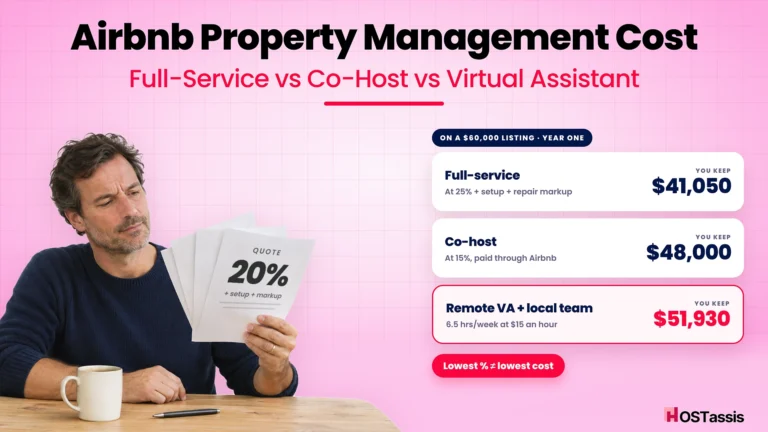
On the same breakdown, offshore freelancers you hire yourself typically charge around $5 to $15 an hour, managed agencies around $10 to $25, and US-based assistants $20 to $35 or more. At about $15 an hour and 8 hours a week, that’s roughly $520 a month for a multi-channel listing. Compare that with a percentage-based manager in our guide to Airbnb property management costs.
Freelancer or team?
A single freelancer can be great until they’re sick, on holiday or asleep. Multi-channel listings are less forgiving of gaps, because a missed booking on one site can turn into a double booking on another. If your calendar is busy, a small team with shift cover is usually safer. That’s how our Airbnb virtual assistant service is set up.
FAQ Hosts Ask Us About Multi-Channel VAs
Can one virtual assistant manage Airbnb and Vrbo?
Yes. One assistant can run both, and usually Booking.com too, if they work from a unified inbox or a fixed routine of inbox sweeps, compare calendars at set times, and have the right access on each platform. The workload grows with each platform, so plan more hours than for Airbnb alone.
How do I prevent double bookings between Airbnb and Vrbo?
Use one source of truth for availability. A channel manager connects the platforms directly and closes dates much faster than iCal. If you use iCal links, remember Airbnb refreshes imported calendars every 3 hours, so have someone check calendars daily and block dates by hand right after each booking.
How often does Airbnb sync with other calendars?
Airbnb automatically updates imported calendars every 3 hours. You can refresh manually, but Airbnb limits how often it pulls updates. Only booked and blocked dates come across; prices and minimum stays don’t.
Does Vrbo have co-hosts like Airbnb?
Not in the same way. Vrbo doesn’t offer Airbnb’s three co-host permission levels. Owners usually add a property manager login or work through a channel manager. Confirm with Vrbo what any added user will be able to see before you give access.
Can I give a VA limited access on Booking.com?
Yes. The primary or admin account can create extra users and give each one specific permissions, such as reservations and guest messaging only. If you have several properties, you add the user to each one.
Do I need a channel manager for two listings?
Not always, but it helps. With one listing on two platforms and bookings made well ahead, iCal plus a daily check can work. Once you have two or more listings, three platforms or lots of last-minute bookings, a channel manager usually pays for itself in time saved and double bookings avoided.
What should I do first after a double booking?
Block the dates on every platform so it can’t happen a third time, then tell the owner before messaging either guest. Decide which booking stays based on who booked first and what cancelling costs on each platform, then find the other guest a comparable place before you contact them.
More Channels, Same Calm
Listing on Airbnb, Vrbo and Booking.com can fill nights a single platform leaves empty. It also creates three inboxes, three calendars and a sync gap that doesn’t care whether you’re asleep. None of that is a reason to stay on one site. It’s a reason to run the extra channels like a system: one source of truth for dates, one routine for checking them, clear access on each platform, and a plan for the bad day before it comes.
A good multi-channel assistant makes all of that boring. Boring is exactly what you want from a calendar.
Running more than one platform and feeling the strain? Book a free 20-minute ops audit. We’ll look at how your calendars are connected, where the gaps are, and how many hours of help your setup really needs. Our plans are on the pricing page, and our 24/7 coverage is explained in 24/7 Airbnb guest messaging service.