Two Replies to the Same Message
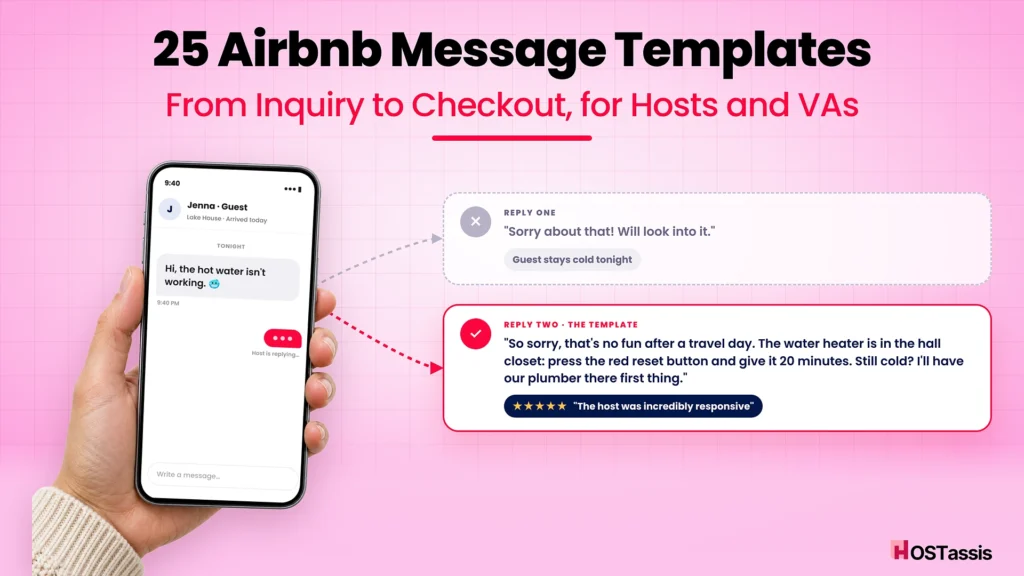
A guest writes at 9:40 p.m.: “Hi, the hot water isn’t working.”
Reply one: “Sorry about that! Will look into it.”
Reply two: “So sorry, that’s no fun at the end of a travel day. The water heater is in the hall closet; there’s a red reset button on the front panel. Could you press it and give it 20 minutes? If it’s still cold, tell me and I’ll have our plumber there first thing tomorrow, and I’ll make it right for tonight.”
Both are polite. Only one gets the guest a hot shower, and only one is likely to end up as “the host was incredibly responsive” in a review. That’s what good templates are for. Not to sound robotic, but so the helpful version is always the one that gets sent, whether it’s you at 9:40 p.m. or your assistant.
Quick answer: most Airbnb hosts need about 25 Airbnb Guest Message Templates to cover a stay: replies for inquiries and booking requests, a booking confirmation, check-in instructions sent 24 to 48 hours before arrival, a first-night check-in, mid-stay and checkout messages, a review request sent within a day or two of checkout, and a handful of scripts for problems like lockouts, noise and damage. Schedule the predictable ones with Airbnb’s quick replies, keep a person on the problem ones, and keep every message inside Airbnb, because Airbnb’s policy doesn’t allow hosts to move guests off-platform before booking.
Below are all 25, grouped by stage, with when to send each one and what to change before you use it. They’re written for hosts and for the virtual assistants and co-hosts who answer guests on a host’s behalf. If you’re still deciding how much of your messaging to automate, start with human vs AI guest messaging on Airbnb.
Before You Copy: Five Rules These Templates Follow
A template is only as good as the moment it’s sent in and the details you fill in. Read this once and you’ll avoid the most common mistakes.
1. Fill the brackets, every time
Anything in [square brackets] is yours to replace. If you set these up as Airbnb scheduled quick replies, Airbnb can fill some details for you, such as the guest’s first name, check-in and checkout dates and times, address, Wi-Fi name and password. If a detail is missing from your listing, Airbnb shows it as unavailable in the message, so fill in your listing details before you schedule anything (Airbnb Help).
2. Keep everything on Airbnb
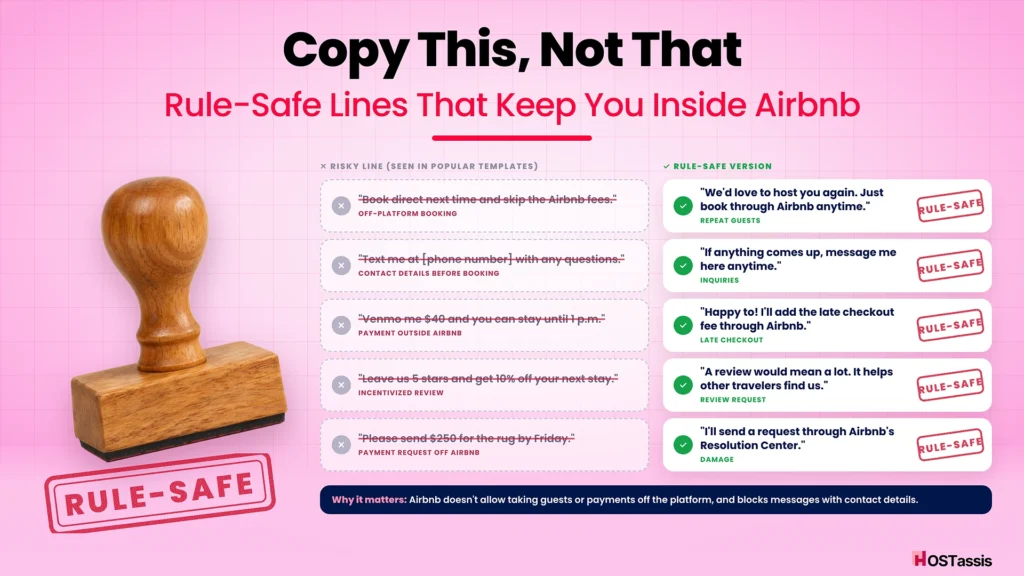
Airbnb’s policy doesn’t allow hosts to ask guests to communicate outside Airbnb before booking, or to take a booking off the platform. Airbnb also reviews and blocks messages that seem to contain contact details or links to other sites (Airbnb Help). Hosts also can’t offer discounts for booking off Airbnb (Airbnb Help). Some popular templates online include “book direct” nudges or phone numbers; none of ours do.
3. Short beats complete
Guests read messages on their phones, often while traveling. One clear message with the three things they need beats a long one they’ll scroll past. Put anything long, like the full house manual, in your guidebook and link to it.
4. Sound like you
Change the wording until it sounds like you’d say it. If you sign off as “Sam,” sign off as Sam every time. If a VA or co-host replies for you, decide together whether they sign as themselves, as you or as “the [brand] team,” and stick to it.
5. Send at the right moment
Timing matters as much as wording. Airbnb’s own suggestion is to send messages at booking confirmation, 24 to 48 hours before check-in, after the first night, before checkout and 24 to 48 hours after checkout (Airbnb Resource Center). The “When to send” line under each template follows that rhythm.
A note for VAs and co-hosts
On Airbnb, quick replies aren’t shared between hosts and co-hosts. A co-host can create and use their own templates but can’t see or edit the host’s (Airbnb Help). If you’re the assistant, build your own set from this page and agree with the host which one of you owns the scheduled messages, so guests don’t get everything twice. Team members with guest-management permissions on a hosting team do share one set.
Before Booking: Templates 1 to 5
These are the messages that decide whether a guest books with you or with the listing next door. Speed matters here more than anywhere else: Airbnb counts your first reply to new inquiries and reservation requests within 24 hours toward your response rate (Airbnb Help), and guests comparing listings tend to book with whoever answers clearly first.
1. Inquiry: your dates are open
When to send: as fast as you can, ideally within the hour.
Hi [Guest first name], thanks for reaching out! Good news: [dates] are open. [Answer their question in one or two sentences, e.g. “Yes, there’s free parking for two cars right in the driveway.”] The house works really well for [their group, e.g. “two families”] because [one specific reason]. If you have any other questions, just ask. Otherwise, you can book whenever you’re ready. [Your name]
Change this: always answer their actual question first. A generic “we’d love to host you” without the answer reads like a bot.
2. Inquiry: your dates are taken
When to send: within the hour.
Hi [Guest first name], thanks so much for asking. Unfortunately we’re already booked for [dates]. We do have [nearest open dates] open if your plans are flexible at all. Either way, I hope you have a great trip to [city]!
Change this: if you have another listing nearby that fits, mention it by name; it’s on Airbnb, so you can.
3. Booking request: a few questions first
When to send: within a couple of hours of the request, well inside Airbnb’s 24-hour window.
Hi [Guest first name], thanks for your request for [dates]! Before I confirm, could you tell me a little about your trip? Who’s coming along, and what brings you to [city]? I ask everyone, just so I can make sure the place suits you. Looking forward to hearing from you.
Change this: use it for guests without reviews or for groups that don’t match your listing. Keep the questions the same for everyone, and screen by your written criteria. Our Airbnb guest screening checklist has a fair set.
4. Declining a request politely
When to send: as soon as you’ve decided. Declining counts as a response; letting a request expire doesn’t.
Hi [Guest first name], thank you for your interest in [listing name]. Unfortunately, I’m not able to accept this booking, as [short, neutral reason, e.g. “the home isn’t set up for groups of this size”]. I hope you find a great place for your stay, and thank you again for thinking of us.
Change this: keep the reason short and about the listing, not the guest.
5. Answering a “can we?” question that’s against your rules
When to send: within the hour.
Hi [Guest first name], great question. We don’t allow [parties / pets / extra guests] at [listing name], mainly because [neighbors / building rules / the size of the home]. I know that’s not the answer you hoped for! If that still works for your trip, we’d love to have you. If not, I completely understand.
Change this: for rules you’re flexible on, say what you can offer instead (“pets up to 30 lb with a pet fee”).
After Booking, Before Arrival: Templates 6 to 11
This stretch is where good hosts prevent most problems. A guest who knows exactly how to get in, where to park and what time they can arrive rarely needs to message you at 11 p.m.
6. Booking confirmation
When to send: scheduled, about 5 minutes after booking.
Hi [Guest first name], thanks for booking [listing name]! You’re all set for [check-in date] to [checkout date]. I’ll send full check-in instructions [1–2 days] before you arrive. In the meantime, you’ll find our house rules and guidebook in the app. If anything comes up before then, message me here anytime. Looking forward to hosting you!
Change this: if you have a guidebook, link it here. Don’t send the door code yet; it’s safer closer to arrival.
7. Early check-in request
When to send: when they ask. Confirm only once your cleaner has confirmed.
Hi [Guest first name], I’d love to help with that. Our cleaners are usually finished by [time], but I’ll know for sure on the morning of your arrival. I’ll message you by [time] that day to let you know. If the home isn’t ready, you’re welcome to [leave bags in X / park in the driveway / use the local tip below] while you wait.
Change this: if you charge for early check-in, state the amount here and collect it through Airbnb, not separately.
8. One week out: trip check-in
When to send: 7 days before arrival, for bookings made well ahead.
Hi [Guest first name], your trip to [city] is just a week away! Quick question: roughly what time do you expect to arrive? That helps us have everything ready. Also, if you’re celebrating anything or need a crib, high chair or extra towels, let me know and I’ll see what I can do.
Change this: skip this for bookings made within the last week; they’ll get template 9 straight away.
9. Check-in instructions
When to send: scheduled, 24 to 48 hours before check-in.
Hi [Guest first name], here’s everything you need for [check-in date]:
Address: [address] Check-in: from [check-in time] Parking: [where to park, and where not to] Getting in: [lock type]. Your code is [code]. [One-line instruction, e.g. “Press the Airbnb logo, then the code”] Wi-Fi: [Wi-Fi name] / [Wi-Fi password]
The guidebook in the app has restaurant tips and how the [thermostat / hot tub / TV] works. If anything doesn’t work when you arrive, message me here and I’ll sort it out quickly. Safe travels!
Change this: add one photo of the front door or lockbox. It prevents more “we can’t find it” messages than any written direction. For lock setups, see our Airbnb self check-in guide.
10. Late arrival reply
When to send: when the guest tells you they’ll be late.
No problem at all, [Guest first name]. Self check-in works any time, so you can arrive whenever you get in. The outdoor light is on a timer, and [the lockbox is to the left of the door]. If you have any trouble getting in, message me here; [I / our team] will be watching for your message tonight.
Change this: only promise someone will be watching if someone really will. If not, give the backup option (spare code, lockbox) instead.
11. Morning of arrival: the home is ready
When to send: on check-in day, once the cleaner confirms.
Good morning [Guest first name]! The home is cleaned and ready for you. Check-in is from [time]. Your code and directions are in my earlier message, and I’m here if you need anything on the way. Enjoy your trip!
Change this: if early check-in is possible today, say so here (and close the loop on template 7).
During the Stay: Templates 12 to 17
The goal during the stay is simple: be easy to reach, fix small things fast and otherwise leave guests alone. One check-in message is welcome. Three is hovering.
12. First-evening check-in
When to send: scheduled, 2 to 3 hours after check-in time, or the morning after for late arrivals.
Hi [Guest first name], just checking you got in okay and everything’s as expected. If anything’s missing or not working, tell me now and I’ll fix it while you’re here. Otherwise, I’ll leave you to enjoy [the lake / the city / your stay]!
Change this: this is the single most useful message for reviews. Problems raised now get fixed; problems discovered later get written up.
13. Recommendations
When to send: when they ask.
Great question! A few favorites: for [breakfast / dinner / coffee], [place] is [distance] away and [one detail, e.g. “the pancakes are huge”]. For [kids / a quiet evening / a view], try [place]. And if it rains, [indoor option]. There’s a longer list in the guidebook in the app. Enjoy!
Change this: two or three real picks beat a list of ten. Keep the full list in your guidebook.
14. Something isn’t working
When to send: immediately when a guest reports a problem.
So sorry about that, [Guest first name]. Let’s get it sorted. [One troubleshooting step, e.g. “Could you try unplugging the router by the TV for 30 seconds?”] If that doesn’t fix it, let me know and I’ll [send someone / call our technician] right away. I’ll check back with you in [30 minutes] either way.
Change this: always give one step and one backup. Then do what you said, including checking back.
15. Extra supplies
When to send: when they ask.
Of course! Extra [towels / blankets / toilet paper] are in [location]. If you can’t find them or need more, I’ll have some dropped off by [time]. Just let me know.
Change this: if you keep a supply closet, describe exactly where it is. It cuts this message to one line.
16. Extending the stay
When to send: when a guest asks to stay longer and the dates are open.
We’d love to have you longer! [Date] is open. Please send a change request through your reservation in the Airbnb app, and I’ll approve it as soon as it comes in. The price for the extra night is [price], and checkout would move to [new date] at [time].
Change this: always handle extensions through Airbnb’s change request, never by cash or a separate payment. Payments for bookings belong on Airbnb under its policy (Airbnb Help).
17. Mid-stay message for longer stays
When to send: around the middle of stays of 7 nights or more.
Hi [Guest first name], hope the stay’s going well! A couple of quick notes for the second half: trash and recycling go out on [day], and if you’d like a fresh set of towels or a mid-stay clean, I can arrange that for [day]. Just reply here.
Change this: if a mid-stay clean has a fee, say so here and add it through Airbnb.
Checkout and Reviews: Templates 18 to 22
The last impression is the one guests carry into the review. Make checkout easy, ask for the review at the right time, and reply to reviews like someone a future guest would want to stay with.
18. Night-before checkout reminder
When to send: scheduled, the evening before checkout.
Hi [Guest first name], hope you’ve had a great stay! A quick reminder that checkout is tomorrow at [checkout time]. Before you go, please [2–3 short tasks, e.g. “start the dishwasher, put trash in the bins outside and lock the door”]. No need to strip the beds. Safe travels, and thank you for looking after the place!
Change this: keep the list to three tasks or fewer. Long chore lists are one of the most common things guests complain about.
19. Late checkout request
When to send: when they ask. Confirm with your cleaner first.
Happy to help if I can! Let me check with our cleaner, since we have [guests arriving today / a tight turnover]. I’ll confirm by [time] tonight. [If yes:] Good news, you can stay until [time]. [If no:] I’m sorry, we can’t today because of another arrival, but you’re welcome to [leave bags until X / use the driveway until X].
Change this: if you charge for late checkout, collect it through Airbnb.
20. Thank you and review request
When to send: scheduled, within 24 hours of checkout. Airbnb suggests 24 to 48 hours after departure for post-stay messages (Airbnb Resource Center).
Hi [Guest first name], thanks so much for staying at [listing name]. It was a pleasure having you. If you have a minute, a review would mean a lot to us; it really helps other travelers find us. And if there was anything that could have been better, I’d genuinely like to hear it, so feel free to reply here. Safe travels home!
Change this: never offer anything in exchange for a review, and don’t ask for a specific star rating. Reviews that are incentivized or pressured break Airbnb’s Reviews Policy.
21. Replying to a glowing review
When to post: within a few days, publicly.
Thank you, [Guest first name]! It was a pleasure hosting [you / your family]. So glad you enjoyed [specific thing they mentioned]. You’re welcome back at [listing name] anytime.
Change this: mention one detail from their review. Future guests read replies too, and a copy-paste “Thanks for staying!” under every review looks automated.
22. Replying to a critical review
When to post: after a day to cool down, publicly. Keep it short.
Thank you for the feedback, [Guest first name]. I’m sorry [the issue] wasn’t up to standard during your stay. We’ve since [specific fix, e.g. “replaced the mattress in the second bedroom”]. We appreciate you letting us know, and we hope future guests enjoy the improvement.
Change this: write for the next guest, not the last one. Don’t argue, don’t share private details and don’t blame the guest in public. If a review breaks Airbnb’s rules, you can ask for it to be removed; our guide to Airbnb review removal shows which reviews qualify.
When Things Go Wrong: Templates 23 to 25
These three are the ones that matter most, and the ones most template lists leave out. Never automate them. A person should send each one, adjusted to what actually happened.
23. Guest is locked out
When to send: within minutes. This is the most urgent message on the list.
I’m so sorry, [Guest first name], let’s get you inside right now. First, could you try [backup step, e.g. “pressing the lock’s logo button, waiting for the keypad to light up, then entering the code slowly”]? If that doesn’t work, there’s a backup [lockbox / code] at [location], and the code is [code]. If you’re still stuck in 10 minutes, I’m calling [local contact name], who can be there in about [time]. I’m staying on this until you’re in.
Change this: have your backup ready before you ever need it: a spare code, a lockbox or a local person who can come. A lockout template without a real backup is just an apology.
24. Noise complaint from a neighbor
When to send: as soon as you hear about it.
Hi [Guest first name], hope you’re having a good evening. A neighbor has just let me know there’s been some noise from the house. Our house rules ask for quiet after [time], and the neighbors are very close by, so could you please keep things down for the rest of the night? Thanks so much for understanding.
If it continues:
Hi [Guest first name], I’m sorry to message again, but we’ve had a second complaint. I need to ask that the noise stops now, as it’s a condition of the booking under our house rules. If it continues, I’ll have to contact Airbnb about the reservation.
Change this: stay calm and factual in writing; this thread is your record if you need Airbnb’s help later. Make sure your quiet hours are actually written in your house rules. Our guide to writing Airbnb house rules covers how.
25. Damage found after checkout
When to send: as soon as the cleaner reports it, with photos.
Hi [Guest first name], I hope you got home safely. During the clean after your stay, our cleaner found [specific damage, e.g. “a large stain on the living-room rug”]. I’ve attached photos. Could you let me know what happened? To cover the [cleaning / repair / replacement], I’ll be sending a request through Airbnb’s Resolution Center for [amount], with the [quote / receipt] attached. Thanks for your understanding.
Change this: act fast. Airbnb asks hosts to file a reimbursement request in the Resolution Center within 14 days of the guest’s checkout; the guest then has 24 hours to respond, and if they don’t pay, you can ask Airbnb to step in under host damage protection (Airbnb Help). Never ask for payment outside Airbnb. Our property inspection checklist helps your cleaner spot damage early and photograph it properly.
The Whole Schedule on One Page
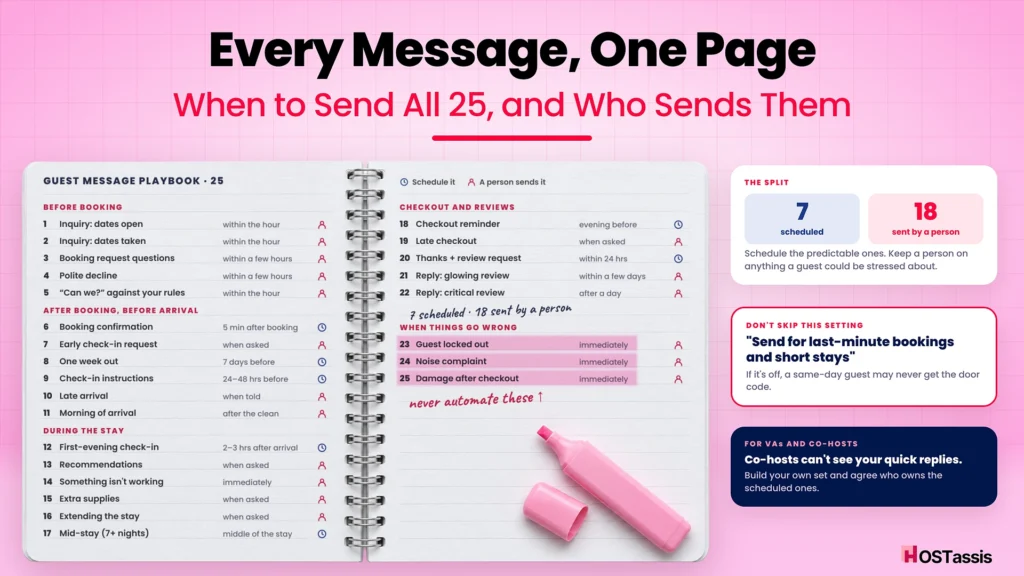
Here’s every template in order, with when it goes out and whether it should be scheduled or sent by a person. Use it to set up your quick replies, or hand it to your assistant as their playbook.
| # | Message | When | Schedule or person? |
|---|---|---|---|
| 1–2 | Inquiry replies | Within the hour | Person (answer their actual question) |
| 3–4 | Booking request questions / decline | Within a few hours | Person |
| 5 | “Can we?” against your rules | Within the hour | Person, from a saved quick reply |
| 6 | Booking confirmation | About 5 minutes after booking | Schedule |
| 7 | Early check-in request | When asked | Person |
| 8 | One week out | 7 days before arrival | Schedule |
| 9 | Check-in instructions | 24–48 hours before check-in | Schedule |
| 10 | Late arrival | When told | Person, from a saved quick reply |
| 11 | Morning of arrival | Check-in day, after the clean | Person (once the cleaner confirms) |
| 12 | First-evening check-in | 2–3 hours after check-in | Schedule |
| 13–15 | Recommendations, problems, supplies | When asked | Person |
| 16 | Extension | When asked | Person |
| 17 | Mid-stay (7+ nights) | Middle of the stay | Schedule |
| 18 | Checkout reminder | Evening before checkout | Schedule |
| 19 | Late checkout | When asked | Person |
| 20 | Thank you and review request | Within 24 hours of checkout | Schedule |
| 21–22 | Review replies | Within a few days | Person |
| 23–25 | Lockout, noise, damage | Immediately | Person, always |
Watch the last-minute bookings
Airbnb’s scheduled quick replies have a setting called “Send for last minute bookings and short stays.” If it’s off, Airbnb skips that scheduled message for last-minute bookings and short stays (Airbnb Help). Turn it on for check-in instructions, or a same-day guest may never get their door code.
Using a PMS instead
If your listings are also on Booking.com or Vrbo, schedule these in a PMS like Guesty so every guest gets the same messages from one place. Our Airbnb + Vrbo virtual assistant guide covers running several inboxes together. For the wider list of what’s worth automating, see 15 Airbnb tasks every host should automate.
Airbnb Message Template FAQ
What messages should an Airbnb host send to guests?
At minimum: a booking confirmation, check-in instructions 24 to 48 hours before arrival, a short check-in after the first night, a checkout reminder the evening before, and a thank-you with a review request within a day of checkout. Add replies for inquiries, booking requests and common problems so you’re never writing from scratch under pressure.
When should I send check-in instructions on Airbnb?
24 to 48 hours before check-in works for most listings. It’s close enough that guests have the details handy, and late enough that door codes aren’t sitting in a thread for weeks. For same-day bookings, make sure your scheduled message is set to send for last-minute bookings.
How do I schedule messages on Airbnb?
Create a quick reply in your Messages settings, then choose when it should send, before or after events like booking, check-in or checkout. Airbnb fills in details such as the guest’s name, dates, address and Wi-Fi, and sends at the listing’s local time. You can skip, edit or send early for any single reservation.
Can I give guests my phone number or email on Airbnb?
Not before booking. Airbnb’s policy doesn’t allow hosts to ask guests to communicate outside Airbnb before a booking is confirmed, and Airbnb blocks messages that appear to contain contact details or links to other sites. Keep all messages in the Airbnb thread; it’s also your record if something goes wrong.
How do I ask for a review on Airbnb without being pushy?
Send one friendly message within a day of checkout, thank the guest, say a review helps other travelers find you, and invite them to share anything that could be better. Don’t offer anything in return, and don’t ask for a specific rating.
How should I message a guest about damage?
Stay factual: say what was found, attach photos and say you’ll send a request through Airbnb’s Resolution Center. File it within 14 days of the guest’s checkout. Never ask the guest to pay outside Airbnb.
Can my virtual assistant use my Airbnb message templates?
Not directly if they’re added as a co-host. Airbnb doesn’t share quick replies between hosts and co-hosts, so your assistant needs their own set. Agree on who owns the scheduled messages so guests don’t receive everything twice.
Templates Are the Floor, Not the Ceiling
These 25 Airbnb Guest Message Templates will cover almost every stay. Set up the scheduled ones this week, save the rest as quick replies, and you’ll spend far less time typing the same answers. Just don’t let them turn you into a robot. The reply that wins the review is usually a template with one human sentence added: the guest’s dog’s name, the game they came for, the rain that ruined their beach day.
And for the 9:40 p.m. hot-water message, the 2 a.m. lockout and the noisy Saturday, you need more than a template. You need someone awake to send it.
Want these sent for you, day and night? Our team uses this exact playbook to answer guests for hosts across the US, with a person on every problem message. See our 24/7 Airbnb guest messaging service or book a free 20-minute call.